Registration in Rust
Registration is a critical component in web development, particularly in Rust-based applications. It involves creating a new user account within a system, which is essential for user management and access control. This process typically includes collecting user information, such as usernames, passwords, and other personal details, and securely storing this data for future authentication. Below, we explore the concept of registration in Rust, drawing from various resources to provide a comprehensive understanding.
Overview
Registration in Rust web applications involves several key steps: displaying a registration form, validating user input, and storing user credentials securely. This process is crucial for managing user access and ensuring that only authorized users can access certain parts of an application. The registration process typically includes:
- Displaying a Registration Form: A web form is presented to the user to collect necessary information.
- Validating User Input: Both client-side and server-side validations are performed to ensure data integrity and security.
- Storing User Credentials: User information is securely stored in a database for future authentication.
Registration Form Display
In Rust, the registration form is often displayed using a template system. For instance, the register.html file contains the HTML structure for the form, and a handler function, such as show_register_form(), populates it with data using a template engine like Tera. The form is styled with CSS and involves both client-side and server-side validation.
Registration Template
The registration form is defined in an HTML file, which includes fields for username, password, password confirmation, and additional user details. Below is an example of a registration form template:
<!doctype html>
<html>
<head>
    <meta charset=utf-8>
    <title>Tutor registration</title>
    <link rel="stylesheet" href="/static/tutor-styles.css">
</head>
<body>
    <div class="header">
        <h1>Welcome to EzyTutor</h1>
        <p>Start your own online tutor business in a few minutes</p>
    </div>
    <div class="center">
        <h2>Tutor registration</h2>
        <form action=/register method=POST>
            <label for="userid">Enter username</label><br>
            <input type="text" name="username" autocomplete="username" minlength="6" maxlength="12" required><br>
            <label for="password">Enter password</label><br>
            <input type="password" name="password" autocomplete="new-password" minlength="8" maxlength="12" required><br>
            <label for="confirm">Confirm password</label><br>
            <input type="password" name="confirmation" autocomplete="new-password" minlength="8" maxlength="12" required><br>
            <button type=submit id="button1">Register</button>
        </form>
    </div>
</body>
</html>
Form Handling
The handler function, such as show_register_form(), is responsible for rendering the registration form. It initializes template variables and returns the fully constructed HTML file as part of the HTTP response.
use actix_web::{web, Error, HttpResponse, Result};

pub async fn show_register_form(tmpl: web::Data<tera::Tera>) -> Result<HttpResponse, Error> {
    let mut ctx = tera::Context::new();
    ctx.insert("error", "");
    ctx.insert("current_username", "");
    ctx.insert("current_password", "");
    ctx.insert("current_confirmation", "");
    let s = tmpl.render("register.html", &ctx).map_err(|_| EzyTutorError::TeraError("Template error".to_string()))?;
    Ok(HttpResponse::Ok().content_type("text/html").body(s))
}
Implementation Details
Adding the Registration Route
In Rust web applications, a new route is added to handle user registration. This route processes registration requests and stores user information in the database. For example, using the Warp web framework, a registration route can be added as follows:
use warp::http::StatusCode;
use crate::store::Store;
use crate::types::account::Account;

pub async fn register(store: Store, account: Account) -> Result<impl warp::Reply, warp::Rejection> {
    match store.add_account(account).await {
        Ok(_) => Ok(warp::reply::with_status("Account added", StatusCode::OK)),
        Err(e) => Err(warp::reject::custom(e)),
    }
}
Configuring the Routes
The registration route is integrated into the main routing configuration of the application. This involves defining the route and specifying the expected request format, such as a JSON body.
#[tokio::main]
async fn main() -> Result<(), sqlx::Error> {
    let registration = warp::post()
        .and(warp::path("registration"))
        .and(warp::path::end())
        .and(store_filter.clone())
        .and(warp::body::json())
        .and_then(routes::authentication::register);

    let routes = registration.with(cors).with(warp::trace::request()).recover(return_error);
    warp::serve(routes).run(([127, 0, 0, 1], 3030)).await;
    Ok(())
}
Testing the Registration Process
Integration tests are implemented to ensure the registration process works as expected. These tests involve starting the web service and sending an HTTP request with user credentials to the registration endpoint.
use rust_web_dev::{config, handle_errors, oneshot, setup_store};
use serde::{Deserialize, Serialize};
use serde_json::Value;

#[derive(Serialize, Deserialize, Debug, Clone)]
struct User {
    email: String,
    password: String,
}

#[tokio::main]
async fn main() -> Result<(), handle_errors::Error> {
    let config = config::Config::new().expect("Config can't be set");
    let store = setup_store(&config).await?;
    let handler = oneshot(store).await;

    let u = User {
        email: "test@email.com".to_string(),
        password: "password".to_string(),
    };

    register_new_user(&u).await?;
    let _ = handler.sender.send(1);
    Ok(())
}

async fn register_new_user(user: &User) {
    let client = reqwest::Client::new();
    let res = client
        .post("http://localhost:3030/registration")
        .json(&user)
        .send()
        .await
        .unwrap()
        .json::<Value>()
        .await
        .unwrap();

    assert_eq!(res, "Account added".to_string());
}
Security Considerations
Security is a paramount concern in the registration process. Passwords should be hashed before storage to prevent unauthorized access. Additionally, validating email addresses and encrypting data transmission are essential steps to enhance security.
Visual Representation
The registration form and flow are visually represented in the following figures:
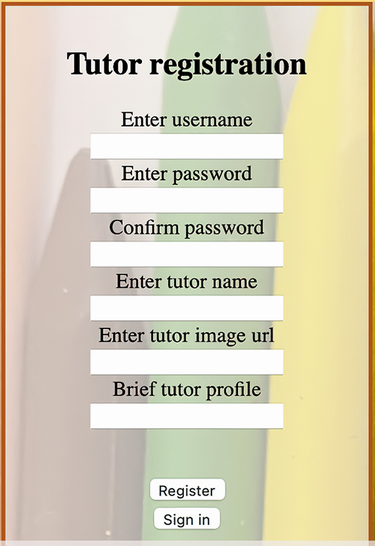 Figure 8.1 Tutor registration form
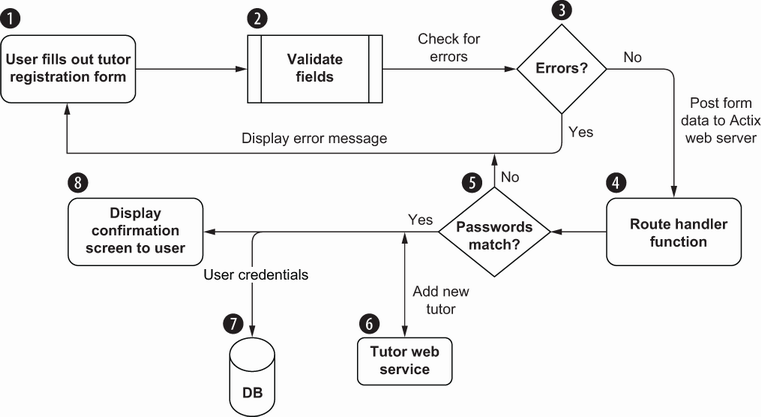 Figure 8.2 Tutor registration flow
In summary, registration in Rust web applications is a multi-step process that involves displaying a form, validating input, and securely storing user data. Proper implementation and security measures are crucial to ensure a robust and secure registration system.
| Book Title | Usage of Registration | Technical Depth | Connections to Other Concepts | Examples Used | Practical Application |
|------------|-----------------------|-----------------|-------------------------------|---------------|-----------------------|
| [Rust Servers, Services, and Apps](https://www.manning.com/books/rust-servers-services-and-apps) | Discusses registration as a process for tutors signing up through a web form, involving client and server-side validation and secure storage of credentials. [more](https://livebook.manning.com/book/rust-servers-services-and-apps/chapter-8/1) | Detailed explanation of form handling using Tera template engine and Actix-web framework. [more](https://livebook.manning.com/book/rust-servers-services-and-apps/chapter-8/50) | Connects registration to user management and authentication processes. [more](https://livebook.manning.com/book/rust-servers-services-and-apps/chapter-8/1) | Provides HTML and Rust code examples for form display and handling. [more](https://livebook.manning.com/book/rust-servers-services-and-apps/chapter-8/50) | Focuses on practical implementation of a registration system for a tutoring service. [more](https://livebook.manning.com/book/rust-servers-services-and-apps/chapter-8/1) |
| [Rust Web Development](https://www.manning.com/books/rust-web-development) | Covers registration as a fundamental process in web development for creating user accounts, emphasizing secure data storage. [more](https://livebook.manning.com/book/rust-web-development/chapter-11/157) | Explores route configuration and integration using the Warp web framework. [more](https://livebook.manning.com/book/rust-web-development/chapter-9/62) | Links registration to user management, access control, and security considerations. [more](https://livebook.manning.com/book/rust-web-development/chapter-9/58) | Includes code snippets for route addition and integration tests using Reqwest. [more](https://livebook.manning.com/book/rust-web-development/chapter-11/157) | Highlights the importance of security, such as password hashing and data encryption. [more](https://livebook.manning.com/book/rust-web-development/chapter-9/58) |
FAQ (Frequently asked questions)
What does registration refer to in this chapter?
What are the steps involved in the registration process?
How is the registration form displayed?
What technologies are used to style and validate the registration form?
What does the registration process involve?
How is user information handled during registration?
What is registration in a web system?
How is the registration endpoint implemented in Rust?
How is the registration process tested?
How do you perform a registration HTTP call in Rust?