Span in Rust
In Rust, the term "span" is used in different contexts, primarily in macros and web development. A span generally refers to a specific range or period, either in source code or during the execution of a program. Understanding spans is crucial for error reporting, diagnostics, and tracing the execution flow of applications.
Span in Rust Macros
In the context of Rust macros, a span is a key concept used to associate code with its location in the source file. This association is vital for error reporting and diagnostics, as it allows the compiler to provide precise feedback about where an issue occurs. The span is part of the syn crate, which is widely used for parsing Rust code in procedural macros.
Using Spans in Macros
When writing macros, manipulating spans ensures that any generated code retains the correct source location information. This is important for maintaining accurate error messages and for the correct functioning of certain macro features.
Example: Using quote_spanned!
In the following example, spans are used in a macro to enforce that a type implements the Default trait. This is achieved by creating an assertion struct that is only valid if the type implements Default. The span of the type is passed along to ensure that any errors point to the correct location in the source code.
// other imports
use quote::{format_ident, quote, quote_spanned};
use syn::spanned::Spanned;          #1

pub fn optional_default_asserts(fields: &Punctuated<Field, Comma>)
    -> Vec<TokenStream> {
        fields.iter()
            .map(|f| {
                let name = &f.ident.as_ref().unwrap();
                let ty = &f.ty;
                let assertion_ident = format_ident!( #2
                    "__{}DefaultAssertion",
                    name
                );

                quote_spanned! {ty.span()=> #3
                  struct #assertion_ident where #ty: core::default::Default;
                }
            })
            .collect()
}
#1 We need this trait to be present when calling span().
#2 Creates an identifier for our empty struct
#3 Tells Rust that it implements Default, passing along the span of the field’s type
By carefully managing spans in macros, developers can create more robust and user-friendly compile-time checks, improving the overall developer experience when using macros in Rust.
Span in Rust Web Development
In Rust web development, particularly when using the Tracing crate, a span represents a period with a start and an end. Spans are crucial for tracing the lifecycle of requests and can be nested to provide a detailed view of the application's execution flow. This nesting capability helps in distinguishing logs for better traceability, making it easier to debug and monitor applications.
Tracing Workflow
The basic tracing workflow consists of three main elements: events, spans, and a subscriber.
- Events: These are the logs that occur within spans. They can represent various actions, such as the return of results from a database query or the success or failure of a task.
- Spans: These define a period in time and have a start and an end. They are used to encapsulate the lifecycle of a request or a specific operation within the application.
- Subscriber: This component collects all the logs generated by events and spans.
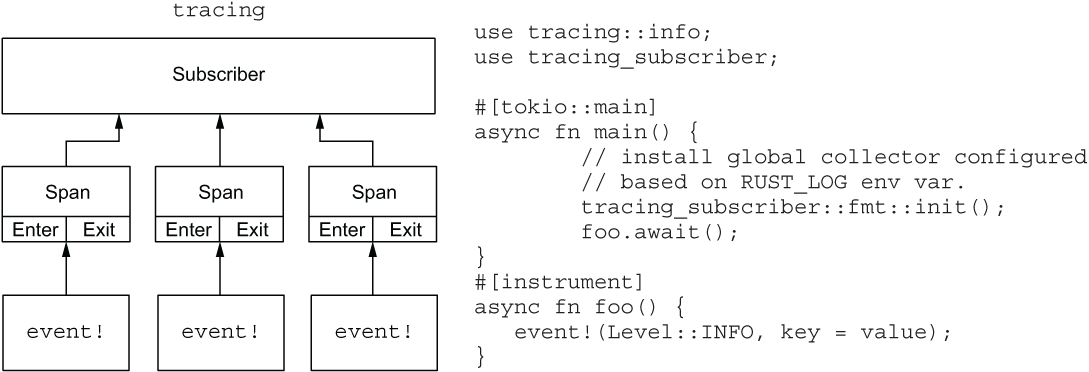 Figure 6.3 A basic tracing workflow consists of three elements: events, which write the logs; spans, which define a period in time and have a start and an end; and a subscriber, which collects all the logs.
Implementing Spans with Tracing
To implement spans in a Rust application, you first need to set up a subscriber and initialize it. This subscriber acts as the global log collector, and each span created will report back to it. The following listing demonstrates how to replace a previous logging crate, such as log4rs, with Tracing in a main.rs file:
#![warn(clippy::all)]

use warp::{http::Method, Filter};
use handle_errors::return_error;
use tracing_subscriber::fmt::format::FmtSpan;

mod routes;
mod store;
mod types;

#[tokio::main]
async fn main() {
    let log_filter = std::env::var("RUST_LOG")
        .unwrap_or_else(|_|
            "practical_rust_book=info,warp=error".to_owned()
        ); #1

    let store = store::Store::new();
    let store_filter = warp::any().map(move || store.clone());

    let id_filter = warp::any().map(|| uuid::Uuid::new_v4().to_string());

    tracing_subscriber::fmt()
        .with_env_filter(log_filter)
        .with_span_events(FmtSpan::CLOSE)
        .init(); #2

    let cors = warp::cors()
        .allow_any_origin()
        .allow_header("content-type")
        .allow_methods(&[
        Method::PUT,
        Method::DELETE,
        Method::GET,
        Method::POST]
    );

    let get_questions = warp::get()
        .and(warp::path("questions"))
        .and(warp::path::end())
        .and(warp::query())
        .and(store_filter.clone())
        .and(id_filter)
        .and_then(routes::question::get_questions)
        .with(warp::trace(|info| {
            tracing::info_span!(
                "get_questions request",
                method = %info.method(),
                path = %info.path(),
                id = %uuid::Uuid::new_v4(),
          )}) #3
    );

...

    let routes = get_questions
        .or(update_question)
        .or(add_question)
        .or(add_answer)
        .or(delete_question)
        .with(cors)
        .with(warp::trace::request()) #4
        .recover(return_error);

    warp::serve(routes).run(([127, 0, 0, 1], 3030)).await;
}

#1 Step 1: Add the log level.
#2 Step 2: Set the tracing subscriber.
#3 Step 3: Set up logging for custom events.
#4 Step 4: Set up logging for incoming requests.
Using the instrument Macro
When dealing with asynchronous functions, Tracing provides a macro called instrument. This macro automatically opens and closes spans for asynchronous functions, ensuring that the spans are correctly managed even when the function yields due to an .await. This is particularly useful to avoid incorrect log entries that might occur if manual spans are used in async functions.
By leveraging spans and the Tracing crate, developers can gain a comprehensive understanding of their application's behavior, making it easier to diagnose issues and optimize performance.
| Book Title | Usage of span | Technical Depth | Connections to Other Concepts | Examples Used | Practical Application |
|------------|---------------|-----------------|-------------------------------|---------------|-----------------------|
| [Write Powerful Rust Macros](https://www.manning.com/books/write-powerful-rust-macros) | Discusses the use of spans in macros for associating code with its source location, crucial for error reporting and diagnostics. [more](https://livebook.manning.com/book/write-powerful-rust-macros/chapter-8/91) | Explores the `syn` crate and the `Spanned` trait for retrieving spans, and the `quote_spanned!` macro for generating code with span information. [more](https://livebook.manning.com/book/write-powerful-rust-macros/chapter-8/91) | Connects spans to error reporting, diagnostics, and procedural macros. [more](https://livebook.manning.com/book/write-powerful-rust-macros/chapter-8/91) | Provides an example using `quote_spanned!` to enforce trait implementation with correct error attribution. [more](https://livebook.manning.com/book/write-powerful-rust-macros/chapter-8/91) | Focuses on improving compile-time checks and developer experience in macro usage. [more](https://livebook.manning.com/book/write-powerful-rust-macros/chapter-8/91) |
| [Rust Web Development](https://www.manning.com/books/rust-web-development) | Describes spans as periods with a start and end, used in tracing the lifecycle of requests in web applications. [more](https://livebook.manning.com/book/rust-web-development/chapter-6/157) | Details the Tracing crate's workflow, including events, spans, and subscribers for log collection. [more](https://livebook.manning.com/book/rust-web-development/chapter-6/164) | Links spans to tracing, logging, and monitoring application execution flow. [more](https://livebook.manning.com/book/rust-web-development/chapter-6/157) | Demonstrates replacing a logging crate with Tracing in a `main.rs` file, and using the `instrument` macro for async functions. [more](https://livebook.manning.com/book/rust-web-development/chapter-6/157) | Aims to enhance debugging and performance optimization in web applications. [more](https://livebook.manning.com/book/rust-web-development/chapter-6/157) |
FAQ (Frequently asked questions)
What is a span in the Tracing crate?
Can spans be nested in the Tracing crate?
Why are spans useful in the Tracing crate?
What are the three elements of a basic tracing workflow?
What role do events play in a tracing workflow?
What is the function of a subscriber in a tracing workflow?
What is the purpose of the Spanned trait in Rust macros?
How is an identifier created for an empty struct in Rust macros?
How does Rust ensure a type implements the Default trait in macros?