SQLx in Rust
SQLx is a powerful Rust library designed to facilitate asynchronous interactions with databases. It is a versatile tool that supports multiple database engines, making it a popular choice among Rust developers for building high-performance applications. SQLx is particularly beneficial in asynchronous environments, where it can efficiently manage multiple database connections through connection pooling.
Overview
SQLx is a Rust crate that provides asynchronous support for interacting with databases. It is designed to work with multiple database engines, making it a flexible and high-performance choice for developers in the Rust community. SQLx is particularly useful in asynchronous environments, where it can manage multiple database connections simultaneously through connection pools. Learn more about SQLx in Rust Web Development.
Key Features
-
Asynchronous Database Access: SQLx provides asynchronous access to a variety of databases, including popular options like Postgres and MySQL. This feature is crucial for building high-performance applications that require non-blocking database operations.
-
Compile-time SQL Checking: One of the standout features of SQLx is its ability to perform compile-time checking of raw SQL queries. This ensures that any errors in the SQL syntax are caught early in the development process, reducing runtime errors and improving code reliability.
-
Connection Pooling: SQLx includes built-in connection pooling, which helps manage database connections efficiently. Connection pooling is essential for applications that need to handle multiple database requests simultaneously, as it reduces the overhead of establishing new connections for each request. Explore more about SQLx features.
Adding SQLx to a Project
To use SQLx in a Rust project, you need to add it as a dependency in your Cargo.toml file. Here's an example of how to include SQLx with specific features:
[package]
name = "practical-rust-book"
version = "0.1.0"
edition = "2021"

[dependencies]
sqlx = {
    version = "0.5",
    features = [ "runtime-tokio-rustls", "migrate", "postgres" ]
}
In this configuration, the tokio, migrate, and postgres features are enabled, allowing the crate to run on the Tokio runtime and perform database migrations. See more on adding SQLx to a project.
Connecting to a Database
SQLx allows you to connect to a database by creating a connection pool. This pool is used to perform database queries, replacing previous file-based storage approaches. The following code snippet demonstrates how to update a Store object to use a database connection:
use tokio::sync::RwLock;
use std::collections::HashMap;
use std::sync::Arc;
use sqlx::postgres::{PgPoolOptions, PgPool, PgRow};
use sqlx::Row;

use crate::types::{
    answer::Answer,
    question::{Question, QuestionId},
};

#[derive(Debug, Clone)]
pub struct Store {
    pub connection: PgPool,
}

impl Store {
    pub async fn new(db_url: &str) -> Self {
        let db_pool = match PgPoolOptions::new()
        .max_connections(5)
        .connect(db_url).await {
            Ok(pool) => pool,
            Err(e) => panic!("Couldn't establish DB connection:[]", e),
        };

        Store {
            connection: db_pool,
        }
    }

    fn init() -> HashMap<QuestionId, Question> {
        let file = include_str!("../questions.json");
        serde_json::from_str(file).expect("can't read questions.json")
    }
}
In this example, the Store struct is modified to include a connection field, which holds the connection pool for a PostgreSQL database. The new function initializes this connection pool asynchronously. Learn more about connecting to a database with SQLx.
Using SQLx in the Codebase
With SQLx added to the dependencies, you can initialize the connection to a PostgreSQL database and query data. The following listing shows how to pass the database URL in the main.rs file:
#[tokio::main]
async fn main() -> Result<(), sqlx::Error>{
    let log_filter = std::env::var("RUST_LOG").unwrap_or_else(|_| {
        "handle_errors=warn,practical_rust_book=warn,warp=warn".to_owned()
    });

    let store =
        store::Store::new("postgres://localhost:5432/rustwebdev").await;
    let store_filter = warp::any().map(move || store.clone());
}
This code snippet demonstrates how to set up the database connection in the main function, using the await keyword to handle the asynchronous nature of the connection process. See more on using SQLx in the codebase.
Abstraction and Flexibility
SQLx can be used to abstract database access in large codebases by creating a connection pool and passing it through a Context object to route handlers. This allows handlers to perform queries without directly managing connections. Additionally, SQLx supports switching between different database management systems (DBMS) with minimal impact on business logic. This involves updating dependencies, changing imports, and adjusting SQL queries and connection types. Explore SQLx's abstraction and flexibility.
Visual Representation
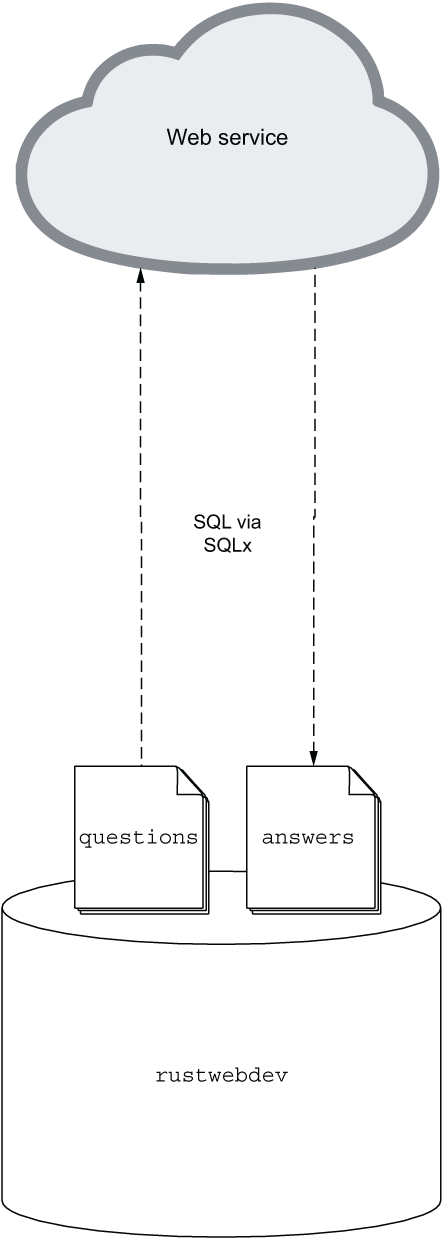 Figure 7.1 Our rustwebdev database and the questions and answers tables are interacting via SQLx and SQL with our web service.
This figure illustrates how the rustwebdev database interacts with the questions and answers tables through SQLx, integrating seamlessly with the web service. View the visual representation.
| Book Title | Usage of sqlx | Technical Depth | Connections to Other Concepts | Examples Used | Practical Application |
|------------|---------------|-----------------|-------------------------------|---------------|-----------------------|
| [Rust Web Development](https://www.manning.com/books/rust-web-development) | Discusses SQLx as a flexible, high-performance choice for asynchronous environments, managing multiple database connections through connection pools. [more](https://livebook.manning.com/book/rust-web-development/chapter-7/72) | Provides detailed instructions on adding SQLx to a project, including configuration in `Cargo.toml` and setting up connection pools. [more](https://livebook.manning.com/book/rust-web-development/chapter-7/73) | Explains how SQLx can abstract database access in large codebases and switch between different DBMS with minimal impact. [more](https://livebook.manning.com/book/rust-web-development/chapter-7/82) | Includes code snippets for setting up a database connection and using SQLx in the codebase. [more](https://livebook.manning.com/book/rust-web-development/chapter-7/74) | Demonstrates practical application by integrating SQLx with a web service, showing interaction with database tables. [more](https://livebook.manning.com/book/rust-web-development/chapter-7/245) |
| [Rust Servers, Services, and Apps](https://www.manning.com/books/rust-servers-services-and-apps) | Highlights SQLx's asynchronous database access, particularly with the Actix framework. [more](https://livebook.manning.com/book/rust-servers-services-and-apps/chapter-4/38) | Emphasizes compile-time SQL checking and connection pooling as key features for building high-performance applications. [more](https://livebook.manning.com/book/rust-servers-services-and-apps/chapter-4/274) | Focuses on SQLx's integration with async operations and its role in reducing runtime errors through compile-time checks. [more](https://livebook.manning.com/book/rust-servers-services-and-apps/chapter-4/274) | Not explicitly detailed in the provided content. | Not explicitly detailed in the provided content. |
FAQ (Frequently asked questions)
What is the sqlx crate in Rust used for?
What features does the sqlx crate provide?
Is sqlx suitable for use with the Actix framework?
Which databases does the sqlx crate support?
Does sqlx have built-in connection pooling?
How do you update a Rust project to use a database connection with SQLx?
What happens if a database connection cannot be established in SQLx?
How do you add SQLx dependencies to a Rust project?
How does the Store object connect to a database using SQLx?
How does SQLx abstract database access in Rust?
What are the benefits of using connection pools in SQLx?
How can developers switch database management systems using SQLx?
What challenges might arise when switching from PostgreSQL to SQLite using SQLx?