Tera: A Template Engine for Rust
Overview
Tera is a powerful template engine for Rust, designed to facilitate the creation of dynamic web pages. It allows developers to define HTML templates with placeholders, which are replaced with actual data at runtime. This enables the rendering of personalized content for users, making Tera an essential tool for web developers working with Rust.
Adding Tera to a Rust Project
To integrate Tera into a Rust project, you need to add it as a dependency in your Cargo.toml file. Additionally, the serde crate is required to enable serialization and deserialization of data structures. Here is how you can add these dependencies:
tera = "1.17.0"
serde = { version = "1.0.144", features = ["derive"] }
Rendering Dynamic Web Pages with Tera
To render dynamic web pages using Tera, you start by defining an HTML template with placeholders. For example, a placeholder might look like {{name}}. You then use Tera's rendering function to replace these placeholders with actual data. This involves creating a Tera context, inserting data into it, and rendering the template with this context.
Example: Setting Up a Dynamic Web Page
-
Define the HTML Template: Create an HTML file using Tera's template format. Below is an example of a simple HTML template:
<!DOCTYPE html>
<html>
<head>
    <title>XYZ Bank Website</title>
</head>
<body>
  <h1>Welcome {{ name }}, to XYZ bank home page!</h1>
  <p>This is an example of a dynamic web page served with Actix and Tera templates.</p>
</body>
</html>
In this template, the
{{name}}tag is a placeholder that Tera will replace with the actual user's name at runtime. -
Set Up the Rust Server: Use Actix Web to serve the dynamic web page. Below is a sample setup:
use tera::Tera; #[actix_web::main] async fn main() -> std::io::Result<()> { println!("Listening on: 127.0.0.1:8080, open browser and visit have a try!"); HttpServer::new(|| { let tera = Tera::new(concat!( env!("CARGO_MANIFEST_DIR"), "/static/iter1/**/*" )) .unwrap(); App::new() .data(tera) .service(fs::Files::new("/static", "./static").show_files_listing()) .service(web::resource("/").route(web::get().to(index))) }) .bind("127.0.0.1:8080")? .run() .await } -
Write the Index Handler: The handler function will render the template with the provided context.
async fn index(tmpl: web::Data<tera::Tera>) -> Result<HttpResponse, Error> {
    let mut ctx = tera::Context::new();
    ctx.insert("name", "Bob");
    let s = tmpl
        .render("index.html", &ctx)
        .map_err(|_| error::ErrorInternalServerError("Template error"))?;

    Ok(HttpResponse::Ok().content_type("text/html").body(s))
}
In this handler, a new Tera context is created, and a value is assigned to the
namevariable. The template is then rendered with this context, and the resulting HTML is returned as an HTTP response.
Dynamic Web Pages with Actix and Tera
Dynamic web pages are characterized by having both static and dynamic parts. The static parts remain unchanged, while the dynamic parts are personalized for each user. This is illustrated in the following figure:
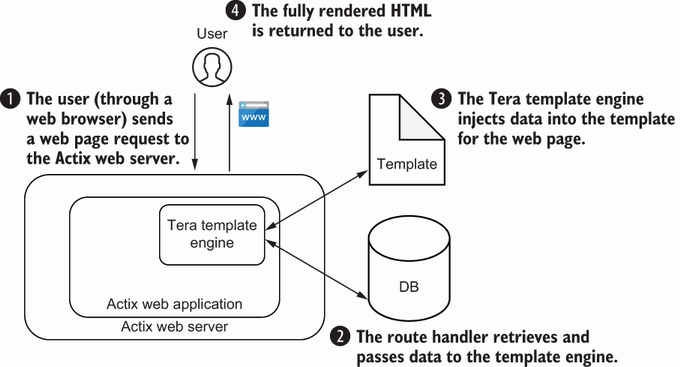 Figure 7.2 Dynamic web pages with Actix and Tera
Figure 7.2 demonstrates how dynamic web pages can be implemented using Actix Web and the Tera template engine. The figure shows a local database as the source of data for the dynamic web page, but it is also possible to retrieve data from an external web service. This flexibility allows developers to create highly personalized and interactive web applications.
FAQ (Frequently asked questions)
How do you render dynamic web pages using Tera?
What is the process of using Tera's rendering function?
How do you add Tera to a Rust project?
What dependencies are needed for using Tera in Rust?
What is Tera in Rust?
How does Tera enable dynamic web page rendering?