Workspace in Rust
A workspace in Rust is a powerful feature provided by Cargo, the Rust package manager, that allows developers to manage multiple related packages (crates) within a single project. This setup is particularly beneficial for organizing and maintaining large codebases with several interdependent components. A workspace shares a top-level Cargo.lock file and a common target/ directory, which facilitates efficient dependency management and builds across multiple subprojects.
Overview
Cargo's workspace feature enables developers to manage multiple related crates as a single unit. This is especially useful for large projects with several interdependent components. A workspace in Rust acts as a container project that holds other projects, allowing for seamless management of related projects within a single Git repository. The workspace shares a top-level Cargo.lock file, a common target/ directory, and certain sections from the top-level Cargo.toml. This setup ensures consistency across projects and streamlines the build process.
Creating a Workspace
To create a workspace, you start by setting up a top-level project and then add subprojects as members of the workspace. Here's a step-by-step guide to creating a workspace:
-
Create the Top-Level Application:
Begin by creating a new binary application using Cargo and navigate into the newly created directory:
$ cargo new workspaces-example $ cd workspaces-example -
Create a Subproject Library:
Next, create a subproject, which will serve as a simple library:
$ cargo new subproject --lib -
Project Structure:
After creating the subproject, your directory structure should look like this:
. ├── Cargo.toml ├── src │ └── main.rs └── subproject ├── Cargo.toml └── src └── lib.rs -
Configure the Workspace:
To include the subproject in the workspace, specify it as a dependency using the
pathproperty and add it to the[workspace.members]section in the top-levelCargo.toml:[dependencies] subproject = { path = "./subproject" } [workspace] members = ["subproject"] -
Add Functionality:
Update
subproject/src/lib.rsto include a function that returns"Hello, world!":pub fn hello_world() -> String { String::from("Hello, world!") }Then, call this function from the main application:
fn main() { println!("{}", subproject::hello_world()); } -
Run the Application:
Finally, compile and run the application to see the output:
$ cargo run
By following these steps, you can efficiently manage multiple subprojects within a single Rust workspace. This approach not only simplifies dependency management but also streamlines the build process across related crates.
Structure and Example
The structure of a workspace can be visualized as shown in Figure 2.2. In this example, a workspace project named scenario1 is created. Under this workspace, four Rust projects are managed using Cargo: tcpclient, tcpserver, http, and httpserver.
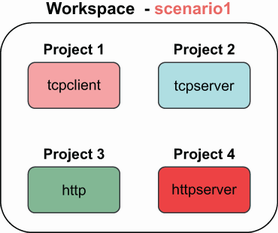 Figure 2.2 Cargo workspace structure for scenario 1
To declare a project as a workspace and specify its relationship with subprojects, the Cargo.toml file is configured as shown in Listing 2.1.
[workspace]
members = [
    "tcpserver", "tcpclient", "http", "httpserver",
]
Advantages
The primary advantage of using a workspace in Rust is the ability to manage multiple projects as a single unit. This structure simplifies dependency management and allows for efficient organization of related projects within a single Git repository. By sharing the same Cargo.lock and output directory, workspaces ensure consistency across projects and streamline the build process.
Running Projects within a Workspace
To run a specific project within a workspace, you can use the cargo run command with the -p flag to specify the package. For example, to run the tcpserver project from the root folder of the scenario1 workspace, you would use the following command:
cargo run -p tcpserver
This command starts the server, and you will see the message “Running on port 3000” printed to the terminal, indicating that the TCP server is listening on port 3000 on localhost.
| Book Title | Usage of Workspace | Technical Depth | Connections to Other Concepts | Examples Used | Practical Application |
|------------|--------------------|-----------------|-------------------------------|---------------|-----------------------|
| [Code Like a Pro in Rust](https://www.manning.com/books/code-like-a-pro-in-rust) | Discusses workspaces as a tool for managing multiple related crates within a single project, sharing a top-level `Cargo.lock` file and `target/` directory. [more](https://livebook.manning.com/book/code-like-a-pro-in-rust/chapter-2/263) | Provides a detailed step-by-step guide on creating and configuring a workspace, including virtual manifests. [more](https://livebook.manning.com/book/code-like-a-pro-in-rust/chapter-2/263) | Connects workspaces to dependency management and build processes across multiple subprojects. [more](https://livebook.manning.com/book/code-like-a-pro-in-rust/chapter-2/263) | Includes a comprehensive example project with a top-level application and a subproject library. [more](https://livebook.manning.com/book/code-like-a-pro-in-rust/chapter-2/263) | Demonstrates practical steps to manage multiple subprojects efficiently within a single workspace. [more](https://livebook.manning.com/book/code-like-a-pro-in-rust/chapter-2/263) |
| [Rust Servers, Services, and Apps](https://www.manning.com/books/rust-servers-services-and-apps) | Defines workspaces as a set of packages sharing the same `Cargo.lock` and output directory, useful for organizing code and dependencies. [more](https://livebook.manning.com/book/rust-servers-services-and-apps/chapter-2/46) | Explains the structure of a workspace with visual aids and configuration examples. [more](https://livebook.manning.com/book/rust-servers-services-and-apps/chapter-2/46) | Highlights the advantages of workspaces in managing multiple projects as a single unit within a Git repository. [more](https://livebook.manning.com/book/rust-servers-services-and-apps/chapter-2/46) | Provides an example with a workspace managing four projects: `tcpclient`, `tcpserver`, `http`, and `httpserver`. [more](https://livebook.manning.com/book/rust-servers-services-and-apps/chapter-2/46) | Shows how to run specific projects within a workspace using the `cargo run` command with the `-p` flag. [more](https://livebook.manning.com/book/rust-servers-services-and-apps/chapter-4/38) |
FAQ (Frequently asked questions)
What is the purpose of Cargo's workspace feature?
What does a workspace share in a Rust project?
How do workspaces help in managing dependencies?
What are virtual manifests in Rust workspaces?
How do you create a new workspace in Rust?
What is the structure of a Rust workspace?
How do you specify a subproject as a dependency in a Rust workspace?
How do you define workspace members in Rust?
What happens when you run a Rust workspace project?
What is a workspace in Rust?
Why is a workspace useful in Rust?
What does Figure 2.2 illustrate in the context of Rust workspaces?
What is shown in Listing 2.1 of the book?
How does a Rust workspace help in project management?
What is the purpose of a Rust workspace?
How do you run a Rust program from the workspace root?
What is required for running a Rust program from the workspace root?