concept cluster in category akka

This is an excerpt from Manning's book Reactive Applications with Akka .NET.
As e-commerce sites continue to grow in popularity, it’s likely that your website and e-commerce application will see an increase in traffic volume. This may become too much for a single server to handle, so you’ll need to use multiple servers. For this purpose, Akka.NET provides the Akka.Cluster extension, which allows you to treat a number of machines as a cluster. You can run your e-commerce application across all machines in the cluster and scale up the application beyond the limits of a single server. In chapter 12, you’ll see how Akka.Cluster lets you build elastically scalable services and systems that scale on demand across multiple machines, as dictated by load.
Akka.Cluster builds on top of the networking abstraction provided by Akka.Remote to create a scalable, fault-tolerant cluster of machines that can represent a cluster of actor systems as a single actor system (see figure 12.1). Akka .Cluster is therefore incredibly useful for scenarios in which you need high availability guarantees that you can’t achieve by using a single machine to host an actor system.
Node—An individual actor system instance that runs as part of a larger cluster. A node runs an Akka.NET application that connects to and communicates with other nodes in the cluster. Seed node—A contact point for new nodes to join the cluster. It has all of the same responsibilities as a regular node, but it has a well-known address that new nodes can contact. Cluster—A set of individual nodes that are joined together through the membership component of Akka.Cluster. A cluster of nodes is addressable as though it was a single node rather than a collection of independent nodes. Gossip protocol—An internal component of Akka.Cluster responsible for communicating changes in cluster membership to all the other nodes in the cluster, thus creating a uniform overview of the cluster state. Leader—The node in the cluster chosen to be in charge of accepting changes to the cluster state and that is responsible for adding or removing new nodes, which are then disseminated through the gossip protocol to other nodes in the cluster. There is no leader election process; instead, the leader is chosen deterministically when the cluster is in a stable state.
After the Akka.Cluster package is installed, you need to configure your application for clustering. All the configuration for Akka.Cluster is handled with HOCON configuration in a way similar to how you configured Akka.Remote, as shown in the following example. Akka.Cluster contains three key components: configuring the actor reference provider, specifying an endpoint for Akka.Remote to listen on, and providing one or more seed nodes that you can join to when initializing the cluster. You configure the actor reference provider to use ClusterActorRefProvider rather than the single-node actor reference provider. This is similar to the RemoteActorRefProvider you used with Akka.Remote. You also specify a listen endpoint; in this case, port 8080, and you listen on localhost. Because this uses Akka.Remote under the hood, you can configure this exactly as with Akka.Remote, specifying other properties such as public hostnames if you’re running the application through a load balancer. Finally, you can also add a seed node for Akka.Cluster. You specify the seed node to be the node’s own address. This means that it will join itself and form a cluster of one node.
akka {
    actor.provider = "Akka.Cluster.ClusterActorRefProvider, Akka.Cluster"
    remote {
        helios.tcp {
            port = 8080
            hostname = localhost
        }
    }
    cluster {
        seed-nodes = ["akka.tcp://Chapter12Cluster@localhost:8080"] # address
     of seed node
    }
}
Now that you have a single node running, you can create a configuration for any subsequent node that uses the address configured for the first node as the seed node. Because a seed node is an address of one node that’s running in the cluster, once you have more than one node in the cluster, you can specify any of the nodes as a seed node.

This is an excerpt from Manning's book Akka in Action.
Next to scaling up (increasing resources; for example, CPUs on existing servers), scaling out refers to dynamically adding more servers to a cluster. Since the ’90s, nothing much has changed in how programming languages support networking, either. Many technologies still essentially use RPC (remote procedure calls) to communicate over the network.
A cluster is a dynamic group of nodes. On each node is an actor system that listens on the network (like you saw in chapter 6). Clusters build on top of the akka-remote module. Clustering takes location transparency to the next level. The actor might exist locally or remotely and could reside anywhere in the cluster; your code doesn’t have to concern itself with this. Figure 14.1 shows a cluster of four nodes.
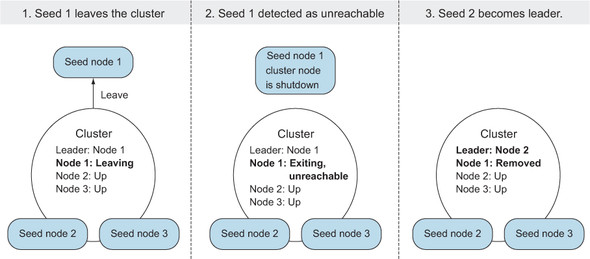
Let’s see what happens if we let the first seed node leave the cluster. The following listing shows seed node 1 leaving the cluster.
Listing 14.5. Seed node 1 leaving the cluster
scala> val address = Cluster(seedSystem).selfAddress #1 address: akka.actor.Address = akka.tcp://words@127.0.0.1:2551 scala> Cluster(seedSystem).leave(address) #2 [Cluster(akka://words)] Cluster Node [akka.tcp://words@127.0.0.1:2551] - Marked address [akka.tcp://words@127.0.0.1:2551] as [Leaving] #3 [Cluster(akka://words)] Cluster Node [akka.tcp://words@127.0.0.1:2551] - Leader is moving node [akka.tcp://words@127.0.0.1:2551] to [Exiting] #4 [Cluster(akka://words)] Cluster Node [akka.tcp://words@127.0.0.1:2551] - Shutting down... [Cluster(akka://words)] Cluster Node [akka.tcp://words@127.0.0.1:2551] - Successfully shut down #1 - Gets address for this node #2 - Lets seed node 1 leave the cluster #3 - Marked as Leaving #4 - Marked as Exiting !@%STYLE%@! {"css":"{\"css\": \"font-weight: bold;\"}","target":"[]"} !@%STYLE%@!Listing 14.5 shows that seed node 1 marks itself as Leaving, and then as Exiting while it’s still the leader. These state changes are communicated to all nodes in the cluster. After that, the cluster node is shut down. The actor system itself (the seedSystem) isn’t shut down automatically on the node. What happens with the cluster? The leader node just shut down. Figure 14.8 shows how the first seed node leaves the cluster and how leadership is transferred.