concept number in category akka

This is an excerpt from Manning's book Reactive Applications with Akka .NET.
The implication is that the most important property of a modern application is its responsiveness: it should quickly respond to requests from users. For example, in the context of a web application, the user should expect to see changes as soon as data is input, whether this is by the application pushing data changes to the user’s web browser, or ensuring that such changes can be retrieved quickly when the user next requests the change. The term responsive is broad, and its definition in one domain may be vastly different than in another context, so some consideration should be applied to what responsive means when applied to your applications. Many of the examples in this book apply to either web applications or real-time data solutions. These two cases themselves include a number of potential interpretations of what responsive means. For example, a web application should be responsive by quickly responding to an HTTP request, whereas a data-streaming solution should ensure that data flows at a constant rate in order to prevent a stalled stream, which might have knock-on effects for other components earlier in the stream.
In recent years, with increased computer and internet use in the home, many traditional retailers have started offering their products for sale on the internet, and many retailers such as Amazon operate exclusively on the internet. Some find that the number of customers attempting to access their site isn’t linear over the course of the year, with significant spikes around holidays or during sales: for example, Black Friday and post-Christmas sales. Retailers offer discounts on products to draw in new customers and encourage them to spend money. When these sales offer significant discounts, there’s a corresponding increase in the number of users trying to access the online store. Most of these visitors likely want to make a purchase, but if the website struggles under the increased load, then it’s likely that many visitors will simply stop trying to access it and instead buy the product from a competitor. A consequence of a degraded UX is that many users could be driven away, leading to a loss of revenue for the retailer.
One use for the broadcast router is as a tool for load-testing services, because with it you can execute a number of requests to the service simultaneously. You create a load-testing actor and the Props to deploy it. Once you’ve got the basic actor Props, you need to specify the router to use. You use the WithRouter method to achieve this and create a new Props object containing the extra routing information. In this case, because the routing information is referenced in the configuration, you need to tell Akka.NET that it should look in the configuration file for the specified definition, by passing an instance of the FromConfig class. Akka.NET looks up the definition based on the address to which the router is being deployed:
var loadTestingProps =
    Props.Create<LoadTestingActor>()
         .WithRouter(FromConfig.Instance);
It’s also possible to create the router entirely in code without using a configuration file. When creating the Props for the actor and specifying the router, you can provide an instance of the routing logic to use. In the case of the broadcast pool, you can create an instance of the BroadcastPool router with the number of routes to use. You then deploy that router in the same way as the configuration approach. The following code creates a router instance and uses that directly in the Props. The router is then deployed, with 10 routees to which it can distribute work:
Given the number of web pages that display ads and the number of people who visit those web pages, advertising agencies have to process a huge number of requests per second. They also have to cope with inevitable spikes in traffic. Given this need for low-latency, high-throughput services, Akka.NET provides an ideal base upon which to build advertising systems. But it’s more than simple scalability that’s required; an advertising system must also respond to traffic spikes.
In this chapter, you’ve seen how to use routers to distribute work across a number of actors. Routers can simplify and automate the process of scaling the number of actors. Given that many actors working in parallel can process more work, such an advertising system can handle more page views and send more bids quickly, providing a competitive advantage.
Figure 7.14 shows how to hide actors behind routers that can deploy more actors on demand and shut down actors after a period of low usage. Each actor is responsible for receiving input containing information related to the visiting user, which includes data such as their IP address, location, anonymized ID, and plenty more. The actor then works out whether a bid should be made. When the originating website sends a request for an ad, it’s converted into a message, and then it’s sent to the router. The router then chooses an actor to process the message. At the same time, the router is computing metrics and calculating the number of messages that are flowing through itself, which it then uses as a means of working out whether more actors are needed to achieve the required throughput.
Figure 7.14. A router allows you to receive a huge number of messages, in this case when users visit a web page to see an ad, and allows you to split those messages across multiple actors, thus increasing throughput.
![]()
In cases where you need to react on demand to unpredictable usage, routers allow you to scale the number of actors to receive and process messages. By parallelizing processing, you can easily increase throughput while also reducing response times.

This is an excerpt from Manning's book Reactive Design Patterns.
This insight leads us to the Sharding pattern described in chapter 17: you can split up the overall dataset into many small pieces—or shards—that you then distribute. Because the number of shards is much smaller than the number of users, it is practical to make the location of each shard known throughout the system. In order to find a user’s mailbox, you only need to identify the shard it belongs to. You can do that by equipping every user with an ID that expresses geographical affinity (for example, using the first few digits to denote the country of residence), which is then mathematically partitioned into the correct number of shards (for example, shard 0 contains IDs 0–999,999; shard 1 contains IDs 1,000,000–1,999,999; and so on).
final List<Integer> numbers = Arrays.asList(1, 2, 3); final List<Integer> numbersPlusOne = numbers.stream() .map(number -> number + 1) #1 .collect(Collectors.toList()); #1 - Passes a function that increments its argument by 1
When someone shares their location, the lowest-level map tile containing that location must be informed that there is a user positioned within it. Other users looking at the same map tile can register for (anonymized) updates about what happens in that little map area. The influx of position updates for each of these lowest-level map tiles is given by how many users are logged in to the application in that geographic area, and the outflux conversely is given by how many users are watching that precise map tile. Therefore, no matter how many users may eventually be using this application, you can regulate the amount of information processing per map tile by choosing the granularity—which means choosing the number of levels in your partitioning.
The first important point about implementing a Reactive application is thus to identify the minimal unit of processing that can operate independently. You can execute the bookkeeping functions of where people are moving within a map tile separately from the bookkeeping of all other map tiles, possibly on different computers or even in different data centers—each catering to one continent, for example. You can adapt the processing capacity of the overall system to the load by growing or shrinking the number of these processing units: merging two or more into one is not a problem, because they were independent to begin with, so the only limit is given by how fine you can make this split. The result is a system that can be scaled up and down elastically and can thereby react to varying load.

This is an excerpt from Manning's book Akka in Action.
The number of CPU cores in devices is also ever-increasing: even mobile phones and tablets have multiple CPU cores today.
The throughput is too low— The number of requests that can be served is too low, such as the capacity of the check-license step in our example.
In our example we see that the workers can’t keep up with the arrival of messages, which is caused because we have too few threads, so why don’t we increase the number of threads? We can, but the result greatly depends on how much CPU the workers need to process a message.
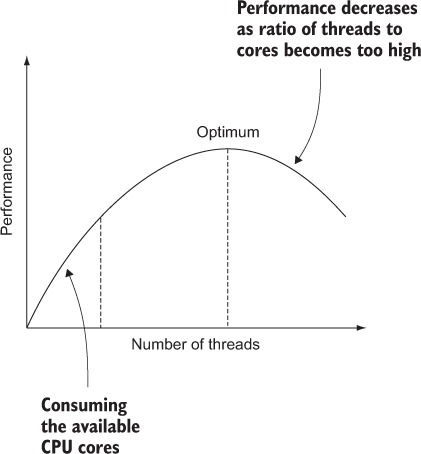
Increasing the number of threads will have an adverse effect on the total performance when the processing is heavily dependent on CPU power, because one CPU core can only execute one thread at any given moment. When it has to service multiple threads, it has to switch context between multiple threads. This context switch also takes CPU time, which reduces the time used to service the threads. When the ratio of number of threads to available CPU cores becomes too large, the performance will only decrease. Figure 16.9 shows the relationship between the performance and number of threads for a given number of CPU cores.
The first part of the graph (up to the first dotted vertical line) is almost linear, until the number of threads is equal to the number of available cores. When the number of threads increases even more, the performance still increases, but at a slower rate until it reaches the optimum. After that, the performance decreases when the number of threads increases. This graph assumes that all the available threads need CPU power. So there’s always an optimum number of threads. How can you know if you can increase the number of threads? Usually the utilization of the processors can give you an indication. When this is 80% or higher, increasing the number of threads will probably not help to increase the performance.
But when the CPU utilization is low, you can increase the number of threads. In this case the processing of messages is mainly waiting. The first thing you should do is check whether you can avoid the waiting. In this example it looks like freezing your actor and not using nonblocking calls, for example, using the ask pattern, would help. When you can’t solve the waiting problem, it’s possible to increase the number of threads. In our example we’re not using any CPU power, so let’s see in our next configuration example if increasing the thread number works.
worker-dispatcher { fork-join-executor { parallelism-min = 8 #1 parallelism-factor = 3.0 #2 parallelism-max = 64 #3 } } #1 - Min number of threads #2 - Factor used to calculate number of threads from available processors #3 - Max number of threads !@%STYLE%@! {"css":"{\"css\": \"font-weight: bold;\"}","target":"[]"} !@%STYLE%@!The number of threads used is the number of available processors multiplied by the parallelism-factor, but with a minimum of parallelism-min and a maximum of parallelism-max. For example, when we have an eight-core CPU, we get 24 threads (8 × 3). But when we have only two cores available, we get 8 threads, although the number would be 6 (2 × 3), because we’ve set a minimum of 8.
We want to use 100 threads independent of the number of cores available; therefore, we set the minimum and maximum to 100: