concept directive in category angular
This is an excerpt from Manning's book Angular Development with Typescript, Second Edition.
Components are grouped into Angular modules. A module is a class decorated with @NgModule(). A typical Angular module is a small class that has an empty body, unless you want to write code that manually bootstraps the application—for example, if an app includes a legacy AngularJS app. The @NgModule() decorator lists all components and other artifacts (services, directives, and so on) that should be included in this module. The following listing shows an example.
Think of an Angular directive as an HTML enhancer. Directives allow you to teach an old HTML element new tricks. A directive is a class annotated with the @Directive() decorator. You’ll see the @Directive() decorator used in section 11.7 in chapter 11.
A directive can’t have its own UI, but can be attached to a component or a regular HTML element to change their visual representation. There are two types of directives in Angular:
Structural— The directive changes the structure of the component’s template. Attribute— The directive changes the behavior or visual representation of an individual component or HTML element.
This is an excerpt from Manning's book Testing Angular Applications.
This book is separated into two parts. The first part covers unit testing, which tests units of code. You’ll learn how to create unit tests for components, directives, pipes, services, and routing—using testing tools like Karma and Jasmine—and run those tests using the Angular command-line interface (CLI). The following list breaks down each of the testable concepts we’ll cover in part 1 of the book:
Components —Chunks of code that you can use to encapsulate certain functionality that you can then reuse throughout the application. Components are types of directives (see next bullet), except they include a view or HTML template. Directives —Used to manipulate elements that exist in the DOM or can add elements to or remove them from the DOM. Examples of directives included with Angular are ngFor,ngIf, andngShow.
In this chapter, you’ll learn how to test directives. Directives, like components, are a way to encapsulate parts of your application as reusable chunks of code. With regard to functionality, both directives and components allow you to add behavior to the HTML in your application.
For example, let’s say your application has a table, and you want to change the background color of a row when the pointer hovers over it. You could create a directive named
HighlightRowDirectivethat adds that row highlighting behavior and reuse it throughout your project.Before you get started writing the tests for directives, you’ll want to know a little more about them.
This is an excerpt from Manning's book Angular in Action.
Fuel-UI (http://fuelinteractive.github.io/fuel-ui/) —Another Bootstrap CSS frameworkbased set of components, directives, and pipes by Fuel Travel. It has an open source license.
Angular ships with a number of directives and pipes for the broadest use cases. Chapter 3 covered the defaults, so you can review what they are and how they’re used. This includes directives such as NgFor and NgIf for iterating over a list or conditionally displaying items, and pipes such as Currency and Number for formatting values for currency or number display.
This chapter focuses on creating custom directives and pipes and talks about why you might create them. The built-in pipes and directives may fill many of the use cases, but sometimes your application requirements will benefit from a custom implementation to make things easier to use.
The Angular CLI allows us to generate the directive scaffolding quickly, so we’ll use the following command to generate the files we need—the files will be placed inside of the src/app/directives directory:
ng generate directive directives/card-typeAs with a component, it will also add the directive to the App module for you, saving a little bit of effort. We’ll implement this directive to also take an input that contains the stock data used by the component so we can detect the correct class to attach.

This is an excerpt from Manning's book AngularJS in Action.
Directives are one of the most powerful and exciting things in AngularJS. In fact, you’ve already seen some directives in action in the previous sections. For instance, when you attach ng-click to an element, you’re using a built-in AngularJS directive to augment the behavior of that specific element. When you add ng-app or ng-controller to the page, you’re using AngularJS directives to provide new behavior to an otherwise static page. In figure 1.9, you can see how they fit into the big picture.
AngularJS solves this limitation by allowing you to define your own HTML behavior with directives. Directives are essentially custom HTML tags and attributes that you can create to do some very clever things. And by “clever,” we mean “anything you want.”
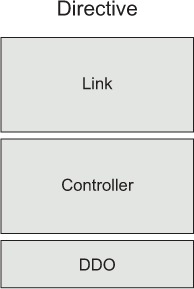
We’ll lay the foundation as to what generally goes into a directive so we can start building our own as quickly as possible (see figure 5.1). Directives generally have three parts in them—the controller function, the link function, and the directive definition object (DDO). A directive will always have a DDO but may only have a link or controller function depending on the context.
The DDO is the foundation of the directive. It tells AngularJS how the directive should be handled during the compilation cycle and what it should do. The DDO is where you can set things like how the directive’s going to be marked up in the HTML, how its scope is going to interact with the outside world, and whether it’s going to use the existing HTML or load new HTML into the directive.
The controller function works just like controllers in the rest of your application. It’s responsible for setting state for the directive and defining functionality for it as well. This is also where you would interact with a service if the directive needs to perform an action outside of its narrow area of focus.
Defining a directive is very similar to defining a controller or service, in that you give it a name and a factory function that will return an object of a defined sort when the directive is needed. Following is the basic syntax for creating a controller. Notice that you give it a name as the first parameter of the controller method call and then a factory function as the second parameter:
myModule.controller('MainCtrl', function ($scope) {
  // ...
});
When you define a directive, the pattern is the same. We’ll give this directive a name of userstory, and then we’ll start to build out the factory function as we progress:
myModule.directive('userstory', function () {
  // ...
});
Now let’s fill out the directive with a link function, a controller function, and a definition object to lay the foundation for the rest of the functionality in the directive. Notice that we also have a controllerAs attribute on the definition object so we can reference the controller everywhere in the template: