concept TypeScript in category angular

This is an excerpt from Manning's book Getting MEAN with Mongo, Express, Angular, and Node.js 2ED.
TypeScript is a superset of JavaScript, meaning that it is JavaScript, but with added features. In this book, you’ll use TypeScript to build the Angular part of your application. But don’t worry: we’ll start from the ground up in part 3 and cover the parts of TypeScript you need to know.
Here it comes. It’s time to take a look at the final part of the MEAN stack: Angular! When you’re getting started with Angular and TypeScript, it can feel like a different language at times, but TypeScript is a superset of JavaScript, so it’s JavaScript with some additional bits and pieces. TypeScript is the preferred language for creating Angular applications. We’ll cover what we need to as we go, and you’ll be fairly comfortable with it by the end of this chapter.
This is an excerpt from Manning's book Angular Development with Typescript, Second Edition.
The generated JavaScript code is easy to read and looks like hand-written code. The Angular framework itself is written in TypeScript, and most of the code samples in the Angular documentation (see https://angular.io), articles, and blogs are use TypeScript. In 2018, a Stack Overflow developer survey (https://insights.stackoverflow.com/survey/2018) showed TypeScript as the fourth-most-loved language. If you prefer to see more scientific proof that TypeScript is more productive compared to JavaScript, read the study “To Type or Not to Type: Quantifying Detectable Bugs in JavaScript,” (Zheng Gao et al., ICSE 2017) available at http://earlbarr.com/publications/typestudy.pdf.
Web browsers don’t understand any language but JavaScript. If the source code is written in TypeScript, it has to be transpiled into JavaScript before you can run it in a JavaScript engine, whether browser or standalone.
Transpiling means converting the source code of a program in one language into source code in another language. Many developers prefer to use the word compiling, so phrases like “TypeScript compiler” and “compile TypeScript into JavaScript” are also valid.
Figure B.1 shows TypeScript code on the left and its equivalent in an ES5 version of JavaScript generated by the TypeScript transpiler on the right. In TypeScript, we declared a variable foo of type string, but the transpiled version doesn’t have the type information. In TypeScript, we declared a class Bar, which was transpiled in a class-like pattern in the ES5 syntax.
Listing B.4. Calculating tax in TypeScript, modified
function calcTax(income: number, state: string = 'NY', dependents?: number):
     number{

    let deduction: number;

    if (dependents) {
        deduction = dependents * 500;
    }else {
      deduction = 0;
    }

    if (state === 'NY') {
        return income * 0.06 - deduction;
    } else if (state === 'NJ') {
        return income * 0.05  - deduction;
    }
}

let tax: number = calcTax(50000, 'NJ', 3);
console.log(`Your tax is ${tax}`);

tax = calcTax(50000);
console.log(`Your tax is ${tax}`);
TypeScript is a superset of JavaScript, which only supports prototypal inheritance, where you can create an inheritance hierarchy by attaching one object to the prototype property of another. In this case, an inheritance (or rather, a linkage) of objects is created dynamically.
In TypeScript, the class keyword is syntactic sugar to simplify coding. In the end, your classes will be transpiled into JavaScript objects with prototypal inheritance. In JavaScript, you can declare a constructor function and instantiate it with the new keyword. In TypeScript, you can also declare a class and instantiate it with the new operator.
This is an excerpt from Manning's book Testing Angular Applications.
1.2 Getting friendly with TypeScript
TypeScript is an open source language created at Microsoft in 2012 by Anders Hejlsberg, who also created C#.1 The major problem that Hejlsberg attempted to solve with TypeScript is that JavaScript was never meant to be used with large-scale applications. The first version of JavaScript was created in 1995 in 10 days by Brendan Eich2 and was meant to be used as a scripting language for adding interactivity to web pages.
Although you can build Angular applications with native JavaScript, we recommend you use TypeScript, because most of the examples, tutorials, documentation, code examples, and so on in the book will use TypeScript. In addition, the Angular framework itself is built with TypeScript.
TypeScript adds benefits needed for enterprise applications, such as annotations, static typing, and classical object-oriented features like interfaces and code encapsulation, while still providing the key features of JavaScript.
You’ll find the syntax of TypeScript to be much like that of JavaScript, because TypeScript is a superset of JavaScript. Figure 1.1 shows how TypeScript’s key features (outer circle) encompass the key features of the ES6 version of JavaScript (inner circle).
Figure 1.1 TypeScript is a superset of JavaScript version ES6, so they share much of the same syntax.
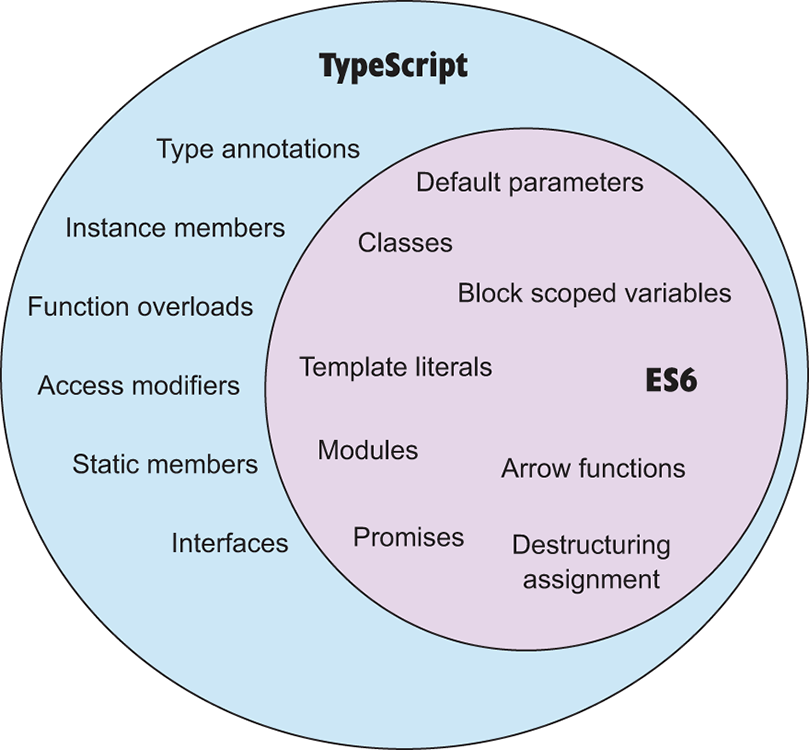
TypeScript includes most of the key ES6 features, so almost any valid ES6 or ES5 feature is also valid TypeScript. You could have a perfectly valid TypeScript file that uses only standard JavaScript syntax.
TypeScript compiles to JavaScript, and the Angular CLI will compile TypeScript automatically out of the box. If you’re familiar with JavaScript and have some knowledge of object-oriented programming (OOP), you should be able to pick up TypeScript quickly. If you’re new to OOP, that’s fine. It may just take a little more work for you to get up to speed.
The following listing creates a simple class called
Catthat demonstrates what a class looks like in TypeScript.Listing 1.1 Simple TypeScript class example
export class Cat {
 private _name: string = '';    #1    #2    #3

 constructor(name? : string) {    #1    #4
this._name = name;
  }

 get name() : string {    #1
    return this._name;
  }

 set name(name : string) {    #1
    this._name = name;
  }

 toString() : string {    #1
    return `This cat's name is ${this._name}!`;
  }
}

const cat = new Cat('Nicky');

#1   _name is set to an empty string by default.
#2   _name is a private instance variable.
#3   The string types are added to specify return, variable, and parameter types.
#4   The ? makes parameters optional.
This example demonstrates several features. The
class,get,set, andconstructorkeywords, along with the template string found in thetoString()method, are all part of the ES6 version of JavaScript, so those keywords aren’t exclusive to TypeScript.The features in the example that belong to TypeScript are the actual variable types, the
privateaccess modifier, and the?operator, which allows for an optional parameter.In the
Catclass, notice that the keywordstringis sprinkled throughout the example. This is how you specify the expected types in TypeScript. You can specify return types, variable types, and parameter types within your code. The ability to specify types—type annotations—is the key advantage of using TypeScript, hence the name.We’ll be covering TypeScript throughout the book, but if you want to get your feet wet with TypeScript outside of that, visit http://www.typescriptlang.org. The website offers a Playground feature where you can write and test code.
This is an excerpt from Manning's book Angular in Action.
I hope you’re sold on the value of TypeScript. If not, I hope you’ll give it a closer look during the course of the book. This book uses it in examples to help provide more clarity and to help further demonstrate the power of TypeScript. I’ll try to provide additional insight into TypeScript features and functionality as we use features in the examples, but you can always learn all there is to know at www.typescriptlang.org/docs/tutorial.html.
Even if you choose not to use TypeScript for type enforcement in your application, you can use TypeScript to compile your application. Because the Angular CLI already uses TypeScript internally, you may be using it without even knowing. If you decide to build your own build tooling, TypeScript is still a worthwhile compiler option.
If you’re wondering whether using TypeScript in your Angular application is required, the answer is technically no. There are ways to write your application in vanilla JavaScript and avoid TypeScript, to a certain degree. But it’s intentionally not documented because there are simply too many features of Angular that don’t work unless you use TypeScript. If you’re afraid it will be hard to learn, don’t be. It’s straightforward, and in several places throughout the book I’ll explain some nuances of TypeScript that you may not have seen before.