concept server in category asp.net

This is an excerpt from Manning's book ASP.NET Core in Action, Second Edition.
If you’re new to web development, it can be daunting moving into an area with so many buzzwords and a plethora of ever-changing products. You may be wondering if they’re all necessary—how hard can it be to return a file from a server?
1.3.1 How does an HTTP web request work?
As you know, ASP.NET Core is a framework for building web applications that serve data from a server. One of the most common scenarios for web developers is building a web app that you can view in a web browser. The high-level process you can expect from any web server is shown in figure 1.7.
Figure 1.7 Requesting a web page. The user starts by requesting a web page, which causes an HTTP request to be sent to the server. The server interprets the request, generates the necessary HTML, and sends it back in an HTTP response. The browser can then display the web page.


This is an excerpt from Manning's book ASP.NET Core in Action.
As you know, ASP.NET Core is a framework for building web applications that serve data from a server. One of the most common scenarios for web developers is building a web app that you can view in a web browser. The high-level process you can expect from any web server is shown in figure 1.7.
Figure 1.7. Requesting a web page. The user starts by requesting a web page, which causes an HTTP request to be sent to the server. The server interprets the request, generates the necessary HTML, and sends it back in an HTTP response. The browser can then display the web page.
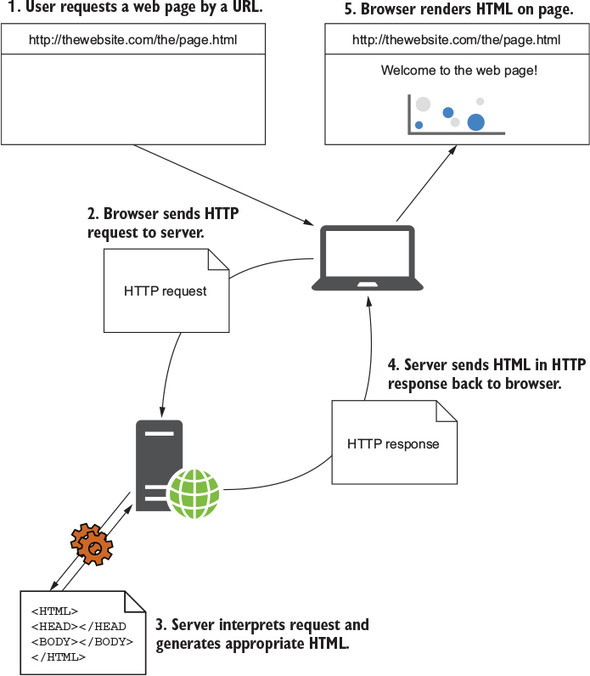
The process begins when a user navigates to a website or types a URL in their browser. The URL or web address consists of a hostname and a path to some resource on the web app. Navigating to the address in your browser sends a request from the user’s computer to the server on which the web app is hosted, using the HTTP protocol.
I’ve already hinted that in most cases, these values come from the request itself. But the HTTP request that the server receives is a series of strings—how does the MvcMiddleware turn that into a .NET object? This is where model binding comes in.
With this approach, the user sees any errors with their form immediately, even before the request is sent to the server, as shown in figure 6.9. This gives a much shorter feedback cycle, providing a much better user experience.
Figure 6.9. With client-side validation, clicking Submit will trigger validation to be shown in the browser before the request is sent to the server. As shown in the right-hand pane, no request is sent.
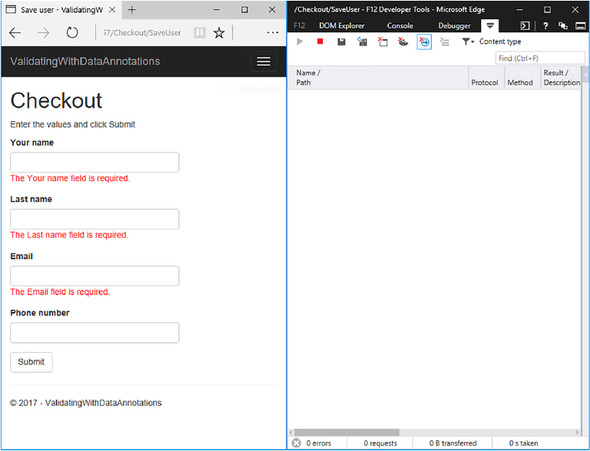
If you’re building an SPA, then the onus is on the client-side framework to validate the data on the client side before posting it to the Web API. The Web API will still validate the data when it arrives at the server, but the client-side framework is responsible for providing the smooth user experience.
When you use the Razor templating engine to generate your HTML, you get much of this validation for free. It automatically configures the validation for the built-in attributes without requiring any additional work. Unfortunately, if you’ve used custom ValidationAttributes, then these will only run on the server by default; you need to do some wiring up of the attribute to make it work on the client side too. Despite this, custom validation attributes can be useful for handling common scenarios in your application, as you’ll see in chapter 19.
The POST-REDIRECT-GET design pattern is a web development pattern that prevents users from accidently submitting the same form multiple times. Users typically submit a form using the standard browser POST mechanism, sending data to the server. This is the normal way by which you might take a payment, for example.
If a server takes the naive approach and responds with a 200 OK response and some HTML to display, then the user will still be on the same URL. If the user refreshes their browser, they will be making an additional POST to the server, potentially making another payment! Browsers have some mechanisms to avoid this, such as in the following figure, but the user experience isn’t desirable.
Listing 20.13. Creating an integration test with TestServer
public class StatusMiddlewareTests { [Fact] public async Task StatusMiddlewareReturnsPong() { var hostBuilder = new WebHostBuilder() #1 .Configure(app => #1 { #1 app.UseMiddleware<StatusMiddleware>(); #1 }); #1 using (var server = new TestServer(hostBuilder)) #2 { HttpClient client = server.CreateClient(); #3 var response = await client.GetAsync("/ping"); #4 response.EnsureSuccessStatusCode(); #5 var content = await response.Content.ReadAsStringAsync(); #6 Assert.Equal("pong", content); #6 } } } #1 Configures a WebHostBuilder that defines your app #2 Creates an instance of the TestServer, passing in the WebHostBuilder app #3 Creates an HttpClient, or you can interact directly with the server object #4 Makes an in-memory request, which is handled by the app as normal. #5 Verifies the response was a success (2xx) status code #6 Reads the body content and verifies that it contained “pong” !@%STYLE%@! {"css":"{\"css\": \"font-weight: bold;\"}","target":"[[{\"line\":5,\"ch\":72},{\"line\":5,\"ch\":74}],[{\"line\":6,\"ch\":72},{\"line\":6,\"ch\":74}],[{\"line\":7,\"ch\":72},{\"line\":7,\"ch\":74}],[{\"line\":8,\"ch\":72},{\"line\":8,\"ch\":74}],[{\"line\":9,\"ch\":72},{\"line\":9,\"ch\":74}],[{\"line\":24,\"ch\":0},{\"line\":24,\"ch\":2}],[{\"line\":5,\"ch\":72},{\"line\":5,\"ch\":74}],[{\"line\":6,\"ch\":72},{\"line\":6,\"ch\":74}],[{\"line\":7,\"ch\":72},{\"line\":7,\"ch\":74}],[{\"line\":8,\"ch\":72},{\"line\":8,\"ch\":74}],[{\"line\":9,\"ch\":72},{\"line\":9,\"ch\":74}],[{\"line\":24,\"ch\":0},{\"line\":24,\"ch\":2}],[{\"line\":5,\"ch\":72},{\"line\":5,\"ch\":74}],[{\"line\":6,\"ch\":72},{\"line\":6,\"ch\":74}],[{\"line\":7,\"ch\":72},{\"line\":7,\"ch\":74}],[{\"line\":8,\"ch\":72},{\"line\":8,\"ch\":74}],[{\"line\":9,\"ch\":72},{\"line\":9,\"ch\":74}],[{\"line\":24,\"ch\":0},{\"line\":24,\"ch\":2}],[{\"line\":5,\"ch\":72},{\"line\":5,\"ch\":74}],[{\"line\":6,\"ch\":72},{\"line\":6,\"ch\":74}],[{\"line\":7,\"ch\":72},{\"line\":7,\"ch\":74}],[{\"line\":8,\"ch\":72},{\"line\":8,\"ch\":74}],[{\"line\":9,\"ch\":72},{\"line\":9,\"ch\":74}],[{\"line\":24,\"ch\":0},{\"line\":24,\"ch\":2}],[{\"line\":5,\"ch\":72},{\"line\":5,\"ch\":74}],[{\"line\":6,\"ch\":72},{\"line\":6,\"ch\":74}],[{\"line\":7,\"ch\":72},{\"line\":7,\"ch\":74}],[{\"line\":8,\"ch\":72},{\"line\":8,\"ch\":74}],[{\"line\":9,\"ch\":72},{\"line\":9,\"ch\":74}],[{\"line\":24,\"ch\":0},{\"line\":24,\"ch\":2}],[{\"line\":11,\"ch\":72},{\"line\":11,\"ch\":74}],[{\"line\":25,\"ch\":0},{\"line\":25,\"ch\":2}],[{\"line\":13,\"ch\":72},{\"line\":13,\"ch\":74}],[{\"line\":26,\"ch\":0},{\"line\":26,\"ch\":2}],[{\"line\":15,\"ch\":72},{\"line\":15,\"ch\":74}],[{\"line\":27,\"ch\":0},{\"line\":27,\"ch\":2}],[{\"line\":17,\"ch\":72},{\"line\":17,\"ch\":74}],[{\"line\":28,\"ch\":0},{\"line\":28,\"ch\":2}],[{\"line\":18,\"ch\":72},{\"line\":18,\"ch\":74}],[{\"line\":19,\"ch\":72},{\"line\":19,\"ch\":74}],[{\"line\":29,\"ch\":0},{\"line\":29,\"ch\":2}],[{\"line\":18,\"ch\":72},{\"line\":18,\"ch\":74}],[{\"line\":19,\"ch\":72},{\"line\":19,\"ch\":74}],[{\"line\":29,\"ch\":0},{\"line\":29,\"ch\":2}]]"} !@%STYLE%@!

This is an excerpt from Manning's book Fast ASP.NET Websites.
Starting with the early versions of ASP.NET, there has always been a focus on developer productivity. Unfortunately, with this productivity came elements of the .NET framework that you might not have needed in your application. When you used earlier versions of ASP.NET, you got the whole stack, which included drag-and-drop controls, ViewState, server controls, and clunky HTML. Fortunately, the latest versions of ASP.NET put the focus on simplicity and getting your web framework to work just the way you want. In this book, you’ll look at the latest ASP.NET tools (ASP.NET MVC, ASP.NET Web Forms, and IIS) and use them to adjust and tweak your website’s code to provide your users with a responsive, high-performance website that runs smoothly. Internet Information Services (IIS) is an integral part of the Windows Server family of products and is one of the most popular servers for hosting websites. You’ll be using it to fine tune websites and optimize the way the server returns data to a browser. You’ll also look at a sample e-commerce website in both ASP.NET Web Forms and ASP.NET MVC and take it from slow to extremely high speed. You’ll create a sample application called Surf Store, which you’ll build and improve upon in each chapter. This gradual progression will also help you gain the understanding that you need to create fast ASP.NET websites.

Every time you open a browser and request a URL, you’re connecting to a server that could be located thousands of miles away. Each request you make might have to make a round-trip to a server that’s halfway around the world! If you host your website in a data center in New York and a user connects to your site from Sydney, each HTTP request travels a very long distance. Each round-trip takes time, and even though it may only amount to milliseconds, it all adds up.
It’s important to keep in mind who might be accessing your website—and from where. While the majority of users might be located in your own country, your website can be accessed by users who live elsewhere. A Content Delivery Network (CDN) allows users to access content on servers that are relatively close to them, minimizing the distance a request travels and reducing your site’s web page load times. A CDN improves your chances of serving the same website experience to all your users, regardless of their location. Happy users = happy developers!
Content Delivery Networks, or CDNs as they are better known, are a collection of server nodes located around the world that contain a clone of your site’s static files. Because static files such as images, JavaScript, and CSS don’t change often, they’re ideal for CDNs.
Figure 9.1 shows a collection of nodes that might represent a typical CDN. Many CDN services will have a similar collection of nodes around the world. When you upload your content onto a CDN, it gets cloned and propagated to all the other servers in its network throughout the world. Each time a user requests one of these files, they get served the file from the node closest to them. If a user in Sydney requests a file, they will receive the file from a server in Sydney instead of a server in New York. This simple change is highly effective in reducing load times.

This is an excerpt from Manning's book ASP.NET 4.0 in Practice.
You’ll notice a couple of XML/HTML tags with a strange attribute named runat. The value for this attribute is always set to server. This setting is what makes the server control usable in the server code.
Figure 12.1. The interaction between the user and the server without Ajax. The user requests a page or performs an action on it, and the server replies with another HTML page.
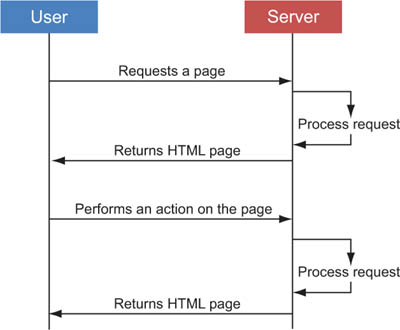
This interaction model works perfectly, but suffers from a big problem. Each time the user needs data from the server, he needs to perform an action. This action causes the entire page to be posted to the server; the user has to wait for the server to reply with a brand new page.
Suppose you’re using a page that shows a list of orders. For performance reasons, the amount isn’t shown beside the order but must be requested using a link in the order row. If you have to check several orders, you’ll click the link for the first one, wait for the server to respond, and then see the entire page refreshed—just for a number. Come on, we can do better than that.
Next, the data parameter contains the method parameters. This class must be a stringified JSON class. This point is important; if this class isn’t rendered correctly, the server won’t be able to process the information.
The type parameter specifies how the request is submitted to the server. WCF REST services allow only POST calls (unless manually configured to accept GET), so you should force a POST. The contentType and dataType parameters inform the server about how data is serialized when they’re sent from client to server and from server to client, respectively. In this case, data is both sent and received using the JSON format.

This is an excerpt from Manning's book ASP.NET MVC in Action with MvcContrib, NHibernate, and More.
Depending on how long you’ve been building web applications on the Microsoft platform, you’ll relate to some or all of the following pain. In the 1990s, developers built interactive websites using executable programs that ran on a server. These programs (Common Gateway Interface [CGI] was a common technology at the time) accepted a web request and were responsible for creating an HTML response. Templating was ad hoc, and the programs were difficult to write, debug, and test. In the late 1990s, Microsoft, after a brief stint with HTX templates and IDC connectors, introduced Active Server Pages, or ASP. ASP brought templating to web applications. The server page was an HTML document with dynamic script mixed in. Although this was a big step forward from the alternatives, the world soon saw massive server pages with code indecipherable from the markup.
Rendering a screen is one of the easiest things to do in the MVC framework, but how do we post information back to the server so that our controller can save the conference? The next section tackles methods for taking this rendered form and posting it back to the server so that we can save modified information back to our data store.
A web application is only a website without the posting of information. Saving information on the server makes the web interesting, and the ASP.NET MVC Framework delivers a compelling experience. In the following example, you will see that you can save a new conference without fishing around in the Request object or writing tedious mapping code. In listing 4.16, you saw a view that contains a form that will post back to the “edit” relative path. We used the Html.BeginForm() view helper to render the form tag, which renders the following: <form action="/conference/edit" method="post">.

This is an excerpt from Manning's book ASP.NET AJAX in Action.
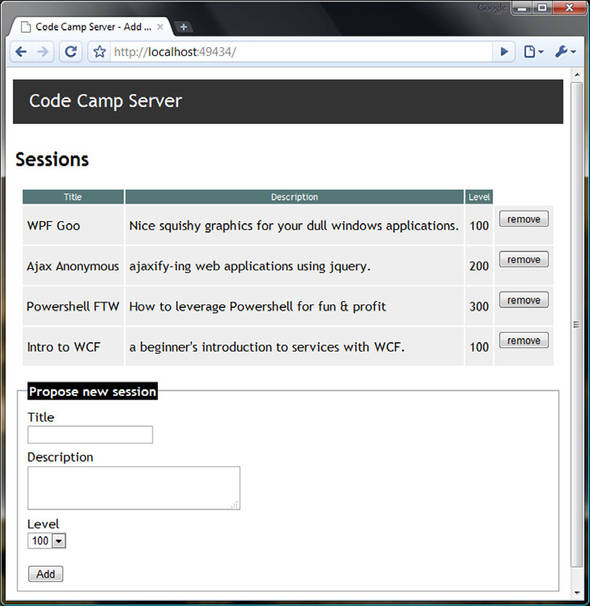
Normally, a user action such as clicking a button on a form invokes an HTTP request back to the web server. The server then processes the request, possibly doing some calculations or performing a few database operations; and then returns back to the client a whole new page to render. Technically, this makes a lot of sense—web pages are stateless by nature, and because all the logic about the application typically resides on the server, the browser is just used to display the interface. The server goes through the entire page lifecycle again and returns to the browser the HTML, CSS, and any other resources it needs to refresh the page. Unfortunately, this doesn’t present the user with a desirable experience. Instead, they’re exposed to a stop-start-stop pattern where they temporarily (and unwillingly) lose interaction with the page and are left waiting for it to be updated.
At the heart of Ajax programming is the ability to make asynchronous calls from the browser to the server. Establishing this dialogue eliminates the need for the browser to reload as a result of each request or user interaction. Instead, relevant data can be exchanged in the background while updates to the page are applied incrementally from the browser. Web pages that leverage this technique remain responsive, and the user experience is greatly improved.
In chapter 1, you got a glimpse into how this type of programming works with ASP.NET AJAX—we called this approach the client-centric development model. This model grants you more control over the application by moving the logic from the server into the browser. This shift from traditional ASP.NET development means the server is primarily used for data rather than application logic and data together.
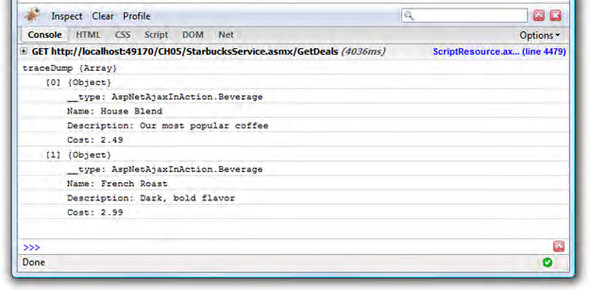
If you insert a call to Sys.Debug.traceDump(result) from the callback function for the GetDeals method, you can use the Firebug tool to inspect what comes back from the server (see figure 5.5).
What about classes that aren’t used in the Web Service? In some cases, the client would like to use the same class they defined on the server, in the browser as well. It seems redundant to have to define the same object in JavaScript because it isn’t used by the service.
To demonstrate how you can resolve this situation, let’s create another class on the server called Employee. For simplicity, this class also has three basic properties: first name, last name, and title. Listing 5.8 shows the implementation for the class.
Listing 5.8. The Employee class: another complex type defined on the server
using System; namespace AspNetAjaxInAction { public class Employee { public Employee() { } private string first; public string First { get { return this.first; } set { this.first = value; } } private string last; public string Last { get { return this.last; } set { this.last = value; } } private string title; public string Title { get { return this.title; } set { this.title = value; } } } }
Let us recap what you know so far. First, you learned that including scripts in pages from other domains allows you to retrieve data from their services. But due to the way requests are delegated (via the HTTP GET verb), certain limitations restrict you from doing more than retrieving simple data. Second, you know that in the server-side code (in the code-behind files), you have full access to other domains through the rich APIs afforded to you in .NET. This leads to the second option for making cross-domain calls: calls through the server.