concept argument in category c#

This is an excerpt from Manning's book C# in Depth, Fourth Edition.
The parameter types indicate that the argument corresponding to x shouldn’t be null but that the argument corresponding to y may be null. The return type indicates that the method won’t return null.
The other features in C# 4 also improve interoperability, particularly with COM. Some improvements are specific to COM, such as named indexers, implicit ref arguments, and embedded interop types. Optional parameters and named arguments are useful with COM, but they can also be used in purely managed code. These two are the features from C# 4 that I use on a daily basis.
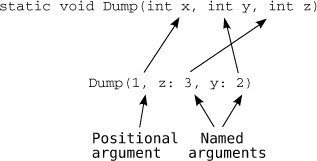
An argument can specify a name before the value with a colon between the name and the value. An argument without a name is called a positional argument.
Listing 9.10. Implementing FormattableString from scratch
using System.Globalization;

namespace System.Runtime.CompilerServices
{
    internal static class FormattableStringFactory
    {
        internal static FormattableString Create(
            string format, params object[] arguments) =>
            new FormattableString(format, arguments);
    }
}

namespace System
{
    internal class FormattableString : IFormattable
    {
        public string Format { get; }
        private readonly object[] arguments;

        internal FormattableString(string format, object[] arguments)
        {
            Format = format;
            this.arguments = arguments;
        }

        public object GetArgument(int index) => arguments[index];
        public object[] GetArguments() => arguments;
        public int ArgumentCount => arguments.Length;
        public static string Invariant(FormattableString formattable) =>
            formattable?.ToString(CultureInfo.InvariantCulture);
        public string ToString(IFormatProvider formatProvider) =>
            string.Format(formatProvider, Format, arguments);
        public string ToString(
            string ignored, IFormatProvider formatProvider) =>
            ToString(formatProvider);
    }
}
This is an excerpt from Manning's book Functional Programming in C#: How to write better C# code.
Some HOFs take other functions as arguments and invoke them in order to do their work, somewhat like a company may subcontract some of its work to another company. You’ve seen some examples of such HOFs earlier in this chapter: Sort (an instance method on List) and Where (an extension method on IEnumerable).
We’ll then look at how partial application can be used in practice to first specify configuration arguments that are available at startup, and purely runtime arguments later, as they’re received.
If you want to use the generic Apply to supply arguments to a method, you have to use one of the following forms.
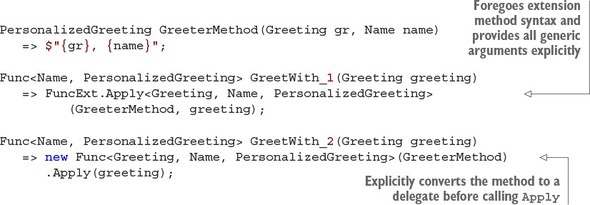
The greet function shows what is generally a good order of arguments: the more general parameters, which are likely to be applied early in the life of the application, should come first, followed by the more specific parameters. We learn to say “Hello” early in life, but we keep meeting and greeting new people until we’re old.

This is an excerpt from Manning's book C# in Depth.
Listing 1.4. Named arguments for clear initialization code (C# 4)
using System.Collections.Generic; public class Product { readonly string name; public string Name { get { return name; } } readonly decimal price; public decimal Price { get { return price; } } public Product(string name, decimal price) { this.name = name; this.price = price; } public static List<Product> GetSampleProducts() { return new List<Product> { new Product( name: "West Side Story", price: 9.99m), new Product( name: "Assassins", price: 14.99m), new Product( name: "Frogs", price: 13.99m), new Product( name: "Sweeney Todd", price: 10.99m) }; } public override string ToString() { return string.Format("{0}: {1}", name, price); } }The benefits of specifying the argument names explicitly are relatively minimal in this particular example, but when a method or constructor has several parameters, it can make the meaning of the code much clearer—particularly if they’re of the same type, or if you’re passing in null for some arguments. You can choose when to use this feature, of course, only specifying the names for arguments when it makes the code easier to understand.
Parameters and arguments
This section obviously talks about parameters and arguments a lot. In casual conversation, the two terms are often used interchangeably, but I’ll use them in line with their formal definitions. Just to remind you, a parameter (also known as a formal parameter) is the variable that’s part of the method or indexer declaration. An argument is an expression used when calling the method or indexer. For example, consider this snippet:
void Foo(int x, int y)
{
   // Do something with x and y
}
...
int a = 10;
Foo(a, 20);
Here the parameters are x and y, and the arguments are a and 20.
You can use optional parameters and named arguments with indexers as well as methods. But this is only useful for indexers with more than one parameter: you can’t access an indexer without specifying at least one argument anyway. Given this limitation, I don’t expect to see the feature used much with indexers, and I haven’t demonstrated it in the book. It works exactly as you’d expect it to, though.
This is an excerpt from Manning's book Real-World Functional Programming with Examples in F# and C#.
The expression that calculates the result (filteredInfos) is composed from basic operators such as where or select. These operators take other expressions as an argument, because they need to know what we want to filter or select as a result. Using the previous analogy, these operators give us a new way of combining pieces of code to express our intention with less writing. Note that the whole calculation in listing 1.4 is written as a single expression that describes the result rather than a sequence of statements that constructs it. You’ll see this trend repeated throughout the book. In more declarative languages such as F#, everything you write is an expression.
The match construct lets us match the specified expression (tuple) against one or more patterns starting with the bar symbol. In our example, we have only one pattern, and because any tuple with two elements can be deconstructed into two values containing its elements, the execution will always follow this single branch. The F# compiler analyzes the pattern matching to deduce that the argument tuple is a tuple type containing two elements.
You’ve seen that in C#, passing a function as an argument can be done using delegates, in particular the Func delegate. In listing 3.17, the delegate will have two arguments of type int and will return an int as a result. The code shows how we can implement the aggregation as a recursive method that takes a delegate as a parameter.
Listing 5.17. Using a function as an argument in C# and F#
// C# version int Twice(int input, Func<int,int> f) { ❶ return f(f(input)); } var result = Twice(2, n => n * n); ❷ // F# version > let twice (input:int) f = f(f(input));; ❸ val twice : int -> (int -> int) -> int ❹ > twice 2 (fun n -> n * n);; ❺ val it : int = 16

This is an excerpt from Manning's book ASP.NET AJAX in Action.
The Microsoft Ajax Library lets you access the DOM in a manner independent from the browser that renders the page. The abstraction API consists of the methods exposed by two client classes: Sys.UI.DomElement and Sys.UI.DomEvent. The first one abstracts a DOM element, and the second represents the event data object that DOM event handlers receive as an argument.
Because JavaScript is a loosely typed language, you don’t need to specify the type of the arguments or the type of the returned value (if any). All the information about types is inferred at runtime. As a consequence, if the arguments a and b passed to the add function are numbers, the returned value is their sum. If, on the other hand, a and b are strings, the result is the concatenation of the two strings. If the arguments are of different types, strange things may happen, and an error may be raised at runtime. In chapter 13, we’ll discuss a technique called parameter validation, which the Microsoft Ajax Library uses to check that the arguments passed to a function are of the expected types.
To distinguish between objects instantiated with different constructors, you could use JavaScript’s instanceof operator. Due to the way inheritance is resolved, the instanceof operator doesn’t work with classes created with the Microsoft Ajax Library. Instead, you have to use the isInstanceOfType method. This method is called on the type that you will test. It accepts an object as an argument and returns true if the object is an instance of that type. In the following code, the test1 and test2 variables hold true because both instances are of type Pet. The test3 variable holds false because tmpr1 isn’t of type Cat:
var pet1 = new Samples.Pet();
var cat1 = new Samples.Cat();
var tmpr1 = new Samples.Temperature();

var test1 = Samples.Pet.isInstanceOfType(pet1);
var test2 = Samples.Pet.isInstanceOfType(cat1);
var test3 = Samples.Cat.isInstanceOfType(tmpr1);
To retrieve information about the inheritance relationship between classes, you use the inheritsFrom method. This method is called on a child class and accepts the potential parent class as an argument. It returns true if the class passed as an argument is effectively the parent class. In the following code, the catIsAPet variable hold true because Cat inherits from Pet:
To pass arguments to the constructor of the base class, you have to pass them to the initializeBase method. Let’s rewrite the constructor of the Pet class to accept the values of the _name and _age members as arguments:
