concept delegate in category c#

This is an excerpt from Manning's book C# in Depth, Fourth Edition.
First, we’ll consider how you create and initialize objects. Delegates have probably evolved the most and in multiple stages. In C# 1, you had to write a separate method for the delegate to refer to and then create the delegate itself in a long-winded way. For example, here’s what you’d write to subscribe a new event handler to a button’s Click event in C# 1:
It’s important to understand that the lambda expression captures the variables themselves, not the values of the variables at the point when the delegate is created.[2] If you modified any of the captured variables between the time at which the delegate is created and when it’s invoked, the output would reflect those changes. Likewise, the lambda expression can change the value of the captured variables. How does the compiler make all of that work? How does it make sure all those variables are still available to the delegate when it’s invoked?
Whereas delegates provide code you can run, expression trees provide code you can inspect, a little like reflection. Although you can build up expression trees directly in code, it’s more common to ask the compiler to do this for you by converting a lambda expression into an expression tree. The following listing gives a trivial example of this by creating an expression tree just to add two numbers together.
Expression<TDelegate> has a Compile() method that returns the delegate type. You can then handle this delegate as you do any other. As a trivial example, the following listing takes our earlier adder expression tree, compiles that to a delegate, and then invokes it, producing an output of 5.
Listing 3.14. Compiling an expression tree to a delegate and invoking the result
Expression<Func<int, int, int>> adder = (x, y) => x + y;
Func<int, int, int> executableAdder = adder.Compile();     #1
Console.WriteLine(executableAdder(2, 3));                  #2
This approach can be used in conjunction with reflection for property access and method invocation to produce delegates and then cache them. The result is as efficient as if you’d written the equivalent code by hand. For a single method call or property access, there are already methods to create delegates directly, but sometimes you need additional conversion or manipulation steps, which are easily represented in expression trees.

This is an excerpt from Manning's book C# in Depth.
The test variable is initialized using the anonymous method feature you saw in the previous section. The print variable initialization uses another new C# 2 feature called method group conversions that makes it easier to create delegates from existing methods.
I’m sure you already have an instinctive idea about what a delegate is, even though it can be hard to articulate. If you’re familiar with C and had to describe delegates to another C programmer, the term function pointer would no doubt crop up. Essentially, delegates provide a level of indirection: instead of specifying behavior to be executed immediately, the behavior can somehow be “contained” in an object. That object can then be used like any other, and one operation you can perform with it is to execute the encapsulated action. Alternatively, you can think of a delegate type as a single-method interface, and a delegate instance as an object implementing that interface.
If that’s just gobbledygook to you, maybe an example will help. It’s slightly morbid, but it does capture what delegates are all about. Consider your will—your last will and testament. It’s a set of instructions: “pay the bills, make a donation to charity, leave the rest of my estate to the cat,” for instance. You write it before your death, and leave it in an appropriately safe place. After your death, your attorney will (you hope!) act on those instructions.
A delegate in C# acts like your will does in the real world—it allows you to specify a sequence of actions to be executed at the appropriate time. Delegates are typically used when the code that wants to execute the actions doesn’t know the details of what those actions should be. For instance, the only reason why the Thread class knows what to run in a new thread when you start it is because you provide the constructor with a ThreadStart or ParameterizedThreadStart delegate instance.
We’ll start our tour of delegates with the four absolute basics, without which none of the rest would make sense.
delegate void StringProcessor(string input);
Delegates of all kinds get a boost in C# 2, and then they’re given even more special treatment in C# 3. Most of the features aren’t new to the CLR but are clever compiler tricks to make delegates work more smoothly within the language. The changes affect not just the syntax you can use, but the appearance and feeling of idiomatic C# code. Over time, C# is gaining a more functional approach.
C# 1 has pretty clumsy syntax when it comes to creating a delegate instance. For one thing, even if you need to accomplish something straightforward, you have to write a whole separate method to create a delegate instance for it. C# 2 fixed this with anonymous methods and introduced a simpler syntax for the cases where you still want to use a normal method to provide the action for the delegate. You can also create delegate instances using methods with compatible signatures—the method signature no longer has to be exactly the same as the delegate’s declaration.
This is an excerpt from Manning's book Dependency Injection in .NET.
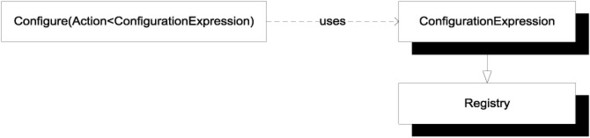
The configure parameter is a delegate that takes a ConfigurationExpression as input. In the code examples in this chapter, this parameter is usually denoted by r, and I normally supply the delegate as a code block expressed using the r parameter.
Figure 11.4. The Configure method of the Container class takes as input a delegate that operates on a ConfigurationExpression—in this chapter, we represent this ConfigurationExpression instance with the variable name r. The ConfigurationExpression class is a child class of the concrete Registry class.
The EnrichWith method is a member of the generic SmartInstance<T> class returned by the Use method. In this case, you invoke the Use method with the VealCutlet type argument, which returns an instance of SmartInstance<VealCutlet>. The EnrichWith method takes a delegate that takes a VealCutlet as input and returns an object.
This is an excerpt from Manning's book Real-World Functional Programming with Examples in F# and C#.
We added two parameters to the function—the initial value (init) and an operation (op) that specifies how to transform the intermediate result and a number from the range into the next result. To specify the second parameter, we’re using a delegate, Func<int, int, int>, which represents a function that has two parameters of type int and returns an int. This delegate type is available in .NET 3.5 (we’ll talk about it in chapter 3).
In functional languages, we don’t have to use delegates, because these languages have a much simpler concept: a function. This is exactly what the term functions as values refers to—the fact that we can use functions in the same way as any other data type available in the language. We can write functions that take functions as parameters (as we did in this example), but also return a function as the result or even create a list of functions, and so on. Functions are also useful as a mental concept when approaching a problem.
delegate R Func<T1, T2, R>(T1 arg1, T2 arg2);
Func<int, int, int> add = delegate(int a, int b) { return a + b; }
Another problem crops up when we want to export a value or function directly: methods (and fields) don’t appear on their own in .NET, or even as part of a namespace—they’re always part of a type. The very idea of a method existing with no containing type to love and nurture it is enough to make a compassionate C# developer distraught. Help is at hand in the form of F# modules. Listing 9.22 shows how a value and a utility function can be exported so they can be used from C#, and also demonstrates the previous point about using delegates for higher-order functions.

This is an excerpt from Manning's book LINQ in Action.
The return value of the lambda (if any) must be implicitly convertible to the delegate’s return type. To give you a good overview of the various possible combinations, we have prepared a set of sample lambda expressions declared as delegates. These samples demonstrate the compatibility between the delegate types we have just introduced and some lambda expressions. Listings 2.13 and 2.14 contain the samples, which include lambda expressions and delegates with and without parameters, both with and without result, as well as expression lambdas and statement lambdas.

In order to make our code more generic, we’ll try to provide the filter information as a parameter of our method instead of keeping it hard-coded. In C# 2.0 and earlier, this was possible thanks to delegates. A delegate is a type that can store a pointer to a method.
Listing 2.7. DisplayProcesses method that uses a delegate for filtering
static void DisplayProcesses(Predicate<Process> match) { var processes = new List<ProcessData>(); foreach (var process in Process.GetProcesses()) { if (match(process)) { processes.Add(new ProcessData { Id=process.Id, Name=process.ProcessName, Memory=process.WorkingSet64 }); } } ObjectDumper.Write(processes); }