concept event in category c#

This is an excerpt from Manning's book Code like a Pro in C#.
You can pronounce “tuple” in two ways. I prefer ‘tjʊpəl (rhymes with “scruple”) but some people say ˈtʌpəl (rhymes with “couple”).
This is an excerpt from Manning's book Functional Programming in C#: How to write better C# code.
There is a third option, which is to use F# to model your data objects. When coding functionally, it’s natural to separate data from behavior: data is encoded in data types that have little or no behavior (they typically represent the events, view models, data-transfer objects, entities, and value objects of your domain), whereas behavior is encoded in functions that transform that data or perform side effects.
Events are really simple, and they should be really simple. They’re just plain data objects that capture the minimum amount of information required to faithfully represent what happened. For example, here are some events that represent things that may affect a bank account.
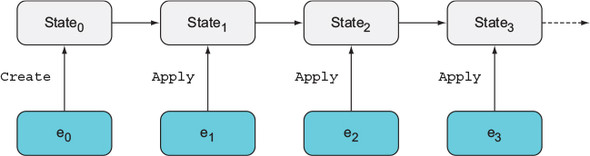
Now let’s see how states and events are combined in state transitions. Once you have a state and an event, you can compute the next state by applying the event to the state. This computation is called a state transition, and it’s a function whose signature has this general form:
state → event → stateIn other words, “Give me a state and an event, and I’ll compute the new state after the event.” Particularized for our scenario, this signature becomes
AccountState → Event → AccountStateHere, Event is the base class from which all our events derive, so an implementation must pattern match on the type of the event and then compute a new AccountState with the relevant changes.
Now that you’ve seen how to represent states and events, and how to combine them with state transitions, you’re ready to see how an entity’s current state can be computed from the history of events that affected that entity in the past.
Let’s look at the signature first. We’re taking a sequence of events: the entity’s history. This is the list of events you get from the DB when you query all events for a given EntityID. I’m assuming that the sequence is sorted: events that happened first should be at the top of the list. You must enforce this when you retrieve events from the database, and this often comes for free: because events are persisted as they occur, they’re appended in order, and this ordering is normally preserved when they’re retrieved.
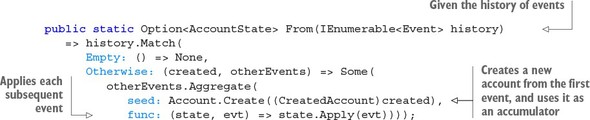
The desired return value is an AccountState, but here it’s wrapped in an Option. This is where the previously discussed implementation of Match for IEnumerable comes in handy. If the history is empty, which means that there’s no recorded history of that entity, the entity doesn’t exist in the system, so the code returns None. Otherwise the sequence must contain a CreatedAccount at the head of the list, with the tail containing all following events. In this case, the code creates the initial state from the CreatedAccount event and uses that as an accumulator to Aggregate, which applies all subsequent events to the state, finally obtaining the current state.
Notice that if you wanted to see not the current state of the account, but its state at any point in the past, this can be done trivially by evaluating the very same function but filtering to exclude events past the desired date. For this reason, event sourcing is a very valuable model when you need an audit trail and to see how an entity has changed through time.
There are two main approaches to immutable storage:
- Event-based—The DB is an ever-growing collection of events.
- Assertion-based—The DB is an ever-growing collection of facts.
Event sourcing means persisting event data as events occur. The state of an entity need not be stored, because it can always be computed as the “sum” of all events that affected the entity. An event-sourced system naturally separates the concerns of reading and writing data, enabling a CQRS architecture that separates between
- The command side, where commands are received, validated, and turned into events that are persisted and published.
- The query side, where events are combined to create view models, which are served to clients and, optionally, cached for better performance.
Event-sourced systems have several main components:
- Commands—Simple, immutable data objects encapsulating a request from a client program.
- Events—Simple, immutable data objects capturing what happened.
- States—Data objects representing the state of an entity at a certain point in time.
- State transitions—Functions that take a state and an event, and produce a new state.
- View models—Data objects for populating views. They’re computed from events.
- Event handlers—These subscribe to events to perform business logic (on the command side) or to update view models (on the query side).

This is an excerpt from Manning's book Unity in Action: Multiplatform game development in C# with Unity 5.
The majority of this code happens inside a series of OnMouseSomething functions; like Start() and Update(), these are a series of functions automatically available to all script components in Unity. MouseDown was mentioned back in section 5.2.2, but all these functions respond to mouse interactions if the object has a collider; MouseOver and MouseExit are a pair of events used for hovering the mouse cursor over an object: MouseOver is the moment when the mouse cursor first moves over an object, and MouseExit is the moment when the mouse cursor moves away. Similarly, MouseDown and MouseUp are a pair of events for clicking the mouse. MouseDown is the moment when the mouse button is physically pressed, and MouseUp is the moment when the mouse button is released.
Now click Add New Event Type to add a new type to the EventTrigger component. Choose Pointer Down for the event. This will create an empty panel for that event, just like OnClick had. Click the + button to add an event listing, drag the controller object to this entry, and select OnPointerDown() in the menu. There you go!
To alert the UI of actions in the scene, we’re going to make use of a broadcast messenger system. Figure 6.17 illustrates how this event messaging system works: scripts can register to listen for an event, other code can broadcast an event, and listeners will be alerted about broadcast messages. Let’s go over a messaging system to accomplish that.

This is an excerpt from Manning's book C# in Depth.
Enter C#. In some ways, C# 1 could have been seen as a nicer version of the Java language, circa 2001. The similarities were all too clear, but C# had a few extras: properties as a first-class feature in the language, delegates and events, foreach loops, using statements, explicit method overriding, operator overloading, and custom value types, to name a few. Obviously, language preference is a personal issue, but C# 1 definitely felt like a step up from Java when I first started using it.
You probably have an instinctive idea about the overall point of events, particularly if you’ve written any UIs. The idea is that an event allows code to react when something happens—saving a file when the appropriate button is clicked, for example. In this case, the event is the clicking of the button, and the action is the saving of the file. Understanding the reason for the concept isn’t the same as understanding how C# defines events in language terms, though.
Developers often confuse events and delegate instances, or events and fields declared with delegate types. The difference is important: events aren’t fields. The reason for the confusion is that C# provides a shorthand in the form of field-like events. We’ll come to those in a minute, but first let’s consider what events consist of as far as the C# compiler is concerned.
It’s helpful to think of events as being similar to properties. To start with, both of them are declared to be of a certain type—an event is forced to be a delegate type.
Listing 5.9. Subscribing to events with anonymous methods that ignore parameters
Button button = new Button(); button.Text = "Click me"; button.Click += delegate { Console.WriteLine("LogPlain"); }; button.KeyPress += delegate { Console.WriteLine("LogKey"); }; button.MouseClick += delegate { Console.WriteLine("LogMouse"); }; Form form = new Form(); form.AutoSize = true; form.Controls.Add(button); Application.Run(form);
This is an excerpt from Manning's book Real-World Functional Programming with Examples in F# and C#.
We’ve already talked about the code to execute a standard Windows application, but listing 4.12 shows it again ❹ because we’ve added two lines of code. Before running the application, we specify that the openAndDrawChart function should be called when the user clicks the btnOpen button and likewise for the second button. This is done by registering a function as a handler of the Click event using the Add method. Unlike in C#, where events are special language constructs, F# treats events as normal objects that have an Add method. Events in F# also have AddHandler and RemoveHandler methods that serve exactly the same purpose as += and –= operators for events in C#. We’ll talk about this topic in more detail in chapter 16, but in most of the cases you can use the Add method.
At this point, you know how to write an application that reacts to events in C#, and we’ve seen that the same technique can be used in F# as well. The pattern is to register a callback function (or a method) with the event; when the event occurs, the callback function is executed. This can react to the event, perhaps updating the state of the application or making changes to the UI.
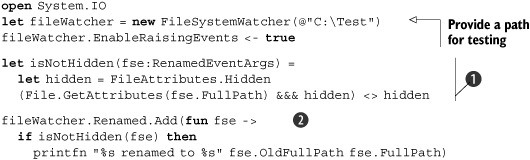
Let’s first review this approach with an example. The code in listing 16.1 monitors changes in the filesystem using the FileSystemWatcher class. Once initialized, the watcher triggers an event every time a file is created, renamed, or deleted.
Listing 16.1 begins by creating the FileSystemWatcher object for a folder where we can easily create and rename some files to test the code. The next few lines ❶ show a simple function that checks whether a file is not marked as hidden. The argument to this function is a class derived from EventArgs that carries information about the event triggered by the watcher. We’ll use this function to demonstrate one interesting feature in declarative event handling shortly. We’re using binary and operator (&&&) to check whether a flag of .NET enumeration type is set.
The last part of the code ❷ registers an event handler that will be called when a file is renamed. Events are represented in a different way in F# compared to other .NET languages. In C#, an event is a special member of a class, and you can only work with it through the operators for adding (+=) or removing (-=) event handlers. In F#, events appear as standard members of type IEvent<'T>, where the T parameter specifies the value carried by the event (usually derived from EventArgs). This type has an Add method that we can use for registering a callback function. It also supports methods called AddHandler and RemoveHandler, so you can still use delegates if you want to be able to remove the registered callback later.
The example in listing 16.1 uses the Add method and gives it a lambda function as an argument. The lambda function takes only a single parameter and doesn’t include the usual “sender” parameter. The reason is that in F#, you can easily access the sender object by capturing it in a closure, so it doesn’t have to be passed explicitly as an argument. The callback reacts to the event by printing information about the renamed file, but we don’t want to react to every event. Instead we want to display the message only when the affected file is not marked as hidden. To do this, we write an if condition inside the callback function.
This works fine, but F# allows us to write the filtering of events in a more declarative way, which makes the program easier to read and promotes a cleaner separation of concerns. Later we’ll see that the same principles can be used in C#, at least to some extent.
So far, we’ve seen two types for representing events. The relation between them is fairly straightforward: the IEvent<'T> interface inherits from the IObservable<'T> interface. The IEvent<'T> type is more specific and is used primarily by F# to represent standard .NET events instead of making them a special language feature.
We’ve also seen the Observable module with higher-order functions for working with events. Functions in the module take values of the IObservable<'T> interface as parameters, but since IEvent<'T> is inherited from IObservable<'T>, we can use the functions for working with standard F# events as well. For completeness, there is also an Event module with functions similar to those from the Observable module. These functions take only values of type IEvent<'T> and produce event values of the same type. Deciding which interface and module to use may sound complicated, but we can decide using four simple facts and rules:
Both functions take an initial state and a function that knows how to calculate a new state from the original one and an element from the list or value carried by the event. The difference is that the fold function returns the result of accumulating all the elements of the list. This is impossible for events, because we don’t know when the event will take place for the last time. Instead of waiting for the last element, the Observable.scan function returns an event that’s triggered every time the internal state is recalculated, with the aggregated value so far. We’ll see an example of this function in section 16.1.3.
The biggest benefit of using higher-order functions for events is that we can write the code in a more declarative way. In our example, we replaced an imperative if in the body of the event handler with a filter, but we can take the example even further. If we create a function (we’ll call it formatFileEvent) that formats the information carried by RenamedEventArgs, we can write the whole event handling as a single, succinct expression, as shown next.
Listing 16.3. Declarative event handling (F#)
fileWatcher.Renamed |> Observable.filter isNotHidden |> Observable.map formatFileEvent |> Observable.add (printfn "%s")Listing 16.3 implements the same functionality as listing 16.2, using two helper functions and the functions from the Observable module. Once you start thinking of an event as a series of values, the code is easy to read. Instead of imperatively specifying what to do when the event occurs, we declaratively specify aspects of the required result. The first line specifies what kind of events we’re interested in, the second one specifies what information is important for us, and the last line displays the formatted information.
Initially, we’re starting with an event carrying values of type RenamedEventArgs. The filtering operation doesn’t change the type; it doesn’t trigger the returned event in some cases. The projection can change the type and the formatFileEvent function returns a string value, so we end up with events carrying strings. This means that the last primitive expects a function taking a string as an argument and returning a unit. As you can see, we can easily create a function like this using partial function application. The printfn function with the %s format specifier creates a function that prints the given string.
This way of handling events also gives us a richer way to split the code into reusable elements. We could omit the last line to create an event that can be used in several other places in the application. We could then use Observable.add in conjunction with MessageBox.Show to display the notifications in a graphical form, and use the same event to append to a log file. Let’s look at a slightly more complicated example.

This is an excerpt from Manning's book ASP.NET AJAX in Action.
Note the functions registered with the application model for the
load and unload events in the browser. If you recall from the earlier overview of the core library, the client framework provides a page lifecycle similar to the ASP.NET lifecycle. In this case, you use the load event as an opportunity to
register a handler for any changes to the list of departments. In addition, you use the unload event to responsibly
remove the registered handler.
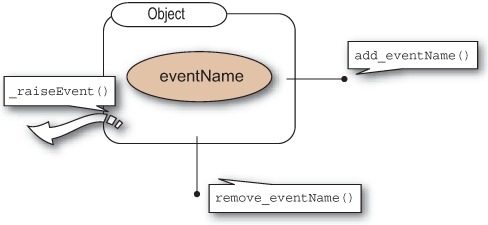
With the Microsoft Ajax Library, you can expose an event in a JavaScript object and subscribe to it with multiple handlers. This means that events are multicast, because you’re able to handle them with multiple functions. Exposing an event is a three-step process:
In the .NET framework, the process for exposing events is conceptually similar. There, you use a delegate to add and remove event handlers, and you fire the event by executing the delegate. You can read a good article about the .NET event model at http://msdn.microsoft.com/msdnmag/issues/03/02/BasicInstincts/.
Figure 3.7 illustrates the pattern used in the Microsoft Ajax Library to expose an event in a JavaScript object.
Listing 11.5. Using the SetProperty action to handle an event
<div><input type="button" id="greetButton" value="Click Me" /></div> <div><h1><span id="msgLabel"></span></h1></div> <script type="text/xml-script"> <page xmlns="http://schemas.microsoft.com/xml-script/2005"> <components> <label id="msgLabel" /> <button id="greetButton"> <click> <setPropertyAction target="msgLabel" property="text" value="Hello XML-script!" /> </click> </button> </components> </page> </script>

This is an excerpt from Manning's book ASP.Net 2.0 Web Parts in Action: Building Dynamic Web Portals.
In ASP.NET every web parts page must contain one and only one WebPartManager control. Furthermore, in a web parts page, the WebPartManager must be the first web part control in the control hierarchy. We’ll discuss this control and these constraints in much more detail in chapter 4; but for now just understand that, as its name suggests, it is the manager part and therefore responsible for many of the operations and events that occur within a portal application. Drag the WebPartManager control from your Toolbox and add it to the top of your page.
A delegate is a special Type in .NET that allows us to specify that methods which handle events must implement a specific interface.