concept extension method in category c#

This is an excerpt from Manning's book C# in Depth, Fourth Edition.
Let’s get back to why extension methods are important to LINQ. It’s time for our first query.
Extension methods imported from a type aren’t available as if you were calling a regular static method like Math.Sin. Instead, you have to call them as if they were instance methods on the extended type. I’ll demonstrate the first point by using the most commonly used set of extension methods in all of .NET: the ones for LINQ. The System.Linq.Queryable class contains extension methods for IQueryable<T> accepting expression trees, and the System.Linq.Enumerable class contains extension methods for IEnumerable<T> accepting delegates. Because IQueryable<T> inherits from IEnumerable<T> with a regular using directive for System.Linq, you can use the extension methods accepting delegates on IQueryable<T>, although you usually don’t want to. The following listing shows how a using static directive for just System.Linq.Queryable means the extension methods in System.Linq.Enumerable aren’t picked up.
Listing 10.3. Selective importing of extension methods
using static System.Linq.Queryable;
...
var query = new[] { "a", "bc", "d" }.AsQueryable();     #1

Expression<Func<string, bool>> expr =                   #2
    x => x.Length > 1;                                  #2
Func<string, bool> del = x => x.Length > 1;             #2

var valid = query.Where(expr);                          #3
var invalid = query.Where(del);                         #4
It can take a little getting used to, but then it’s extremely useful and certainly beats having to call jon.Contacts.AddRange(...) separately. But what if you weren’t using Protocol Buffers, and Contacts was exposed only as List<Person> instead? With C# 6, that’s not a problem: you can create an extension method for List<T> that adds an overload of Add accepting an IEnumerable<T> and calling AddRange with it, as shown in the following listing.
Listing 10.9. Exposing explicit interface implementations via extension methods
static class ListExtensions
{
    public static void Add<T>(this List<T> list, IEnumerable<T> collection)
    {
        list.AddRange(collection);
    }
}
With that extension method in place, the earlier code works fine even with List<T>. If you wanted to be broader still, you could write an extension method targeting IList<T> instead, although if you went down that route, you’d need to write the loop within the method body because IList<T> doesn’t have an AddRange method.
In section 10.2.1, I used ConcurrentDictionary<,> as an example of where you might want to use an indexer instead of a collection initializer. Without any extra help, you can’t use a collection initializer because no Add method is exposed. But ConcurrentDictionary<,> does have an Add method; it’s just that it uses explicit interface implementation to implement IDictionary<,>.Add. Usually, if you want to access a member that uses explicit interface implementation, you have to cast to the interface—but you can’t do that in a collection initializer. Instead, you can expose an extension method, as shown in the following listing.
Listing 10.11. Exposing explicit interface implementations via extension methods
public static class DictionaryExtensions
{
    public static void Add<TKey, TValue>(
        this IDictionary<TKey, TValue> dictionary,
        TKey key, TValue value)
    {
        dictionary.Add(key, value);
    }
}
At first glance, this looks completely pointless. It’s an extension method to call a method with exactly the same signature. But this effectively works around explicit interface implementation, making the Add method always available, including in collection initializers. You can now use a collection initializer for ConcurrentDictionary<,>:
var dictionary = new ConcurrentDictionary<string, int>
{
    { "x", 10 },
    { "y", 20 }
};
This should be used cautiously, of course. When a method is obscured by explicit interface implementation, that’s often meant to discourage you from calling it without a certain amount of care. This is where the ability to selectively import extension methods with using static is useful: you could have a namespace of static classes with extension methods that are meant to be used only selectively and import just the relevant class in each case. Unfortunately, it still exposes the Add method to the rest of the code in the same class, but again you need to weigh whether that’s worse than the alternatives.
The extension method in listing 10.11 is broad, extending all dictionaries. You could decide to target only ConcurrentDictionary<,> instead to avoid inadvertently using an explicitly implemented Add method from another dictionary type.

This is an excerpt from Manning's book C# in Depth.
Listing 1.9. Ordering a List<Product> using an extension method (C# 3)
List<Product> products = Product.GetSampleProducts(); foreach (Product product in products.OrderBy(p => p.Name)) { Console.WriteLine (product); }In this listing, you appear to be calling an OrderBy method on the list, but if you look in MSDN, you’ll see that it doesn’t even exist in List<Product>. You’re able to call it due to the presence of an extension method, which you’ll see in more detail in chapter 10. You’re not actually sorting the list “in place” anymore, just retrieving the contents of the list in a particular order. Sometimes you’ll need to change the actual list; sometimes an ordering without any other side effects is better.
First, though, let’s take a closer look at why extension methods are sometimes desirable compared with what’s available in C# 1 and 2, particularly when you create utility classes.
Not only does the previous list provide all the restrictions, but it also gives the details of what you need to do to turn a normal static method in a static class into an extension method—just add the this keyword. The following listing shows the same class as in listing 10.1, but this time with both methods as extension methods.
Listing 10.3. The StreamUtil class again, but this time with extension methods
public static class StreamUtil { const int BufferSize = 8192; public static void CopyTo(this Stream input, Stream output) { byte[] buffer = new byte[BufferSize]; int read; while ((read = input.Read(buffer, 0, buffer.Length)) > 0) { output.Write(buffer, 0, read); } } public static byte[] ReadFully(this Stream input) { using (MemoryStream tempStream = new MemoryStream()) { CopyTo(input, tempStream); return tempStream.ToArray(); } } }
At this point, the name change is fully appropriate for all the uses—although there’s nothing to stop you from using the extension method as a normal static method, which is useful when you’re migrating a lot of code.
You may have noticed that nothing in these method calls indicates that you’re using an extension method instead of a regular instance method of Stream. This can be seen in two ways: it’s a good thing if your aim is to make extension methods blend in as much as possible and cause little alarm, but it’s a bad thing if you want to be able to immediately see what’s really going on.
If you’re using Visual Studio, you can hover over a method call and get an indication in the tooltip when it’s an extension method, as shown in figure 10.1. IntelliSense also indicates when it’s offering an extension method, in both the icon for the method and the tooltip when it’s selected. Of course, you don’t want to have to hover over every method call you make or be super careful with IntelliSense, but most of the time it doesn’t matter whether you’re calling an instance or extension method.
Figure 10.1. Hovering over a method call in Visual Studio reveals whether the method is an extension method.

There’s still one rather strange thing about this calling code—it doesn’t mention StreamUtil anywhere! How does the compiler know to use the extension method in the first place?
Think carefully before you extend widely used types, such as numbers or object, or before you write a method where the extended type is a type parameter. Some guidelines go as far as to recommend that you shouldn’t do this at all; I think such extensions have their place, but they should have to really earn their place in your library. In this situation, it’s even more important that the extension method be either internal or in its own namespace; I wouldn’t want IntelliSense to be suggesting the June extension method everywhere I used an integer, for example—only in classes that used at least some extension methods related to date and time. The decision to write an extension method should always be a conscious one. It shouldn’t become habitual. Not every static method deserves to be an extension method.
This is an excerpt from Manning's book Real-World Functional Programming with Examples in F# and C#.
Working with collections is the best example of how higher-order functions make your code more declarative. You can do so in C# using the extension methods (such as Where and Select) that are provided as part of LINQ, because everything you can write using a LINQ query can be also written using a method that takes a Func delegate as an argument.
Listing 6.3. Working with strings using extension methods (C#)
public static string AddLine(this string str, string next) { return str + "\n>>" + next; } Console.WriteLine( StringUtils.AddLine( StringUtils.AddLine("Hello world!", "How are you today"), "I'm fine!")); Console.WriteLine("Hello world!" .AddLine("How are you today") .AddLine("I'm fine!"));
The second part of the listing is more interesting. To count the number of primes in the given range, we select only numbers that are primes and then count them. In C# ❶, we generate a range of integers (nums) of type IEnumerable<int>. LINQ provides extension methods Where and Count for this type, so we use these to calculate the result. In F# ❷, we specify the functions explicitly. We’re working with a list, so we implemented the code using functions from the List module.

This is an excerpt from Manning's book LINQ in Action.
Listing 2.18. The DisplayProcesses methods with extension methods (ExtensionMethods.csproj)
static void DisplayProcesses(Func<Process, Boolean> match) { var processes = new List<ProcessData>(); foreach (var process in Process.GetProcesses()) { if (match(process)) { processes.Add(new ProcessData { Id=process.Id, Name=process.ProcessName, Memory=process.WorkingSet64 }); } } Console.WriteLine("Total memory: {0} MB", processes.TotalMemory()/1024/1024); var top2Memory = processes .OrderByDescending(process => process.Memory) .Take(2) .Sum(process => process.Memory)/1024/1024; Console.WriteLine( "Memory consumed by the two most hungry processes: {0} MB", top2Memory); ObjectDumper.Write(processes); }You can see how extension methods are especially useful when you combine them. Without extension methods, we would have to write code that is more difficult to comprehend. For example, compare the following code snippets that use the same methods.
In order to transform our method into an extension method, all we have to do is add the this keyword to the first parameter, as shown in listing 2.16.

It may not appear that using an extension method makes a big difference, but it helps when writing code because our TotalMemory method is now listed by IntelliSense for the types supported by this method, as shown in figure 2.3.
Figure 2.3. IntelliSense displays extension methods with a specific icon in addition to instance methods.
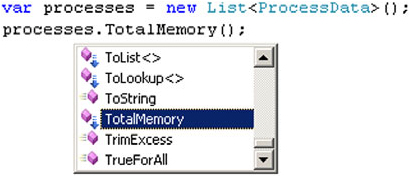
Notice how a specific icon with a blue arrow is used for extension methods. The figure shows the ToList and ToLookup standard query operators (more on these in section 2.5.2), as well as our TotalMemory extension method. Now, when writing code, we clearly see that we can get a total of the memory used by the processes contained in an enumeration of ProcessData objects. Extension methods are more easily discoverable through IntelliSense than classic static helper methods are.
Another advantage of extension methods is that they make it much easier to chain operations together. Let’s consider that we want to do the following: