concept function in category c#
This is an excerpt from Manning's book Functional Programming in C#: How to write better C# code.
In a language where functions are first-class values, you can use them as inputs or outputs of other functions, you can assign them to variables, and you can store them in collections. In other words, you can do with functions all the operations that you can do with values of any other type.
Mapping— Given a sequence and a function, mapping yields a new sequence with the elements obtained by applying the given function to each element in the given sequence (in LINQ, this is done with the Select method). Enumerable.Range(1, 3).Select(i => i * 3) // => [3, 6, 9]
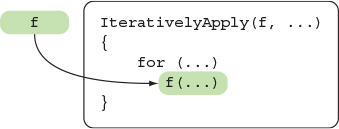
One very crude way of looking at this is that you’re passing as the argument a function whose code will ultimately be executed inside the body of a loop within the HOF—something you couldn’t do by only passing static data. The general scheme is shown in figure 1.5.
There are several language constructs in C# that you can use to represent functions:

This is an excerpt from Manning's book Unity in Action: Multiplatform game development in C# with Unity 5.
As the name implies, StartCoroutine() sets a coroutine in motion. Once a coroutine is started, it keeps running until the function is finished; it just pauses along the way. Note the subtle but significant point that the method passed to StartCoroutine() has a set of parentheses following the name: this syntax means you’re calling that function, as opposed to passing its name. The called function runs until it hits a yield command, at which point the function pauses.
This is an excerpt from Manning's book Real-World Functional Programming with Examples in F# and C#.
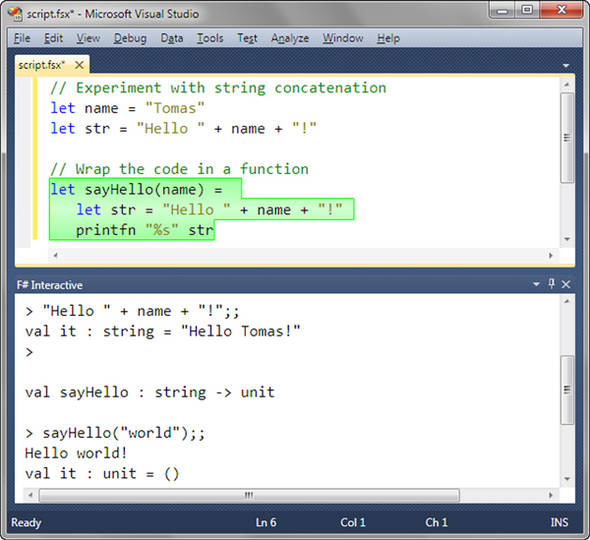
Figure 1.3 shows only the editor and the F# Interactive window, but that’s all we need now because we don’t have a project yet. As you can see, we first wrote a few value bindings to test how string concatenation works in F# and entered the code in the F# Interactive window to verify that it works as expected. After we learned how to use string concatenation, we wrapped the code in a function. (We’ll describe functions in chapter 3.)
Next, we selected the function and pressed Alt+Enter to send it to F# Interactive. If we enter code this way, the shell won’t print the source code again: it prints only information about the values and functions we declared. After that, we entered an expression, sayHello("world"), to test the function we just wrote. Note that the commands in F# Interactive are terminated with ;;. This allows you to easily enter multiline commands.
In a language that supports functions, we can replace the Strategy interface with the appropriate function (a Func delegate in C# or a function type in F#). Usually, we pass the strategy directly to the Operation method as an argument. Using the abstract names from figure 8.1, we could write
Context.Operation(arg => {
  //Implements the specific strategy
});
We’ve already seen a practical example of this pattern when filtering a list. In this case, the function that specifies the predicate is a concrete strategy (and we can use various strategies to write different filters), and the List.filter function or the Where method is the operation of the context. This means that in a language that supports higher-order functions, you can always replace the strategy pattern with a higher-order function.
We’ve already seen a way of working with multiple functions. In the previous example, we returned a tuple of functions as a result and we could use the same technique to represent our application with the new reporting feature. Let’s say the reporting function takes the client, prints something to the screen, and returns a unit as a result. Using this representation, the type of the list of behaviors would be
((Client -> bool) * (Client -> unit)) listThis starts to look a bit scary. It’s complicated and the functions don’t have names, which makes the code less readable. In the previous example, it wasn’t a big problem, because the function was used only locally, but this list is one of the key data structures of our application, so it should be as clear as possible. A simple solution that makes the code much more readable is to use a record type instead of a tuple. We can define it like this:
type ClientTest =
  { Check  : Client -> bool
    Report : Client -> unit }
This code defines a record with two fields, both of which are functions. This is just another example of using functions in the same way as any other type. The declaration resembles a very simple object (or interface); we’ll talk about this similarity later. First, let’s look at listing 8.11, which shows how we can create a list of tests represented using the record declared earlier.
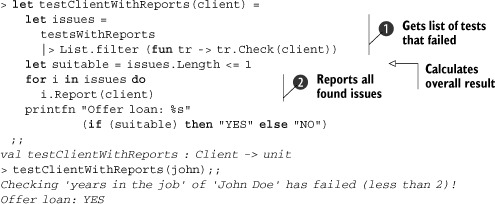
We also have to update the function that tests a particular client. We’ll first find those tests that fail (using the Check field) and then let them print the result (using the Report field). Listing 8.12 shows the modified function, as well as the output when we run it against our sample client.
The testClient function has only changed slightly since listing 8.5. The first change is in the lines that select which tests have failed ❶. The list is now a collection of records, so we have to test the client using a function stored in the Check field. The second change is that earlier, we were interested only in a number of failing tests. This time, we also need to print the detailed information about the failure ❷. This is implemented using an imperative for loop, which invokes the Report function of all the failing tests.

This is an excerpt from Manning's book ASP.NET AJAX in Action.
Welcome.htm is pretty minimal and contains some static text welcoming you to the book. You make the asynchronous request with a few more lines of code that you wrap in a function called sendRequest (see listing 1.3).
A JavaScript object is nothing more than a collection of name and value pairs called properties. Usually, this kind of structure is also called a dictionary or an associative array. JavaScript provides also an array data type, which is a collection of values of different types. A major role in the language is played by functions, which are objects like dictionaries or arrays. Functions are probably the most powerful objects provided by JavaScript; they’re responsible for its great power and flexibility. In the following sections, we’ll do an overview of objects, arrays, and functions, which are the foundations of the JavaScript language.
When a language treats functions as objects, it’s said to support first-class functions . This means functions can be instantiated, returned by other functions, stored as elements of arrays, assigned to variables, and so on. A function represents a portion of executable code and, at first look, seems similar to a method of an object in a classic object-oriented language such as Java, C#, or VB.NET.
As an example, here’s the code for a function called add that returns the sum of its arguments:
function add(a, b) {
    return a + b;
}
Because JavaScript is a loosely typed language, you don’t need to specify the type of the arguments or the type of the returned value (if any). All the information about types is inferred at runtime. As a consequence, if the arguments a and b passed to the add function are numbers, the returned value is their sum. If, on the other hand, a and b are strings, the result is the concatenation of the two strings. If the arguments are of different types, strange things may happen, and an error may be raised at runtime. In chapter 13, we’ll discuss a technique called parameter validation, which the Microsoft Ajax Library uses to check that the arguments passed to a function are of the expected types.
As shown in this example, you can declare a function without specifying a name. A function with no name is called an anonymous function. Interestingly, assigning an anonymous function to a property lets you invoke it through the property itself:

Note that this code treats the add and multiply properties as if they were the names of the functions they hold. Accessing a property that holds a function is similar to invoking a method of an object. For this reason, a JavaScript function stored in a property of an object is called a method.
Let’s continue our discussion of JavaScript functions by introducing two important topics. The first concerns the scope of a function: the context that you can access inside it. The second is another powerful characteristic of functions: the ability to bind them to an environment.