concept let in category c#

This is an excerpt from Manning's book C# in Depth.
We’re about halfway through learning about query expressions, and you may be surprised that we haven’t looked at any joins yet. Obviously they’re important in LINQ, just as they’re important in SQL, but they’re also complicated. I promise we’ll get to them in due course, but in order to introduce just one new concept at a time, we’ll detour through let clauses first. That way we can discuss transparent identifiers before we hit joins.
Figure 11.5. Sequences involved in listing 11.11, where a let clause introduces the length range variable

The let clause achieves its objectives by using another call to Select, creating an anonymous type for the resulting sequence, and effectively creating a new range variable whose name can never be seen or used in source code. The query expression from listing 11.11 is translated into something like this:
SampleData.AllUsers
          .Select(user => new { user, length = user.Name.Length })
          .OrderBy(z => z.length)
          .Select(z => new { Name = z.user.Name, Length = z.length })
Each part of the query has been adjusted appropriately: where the original query expression referenced user or length directly, if the reference occurs after the let clause, it’s replaced by z.user or z.length. The choice of z as the name here is arbitrary—it’s all hidden by the compiler.
A let clause introduces a new range variable with a value that can be based on other range variables. The syntax is as easy as pie:
let identifier = expressionTo explain this operator in terms that don’t use any other complicated operators, I’ll resort to a very artificial example. Suspend your disbelief, and imagine that finding the length of a string is a costly operation. Now imagine that you have a completely bizarre system requirement to order your users by the lengths of their names and then display the name and its length. Yes, I know it’s unlikely. The following listing shows one way of doing this without a let clause.
This is an excerpt from Manning's book Real-World Functional Programming with Examples in F# and C#.
Values and Functions
let num = 10 Value binding that creates an immutable int value (3.1.1) let foo() = printf "foo" Function taking a unit (no value) as an argument (4.4.2) let mul(a, b) = a * b Function taking parameters as a tuple (4.4.2) let add a b = a + b Function taking two parameters (3.1.2, 5.5.3) let add10 = add 10 Partial function application of one argument (5.5.3) let rec fib(n) = <expr> Declaration of a recursive function (3.3.1, 10.1) let <pattern> = <expr> Value binding using pattern matching (3.2.4) let f(<pattern>) = <expr> Pattern matching on a function’s parameter (3.2.4, 15.2.2) match value with | <pattern> -> <expr> Pattern matching against one or more cases (3.2.4, 5.3.2)
You’ve already seen several examples of value binding (written using the let keyword in F#) in chapter 1. As you’ll see, value binding isn’t just a value declaration—it’s a powerful and common construct, used for declaring both local and global values as well as functions. Before we explore examples using functional programming in F#, let’s look at other uses for value binding.
As noted earlier, we can use let bindings to declare functions. Let’s demonstrate this on a fairly simple function that multiplies two numbers given as the arguments. This is how you’d enter it in F# Interactive:
> let multiply num1 num2 =
    num1 * num2;;
val multiply : int -> int -> int
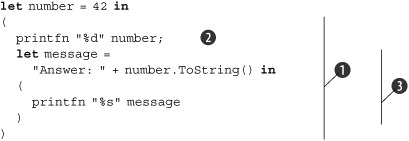
As we already know, you can use the let keyword to declare immutable values. We haven’t yet talked about a scope of the value, but it’s easier to explain with a concrete example. Listing 3.1 is extremely simple, but we think you’ll agree it’s amazing how many nuances can hide in just four lines of code.
Listing 3.2 sports several obvious changes to the layout, but it’s also worth noting the introduction of the in keyword after every let binding. Adding the in keyword is required if you turn off the default syntax where whitespace is significant.[1] The other change is that a block of the code following the let binding is enclosed in parentheses. Doing so is optional, but it’s closer to how the F# compiler understands the code we wrote. Interestingly, the code in listing 3.2 is still valid F# code with the same meaning as earlier—because sometimes you may want to be more explicit about the code, and using in keywords and additional parentheses to wrap expressions enables you to do that.