concept member in category c#

This is an excerpt from Manning's book C# in Depth, Fourth Edition.
For most of these, it’s hard to conceive how the member could be generic. Occasionally, I’ve wanted to write a generic constructor or indexer, though, and the answer is almost always to write a generic method instead.
FormattableString is an abstract class with members as shown in the following listing.
Listing 9.5. Members declared by FormattableString
public abstract class FormattableString : IFormattable
{
    protected FormattableString();
    public abstract object GetArgument(int index);
    public abstract object[] GetArguments();
    public static string Invariant(FormattableString formattable);
    string IFormattable.ToString
        (string ignored, IFormatProvider formatProvider);
    public override string ToString();
    public abstract string ToString(IFormatProvider formatProvider);
    public abstract int ArgumentCount { get; }
    public abstract string Format { get; }
}
Often, it’s useful to be able to refer to members in one type from within code in another type. Going back to the TestCaseSource attribute, for example, in addition to a name, you can specify a type where NUnit will look for that name. If you have a source of information that’ll be used from multiple tests, it makes sense to put it in a common place. To do this with nameof, you qualify it with the type as well. The result will be the simple name:
Listing 9.16. All the valid ways of accessing names of members in other types
class OtherClass
{
    public static int StaticMember => 3;
    public int InstanceMember => 3;
}

class QualifiedNameof
{
    static void Main()
    {
        OtherClass instance = null;
        Console.WriteLine(nameof(instance.InstanceMember));
        Console.WriteLine(nameof(OtherClass.StaticMember));
        Console.WriteLine(nameof(OtherClass.InstanceMember));
    }
}
This is an excerpt from Manning's book Real-World Functional Programming with Examples in F# and C#.
The classical object-oriented way to address this problem is to use a Sort method that takes a parameter of some interface type (in .NET this would be IComparer <Customer>). The parameter specifies how to compare two elements. Now, if we want to sort the list using customer names, we’d create a class that implements this interface and use an instance of that class. To summarize, that means writing an interface that contains a member representing the operation we want to use, creating a class that implements the interface, creating an instance of that class, and passing it as an argument.
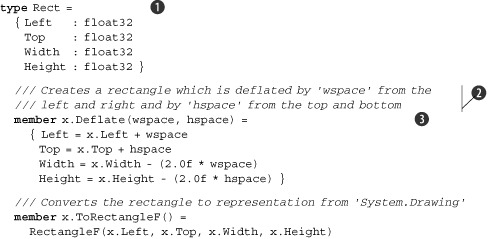
As you’ve just seen, members are very useful when writing mature code, because they wrap the code into well-structured pieces and they make it easier to use the types. In the F# development process, we don’t usually start by writing code with members, but we add them once the code is well tested and the API design is fixed. We’ve discussed two ways of adding members:
Listing 15.12. Representing drawings in C# and F#
// C# version using System.Drawing; interface IDrawing { ❶ void Draw(Graphics gr); } class Drawing : IDrawing { ❷ private readonly Action<Graphics> f; public Drawing(Action<Graphics> f) { this.f = f; } public void Draw(Graphics gr) { DrawFunc(gr); } } // F# version open System.Drawing type Drawing = ❸ abstract Draw : Graphics -> unit let drawing(f) = ❹ { new Drawing with member x.Draw(gr) = f(gr) }