concept test in category c#

This is an excerpt from Manning's book Code like a Pro in C#.
But what does the OCP mean in practical terms? To examine that, let’s apply the OCP to a class: we deem a class “open” for extension and “closed” to modification if we can add functionality to the class without changing the existing functionality (and therefore potentially breaking parts of our code). If you abide by that rule, the odds of you introducing a regression (or new bug) in the existing code are much smaller than if you try to force in the bug fix or new feature with no regard for maintainability and extensibility.
Using Test-Driven Development (TDD) to implement your code sets you apart from a lot of developers. Your code will be more robust and better tested than that of your peers who don’t use TDD. If you have never used TDD: I guide you through the process of actually using TDD practically. Test-Driven Development is, at its most fundamental level, the practice of writing unit tests before writing the code that implements what you are trying to test. You update your tests and code in tandem and build them up simultaneously. Creating tests and logic in tandem promotes good design and solid code as the feedback loop is tight and you are acutely aware of any code that breaks your tests. In this section, we use TDD to write unit tests for the
CustomerRepository.
To run our unit tests, we can either use Visual Studio’s Unit Test Explorer or we can invoke the testing framework through the command line. Either way, we need to compile the code first and then execute the tests. To run all tests in a solution, use this command in the command line:
\> dotnet testOnce the test run finishes, we see that our first test passed. Note, though, that unit tests execute in isolation from other tests and only test individual methods. Therefore, the order in which the MSTest runner executes tests is not guaranteed to be sequential or the same from session to session.

This is an excerpt from Manning's book Functional Programming in C#: How to write better C# code.
The standard object-oriented (OO) technique for ensuring that unit tests behave consistently is to abstract I/O operations in an interface, and to use a deterministic implementation in the tests. I’ll call this the interface-based approach; it’s considered a best practice, but I’ve come to think of it as an anti-pattern because of the amount of boilerplate it entails. If you’re already familiar with this approach, you can skip to the next subsection.

This is an excerpt from Manning's book Continuous Integration in .NET.
At this point, you may be asking yourself several questions, such as, “Why do tests need to be run multiple times?” or “Why can’t I just click Build in Visual Studio?” The answer to these questions is the same: automating the building, testing, and running of other processes through CI ensures that the code from multiple people integrates, compiles, and functions correctly, and that it can be reproduced the same way every time on a different machine than your workstation. Also, consider that you may have an application with many assemblies. When you click Build, you may only build the assemblies you’re responsible for. Even if you’re a one-person shop, adopting CI will improve the quality of your software.
Automating the build and the unit tests are steps in the right direction, but a good CI process can do more—and eventually you’ll want it to, so you can maximize its usefulness. Things like running code-analysis tools, running tests in addition to unit testing, building an install package, and simulating an install on the customer’s PC are all possible through a CI process. But you won’t do all these things with every change.
Integration tests usually take multiple pieces of functionality and test how they behave together. Such tests can involve two or more classes, assemblies, components, or even small programs that interoperate.
It’s a good idea to leave as much isolation as possible while you’re integration testing. What does this mean? When you unit test your software, the goal is to mock every external activity the code is performing. There’s no database connection present, no reading or writing to files, no network connectivity—not even the configuration matters. Integration tests are allowed to interact with the system, but they should stay as small as possible. The tests should be fast and give you immediate feedback if there’s a problem. Integration tests are perfect to use in a CI environment.
Figure 7.2. The software testing pyramid shows how to lay a good base with unit tests and then build up. In the CI scenario, you’ll probably cut the peak off the pyramid because some types of tests take too long to run.
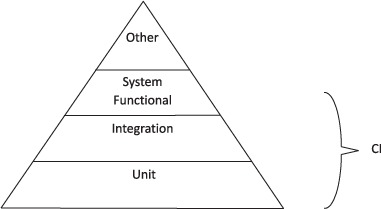
As you can see, unit testing is the foundation or base of your different types of tests. Without it, the other tests collapse and are less meaningful. Additional tests build on unit tests and then on each other. Many of the tests you run involve the customer, and that’s what we talk about next.
Testing a Silverlight application in White is as easy as testing a Windows application. You again use NUnit to perform the test. The following listing shows how to set up White to test your Silverlight application.
Listing 7.8. Automating UI testing of a Silverlight application
[TestFixture] public class SilverlightCalcUiTestFixture { InternetExplorerWindow _browserWindow; [SetUp] public void SetUp() { _browserWindow = InternetExplorer.Launch("http://localhost:52661/ CiDotNet.SilverlightCalcTestPage.aspx", "CiDotNet.SilverlightCalc - Windows Internet Explorer"); } [TearDown] public void TearDown() { _browserWindow.Dispose(); } [Test] public void Test() { SilverlightDocument document = _browserWindow.SilverlightDocument; Button button = document.Get<Button>("btnCalculate"); button.Click(); System.Threading.Thread.Sleep(5000); TextBox rateTextBox = document.Get<TextBox>("txtRate"); Assert.AreEqual(rateTextBox.Text, "878,754159722056"); } }Testing the Silverlight application is as straightforward as testing a Windows application. In the SetUp method, you launch Microsoft Internet Explorer with your Silver-light application. In TearDown, you close the browser. In the test method, you first get the Silverlight document from the page; the test is similar to the WinForms app you tested earlier.
White comes with a ton of neat additional features. For example, it has the ability to reuse a test in multiple test scenarios. This means you don’t have to search the controls on the GUI using the Get() methods. The controls are generated and provided to you in strongly typed fashion. Detailed usage of White isn’t a topic of this book, so we won’t cover the extended features any further, but we encourage you to explore it. It’s well worth your time!
The answer to the question of whether to include UI testing in your CI suite comes from the “it depends” series. Are the tests fast enough to complete in 10 minutes? Are the tests reliable enough not to introduce unnecessary tension by breaking some dependency?

This is an excerpt from Manning's book ASP.NET MVC 2 in Action.
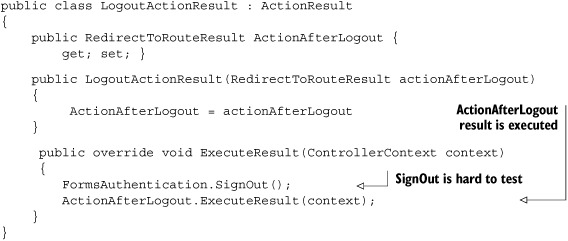
The tests should also be repeatable. That means no shared global variables for the test result state, and no shared state between tests in general. Keep unit tests isolated in every way, and they’ll be repeatable, order-independent, and stable.
Pay attention to pain—if tests become painful and time consuming to maintain, there’s something wrong. Correctly managed design and tests enable sustained speed of development, whereas poor testing techniques cause development to slow down to the point where testing is abandoned. At that point, it’s back to painstaking, time-intensive manual testing. If you start to think that you could move faster without writing the tests, look for technique errors or bad design in the production code. Get a peer to review the code. Tests should enable development, not slow it down.
Logs individual interactions within the test
Once we have described our test scenario behavior, we can author a test to execute this scenario. Our first pass at this UI test is in listing 20.1.

This is an excerpt from Manning's book DSLs in Boo: Domain-Specific Languages in .NET.
Specter is a behavior-driven development (BDD) testing framework, written by Andrew Davey and Cedric Vivier. It allows developers to build specifications for the object under test instead of asserting their behavior. You can read more about BDD here: http://behaviour-driven.org/.
Listing 8.7. Testing the Allow() and Deny() methods
// Pretends to be a DSL that allows access public class AllowAccess : AuthorizationRule { public override void CheckAuthorization() { Allow("just a test"); } } // Pretends to be a DSL that has no opinion on the matter public class AbstainFromVoting : AuthorizationRule { public override void CheckAuthorization() { } } // Pretends to be a DSL that denies access public class DenyAccess : AuthorizationRule { public override void CheckAuthorization() { Deny("just a test"); } } [Test] public void WhenAllowCalled_WillSetAllowedToTrue() { AllowAccess allowAccess = new AllowAccess(null, null); allowAccess.CheckAuthorization(); Assert.IsTrue(allowAccess.Allowed.Value); Assert.AreEqual("just a test", allowAccess.Message); } [Test] public void WhenAllowOrDenyAreNotCalled_AllowHasNoValye() { AbstainFromVoting allowAccess = new AbstainFromVoting(null, null); allowAccess.CheckAuthorization(); Assert.IsNull(allowAccess.Allowed); } [Test] public void WhenDenyCalled_WillSetAllowedToFalse() { DenyAccess allowAccess = new DenyAccess(null, null); allowAccess.CheckAuthorization(); Assert.IsFalse(allowAccess.Allowed.Value); Assert.AreEqual("just a test", allowAccess.Message); }In this example, we start by defining a few classes that behave in a known manner regarding the methods we want to test (Allow() and Deny()). Once we have those, it’s a simple matter to write tests to ensure that Allow() and Deny() behave the way we expect them to. This is a fairly trivial example, but it allows us to explore the approach without undue complexity.
This test doesn’t do anything special—these are standard methods for unit testing—but there is something disturbing in this approach to testing. The code we’re trying to test is exactly 5 lines long; the test is over 45 lines of code.
There is some repetitive code in the test that could perhaps be abstracted out, but I tend to be careful with abstractions in tests. They often affect the clarity of the test. And although I am willing to accept a certain disparity in the number of lines between production and test code, I think that when the disparity is measured in thousands of percent, it’s time to consider another testing approach.
When I start to test a DSL, I like to write tests similar to the one in listing 8.2.
This is an excerpt from Manning's book Real-World Functional Programming with Examples in F# and C#.
In the previous listing we implemented the convertDataRow function, which takes a string containing a line from the CSV file and returns a tuple containing a label and a numeric value. As a next step we’ll implement a function that takes a list of strings and converts each string to a tuple using convertDataRow. Listing 4.3 shows the function—and a test immediately afterward, parsing a sample list of strings.
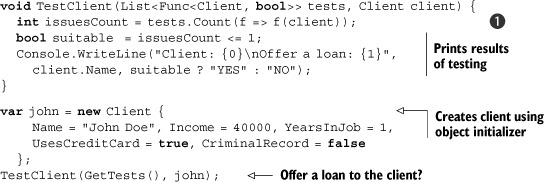
void CondPrint<T>(T value, Func<T, bool> test, Func<T, string> format) {
if (test(value)) Console.WriteLine(format(value));
}
When we’ve discussed testing so far, we’ve usually talked about checking whether the code works immediately after writing it in the F# Interactive shell. If you’re a veteran of unit testing, you may well have been thinking to yourself that a test which can’t be reproduced later on is hardly worth running. Well, let’s see how this kind of test can evolve into a unit test.
We can see that we genuinely have two instances: a test for reference equality ❶ returns false. If we use an overridden Equals method or the standard F# operator for testing equality ❷, the runtime will use structural equality, and it will report that the values are equal. First the two tuple values are compared for structural equality, then the two strings are compared.