concept visitor pattern in category c#
This is an excerpt from Manning's book Real-World Functional Programming with Examples in F# and C#.
If you’re familiar with common design patterns, you may remember the visitor pattern, which is an object-oriented way of processing data structures like discriminated unions. We’ll talk about it when we look at recursive discriminated unions in chapter 7, because it’s usually used when working with complex program data rather than simple values. We’ll also delay the discussion of whether or not to choose a discriminated union until chapter 7, because this question is more relevant when talking about program data, but you can check out the sidebar “Discriminated unions in the real world” for a couple of examples where discriminated unions are useful.
Adding new operations to an existing data structure is the primary way of implementing any code that works with data in a functional language. In object-oriented languages, this is more difficult to do, but it’s also needed less frequently. In this section we’ll talk about the visitor pattern that’s designed for this purpose, and we’ll sketch how we could use it to add operations to our representation of document. Figure 7.8 shows the basic classes that we’ll use in this section.
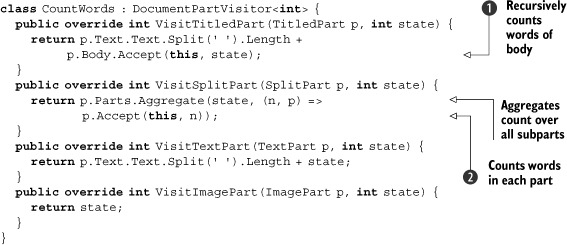
Listing 7.18 shows how we can add an operation that counts words in the document to the object-oriented representation using the visitor pattern.
This code corresponds to writing a recursive F# function that uses pattern matching to test which of the parts we’re currently processing. In an object-oriented way, this choice is done in the Accept methods from the visitor pattern. The CountWords class inherits from the visitor and uses a single int value as the state. Methods that process different types of document parts add the number of words to the current state, and there are two methods (❶, ❷) that have to recursively invoke the visitor on certain subparts. The invocation is done by calling the Accept method on the subpart, similar to the code that we need to run the processing on the entire document: