concept AWS in category coreos

This is an excerpt from Manning's book CoreOS in Action: Running Applications on Container Linux.
Confusingly, the CoreOS folks named this system similarly to the system it’s inspired by: cloud-init, which is a widely used, YAML-based, initial configuration system. cloud-init isn’t unique to CoreOS; you’ll see it everywhere if you’ve had experience using Ubuntu or CentOS in AWS or OpenStack. Developers often use cloud-init to bootstrap other, heavier configuration-management systems like Chef and Puppet, but CoreOS intends cloud-config to be the single source of truth for the OS configuration. It would be possible to use cloud-config to bootstrap systems like Chef, but doing so would be antithetical to the intentions of CoreOS nodes to be single-state and ephemeral.
As discussed in chapter 4, you have a lot of options when it comes to running CoreOS in a public (or private) cloud environment. All cloud deployments have their nuances, but AWS has been first to market with features in general and is the most commonly used platform. AWS is also well supported by CoreOS, and it gives you a lot of tools up front to get you started. This chapter will walk you through a production-ready CloudFormation template, explaining each part of how it’s put together.
This section reviews some AWS terminology and looks at the top-level view of what you’re going to build. You’ll be using some advanced features of AWS, but we’ll cover enough of the basic mechanics of these features that you don’t need to be an expert in AWS. If you’re interested in a more in-depth book on AWS, see Amazon Web Services in Action.
The goal of this chapter is to show you how to build a production infrastructure for the product you’ve created in the previous few chapters. Figure 8.1 shows a diagram of the end product: you’ll build a high-availability setup across three availability zones, with an Auto Scaling group (ASG) to scale for capacity. You’ll also use flannel’s ability to be backed by the AWS VPC API. If you already have experience with AWS, you may be able to skip to section 8.2.
The basic cloud-config for AWS is shown in the following listing.
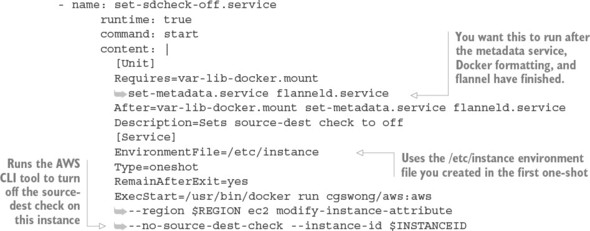
We discussed that flannel requires you turn of the source-dest check on the instances. Unfortunately (to date), AWS hasn’t created a CloudFormation key to switch that off in an ASG. You can do it if you’re spinning up discrete EC2 instances, but not in autoscale. That’s why you have to create this last service (listing 8.18). The exact timing of running it is a bit hairy because you can only use the AWS CLI tools via a Docker container, and you’re also messing around with Docker on boot, formatting its drive and making flannel start. The source-dest check doesn’t have to be on for flannel to start—just for it to function—so it’s okay if it waits until everything else is finished.
This is a fairly generic baseline for cloud-config in AWS, and it should give you an understanding of the few extra bootstrapping procedures you need CoreOS to do to get the most out of running in AWS. Once this cloud-config YAML subdocument is finished and inserted with the appropriate indentation in your template, you should be ready to deploy the CloudFormation stack!