concept rkt in category coreos

This is an excerpt from Manning's book CoreOS in Action: Running Applications on Container Linux.
Docker and rkt are the supported runtimes in CoreOS for your services. rkt is a newer container system developed by the CoreOS folks.
First, for clarity, CoreOS supports both Docker and rkt runtime environments; rkt can run Docker containers as well, right alongside the App Container (appc) specification images (ACIs) it was built to support. rkt was built to have more robust privilege separation and to integrate more easily with Linux init systems. It has no daemon like Docker does, and it relies on whatever init system you use to manage process control for a container. This is, of course, systemd in CoreOS, but rkt can be run anywhere.
Whether you choose rkt or Docker (or both) for abstracting your runtimes, what you gain from these container systems is fully realized in CoreOS. The ephemeral nature of container runtimes becomes the way in which you abstract state from the cluster as a whole, as long as you’re mindful to follow best practices of constructing containerized architectures in general. We’ll cover application architecture in CoreOS in far more depth later in the book.
To wrap up this book, we’ll dive into rkt: a new container runtime developed by CoreOS to run the arguably more “standardized” Application Container Image (ACI) format. This appears at the end of the book because it’s not likely to be part of your workflow any time soon. I’m including it for a couple of reasons: First, it represents a significant development effort by the CoreOS team, and I don’t think this book would be complete without at least showing its functionality. Second, while I’ve been wrapping up these last few chapters, the community around Docker has become a little contentious, and people are starting to look at alternatives—so you may see rkt sooner rather than later. Everything in this section will be done with your Vagrant cluster, rather than your AWS cluster, because rkt is somewhat experimental and the toolchain requires complexity on the workstation side.
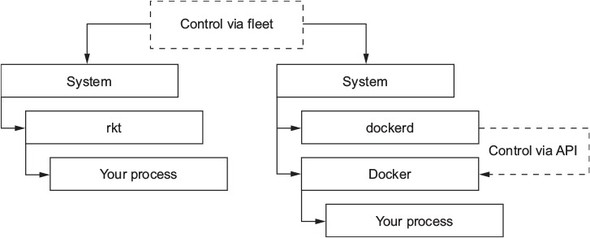
The biggest difference between rkt and Docker is that it has no controlling daemon as the parent process of all the containers you run with it. Rather than issue commands to a daemon, when you run a service with rocket, it spawns a new rkt process and your application as its only child or children. When your application exits, that rkt process exits as well (with an exit code of its child). In practice, this means you don’t have to rely on a daemon as a single point of failure or major security vector, and also that your init system becomes the parent that directly controls your application state, which takes out a lot of boilerplate configuration and simplifies the architecture from the standpoint of a distributed scheduler (see figure 10.1). If you’re familiar with some older process-isolation systems like chroot jails, FreeBSD jail, or Solaris zones, this implementation of containers will seem similar, but with the added benefits of image layering and simple-to-use tooling.
Figure 10.1 is similar to the diagram on the coreos.com page on rkt, but I want to point out a few things. First, regardless of implementation, fleet controls what systemd is doing and can understand the state of the system from context it gathers from systemd. What fleet can’t do (without you adding some kind of programmatic callback in a sidekick, for example) is understand the context of how the dockerd daemon is interacting with the Docker container process. I’ve seen rkt described as a way to make containerization boring, and that’s essentially what it’s doing by not adding a new layer of opaque context.
The other facet of rkt is security by way of signing certificates with GNU Privacy Guard (GPG). This provides an extra layer of certainty that the image you’re using is the one you intended, in addition to SSL certificate validation. rkt and ACI are intended as a suite of tools rather than a monolithic tool. If you’re going to use rkt in production, and you aren’t going to convert Docker images to ACIs, the most important tools to know are ones to help you build rkt images. In this section, we’ll go through a part of the Hello World application with Docker from chapter 3 and turn it into an ACI so it can be run with rkt.
Much like Docker, rkt and the appc user-land tools it depends on (such as acbuild) run directly only on Linux. This means you’ll need to use virtualization for this with Vagrant if you’re not using Linux natively. If you skipped any part of the Vagrant setup in chapter 2, make sure you have it set up to deal with building ACIs.
First, check out the rkt Git repository from GitHub; for simplicity, I assume you’re using git via CLI. I also assume you’re cloning this repo in the same directory where you have your helloworld project directory from chapter 3:
$ git clone https://github.com/coreos/rkt.git
...
$ ls
helloworld rkt  # This directory has both helloworld and rkt
$ cd rkt