concept web service in category esb

This is an excerpt from Manning's book Open-Source ESBs in Action: Example Implementations in Mule and ServiceMix.
One can question if Apache Synapse actually is a true ESB, but based on the core functionalities that we list in section 1.2, Synapse can be called an ESB. In essence, Synapse is a web services mediation framework that is built upon Apache Axis2, the web services container. This is quite a difference compared with the previously discussed ESBs (Mule, ServiceMix, and Open ESB). The focus of Synapse is to provide functionality such as routing, transformation, message validation, and a registry based on web services and XML standards.
As a part of standardization organizations such as OASIS (Organization for the Advancement of Structured Information Standards) and W3C (the World Wide Web Consortium), an enormous set of web services specifications is being standardized. A few examples of these web services specifications are WS-Addressing, WS-Security, WS-Policy, and WS-Reliable Messaging. Based on the naming of these specifications, you can pretty much extract the goal: for example, WS-Security provides a specification for things like message encryption and authentication, and WS-Reliable Messaging shows how messages between web services can be exchanged in a reliable way. These web services standards are quite complex in general, and as a developer, you aren’t always interested in dealing with the exact syntax and semantics of a web services standard.
The web service that we create is a simple service where we implement three operations that can be used to look up information about a company:
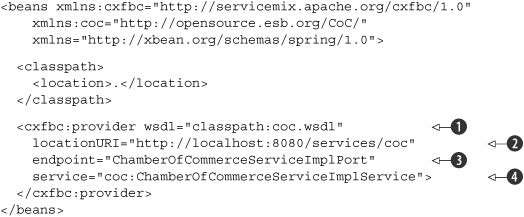
In listing 7.15 we define a web service that can be accessed from external clients. The first thing you see here is that we reference a WSDL file
. We don’t write this WSDL file ourselves but generate it using the tools provided by CXF. For this we once again provide a simple target in the Ant build file for this chapter. When you run this target, cxf-generate-bottom-up, CXF will inspect the Java class we wish to expose, and based on the class, CXF will generate a WSDL file. In addition to the WSDL file, CXF will generate a set of JAXB classes that are used to go from XML to Java and back again.
The next thing we need to do is define the service and the endpoint for which we’re going to provide a web service. This information can be found in the generated WSDL file, just as we did for the top-down web service earlier:
<wsdl:service name="ChamberOfCommerceServiceImplService">
  <wsdl:port name="ChamberOfCommerceServiceImplPort"
      binding="tns:ChamberOfCommerceServiceImplServiceSoapBinding">
    <soap:address location="http://localhost:9090/hello"/>
  </wsdl:port>
</wsdl:service>
The names that are generated for the WSDL are also used in the ServiceMix configuration to define which service and port combination we’d like to expose. This is done in the endpoint and service attributes
in listing 7.15. If you look at the previous code fragment, you can also see a soap:address element. This element is used by ServiceMix to determine on which address it should expose the web service. You can see the default generated address in this fragment. If you want to expose the service on a different address, you can just change the value of the location attribute to the address you want to expose the web service on.
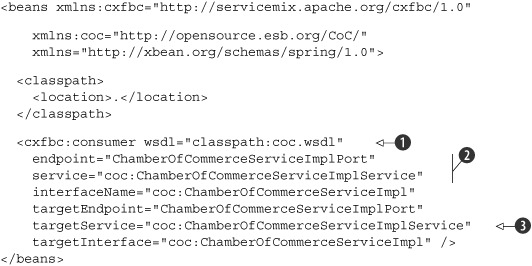
When we want to consume web services in ServiceMix, we have to use a binding component since we’re communicating with a service outside the ESB. For this we use the CXF binding component from section 7.1.3, where we used the consumer element of the binding component. In other words, we made a web service available to external clients over HTTP and consumed an internal service.
In listing 7.17 we specify a WSDL location
The attributes
and
identify the web service. It’s good practice (and also enforced by CXF) to use the same names specified by the web service that we’re calling, since this provider serves as a proxy between internal services and an external web service and as such provides exactly the same functionality. When you now send a message in the correct XML format to this service, the web service will be called.
Let’s look at two other service units, which we use to read a file from the file system and use the file content to invoke the web service, and finally write the result of the web service call to a different directory. Let’s begin with the servicemix-file binding component (listing 7.18).
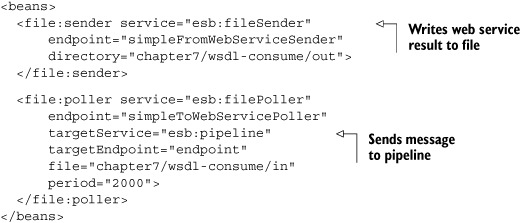
Listing 7.18 configures a simple file poller that reads all incoming files from a directory and a file sender that writes files to a different directory. To connect the file sender and poller to the web service, we use a pipeline from the servicemix-eip component (listing 7.19).
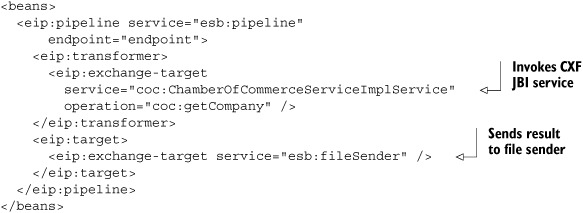
This pipeline definition in listing 7.19 is called from the file poller (listing 7.18) and makes a call to the service endpoint where the CXF web service provider is running. When the result from the web service comes back, it’s sent to the file sender component, which is registered on esb:fileSender.
We need this eip:pipeline because we have to deal with two different MEPs. When a file poller reads a file and sends the content to a service, this is done using the in-only MEP. The web service, however, expects an in-out MEP, since it can return results. We use the eip:pipeline to bridge the in-only MEP to an in-out MEP.
If you want to run this example, go to the resources/chapter7 directory of the ServiceMix workspace and execute the deploy-wsdl-consume Ant target from the ch7-build.xml Ant build file. Just as for the Mule example we once again need a web service to call. We can use the ServiceMix bottom-up or top-down example, but let’s use the Mule service. That way, you can see how easy it is to use web services as one way of integrating these two ESBs. Start up the chapter-7-top-down Ant task from the Mule workspace, and you get a web service that you can use to test this example. A test file is provided in the directory of this example.