concept child item in category ext js
This is an excerpt from Manning's book Ext JS in Action, Second Edition.
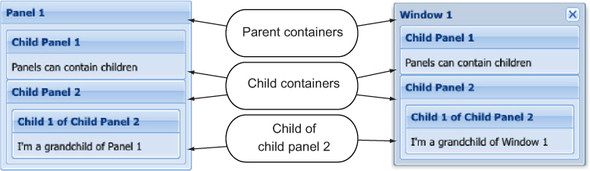
Containers are widgets that can manage one or more child items. A child item is generally any widget or component that’s managed by a container or parent; thus the parent-child paradigm. You’ve already seen this in action in the API. The tab panel is a container that manages one or more child items, which can be accessed via tabs. Please remember this term, because you’ll use it a lot when you start to learn more about how to use the UI portion of the framework.
I (Jay) recall my early days with the Ext framework, when I learned by toying with the examples and reading the API documentation. I spent many hours on some of the most important core UI concepts, such as adding user interaction, reusing widgets, and understanding how one widget can contain or control another. For instance, how would I make clicking an anchor tag display an Ext window? Sure, there’s a generic JavaScript way to attach an event handler, but I wanted to use Ext JS. Likewise, I needed to know how to get widgets to communicate with each other. For example, how would I reload a grid panel when a row of another grid panel was clicked? Also, how would I add child items dynamically to and remove them dynamically from a panel? How could I find a particular field within a form panel based on the type field?