concept datum in category ext js
This is an excerpt from Manning's book Ext JS in Action, Second Edition.
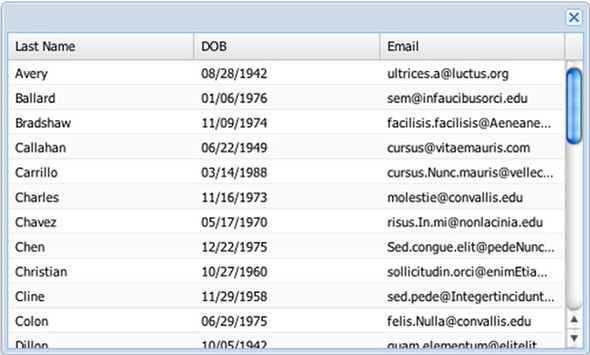
You’ve already learned that the data services portion of the framework is responsible for the loading and parsing of data. Ext JS 4.0 has a lot of widgets that are bound to data stores, known as views. Many of the views that you’ll deploy include the data view, grid panel, and tree panel. If your application requires charts, you’ll be pleased to learn that all of the charts in the framework are also considered views and are bound to data stores. Figure 1.7 shows the Ext JS grid panel in action.
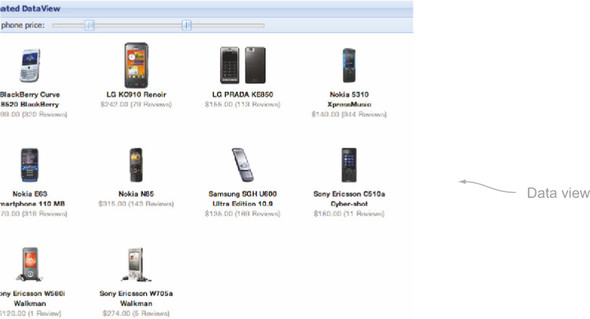
The newly refactored GridPanel is a subclass of Panel and presents data in a table-like format, but its functionality extends far beyond that of a traditional table, offering sortable, resizable, and movable column headers and selection models such as Row-SelectionModel and CellSelectionModel. You can customize its look and feel and couple it with a paging toolbar to allow large datasets to be segmented and displayed in pages. It contains many features and plug-ins, allowing you to do tasks such as edit by row or cell, or lock a column. The data view shown in figure 1.8 renders photos and other bits of data for various phones on the market.
The DataView class consumes data from a store, paints it onscreen using a class known as XTemplate, and provides a simple selection model. The Ext JS XTemplate is an HTML fragment-generation utility that allows you to create a template with placeholders for data elements, which can be filled in by individual records in a store and stamped out on the DOM.
To create a real-world application, you need a way to persist data. Data persistence allows users of your application to access data between sessions, so the data should be stored on a medium that enables it to be accessed after your application has been stopped and started again.
Data persistence can happen by updating or retrieving the data from the components on screen using Ajax techniques if you’re implementing simple applications. But if you’re creating an Ext JS application that involves advanced interaction logic on the client side, you can use the functionality available in the Ext JS data store.
This chapter begins by taking a bird’s-eye view of the data package. We’ll introduce Ext.data.Store and its supporting classes, including Ext.data.Model. You’ll learn how data flows and how it’s consumed by the data store. We’ll discuss the various data readers and explore data consumption with array, JSON, and XML data.
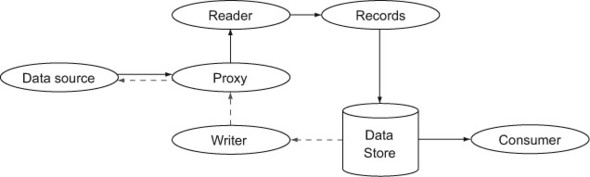
Let’s see how data flows from a data source to the store. We’ll begin with a basic flow illustration, shown in figure 7.3.
As you can see, the data always originates from a data source, and the loading and saving is managed by a data proxy. The data Proxy classes facilitate the retrieval of unformatted data objects from a multitude of sources and contain their own event models for communication with subscribed classes such as the data Reader class.