concept template in category ext js
This is an excerpt from Manning's book Ext JS in Action, Second Edition.
The DataView class consumes data from a store, paints it onscreen using a class known as XTemplate, and provides a simple selection model. The Ext JS XTemplate is an HTML fragment-generation utility that allows you to create a template with placeholders for data elements, which can be filled in by individual records in a store and stamped out on the DOM.
Once you’re familiar with the Ext.Element class, you’ll learn how to use templates to stamp out HTML fragments into the DOM. We’ll also dive deep into the use of the XTemplate, and you’ll learn how to use it to easily loop through data and inject behavior-modification logic while you’re at it. This is going to be a fun chapter. Before you can begin coding, we need to discuss how to bootstrap Ext JS–enabled web applications.
As you can see, three divs were appended to the document body, each with a different name. The benefits of using templates should now be clear. You set the template once and apply it to the DOM with different values.
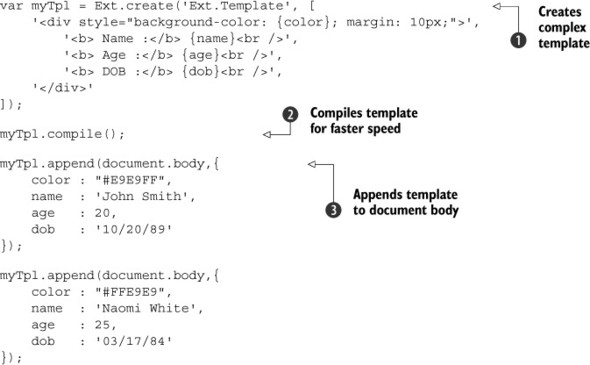
In the previous example, the slots were integers in curly braces, and you passed in single-item arrays. Templates can also map object key/values from plain objects. The following listing shows how to create a template that uses such syntax.
When creating this complex template
the first thing you’ll probably notice is that you pass in quite a few arguments. You do this because, when creating a template, it’s much easier to view the pseudo HTML in a tab-delimited format rather than a long string. The Ext JS developers were keen on this idea, so they programmed the Template constructor to read all of the arguments being passed, no matter how many there might be.