concept application in category f#

This is an excerpt from Manning's book Get Programming with F#: A guide for .NET developers.
Not only will you start to learn how to write applications that are more maintainable, easier to understand and reason about, but – particularly if the primary language in your software career has been C# or VB .NET on Visual Studio –F# will open your eyes and make you a better all-round software developer. You’ll gain a better appreciation in C# for features such as lambda expressions, expression-bodied members (a recent addition in C#6), and LINQ, and will realise that the application of these sorts of features can be used for more than just data access layers. You’ll also probably start to approach modelling problems differently in C#, with less reliance on inheritance and other OO constructs as the “only” way to solve problems.
5. You’ll notice that you don’t have a module declaration in this file. The last file in an application can omit the module declaration and have it taken from the filename (for example, Program).

This is an excerpt from Manning's book F# Deep Dives.
Such analytical and data-rich components are what make the application valuable, but with such a general definition, the value may be hard to see. Here are some examples from later chapters:
You could allow the client to connect to RavenDB directly via its own REST interface, but you need to provide a further abstraction in order to manage session state and security. The next step, therefore, is to implement a Windows Communication Foundation (WCF) REST service as a middle tier for the application.
This is an excerpt from Manning's book Real-World Functional Programming with Examples in F# and C#.
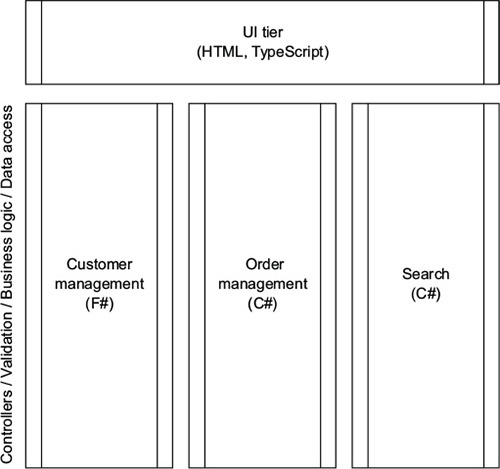
The functional programming paradigm no doubt influences how you design and implement applications. This doesn’t mean that you have to start all over, because many of the programming principles that you’re using today are applicable to functional applications as well. This is true especially at the design level in how you structure the application.
Listing 7.14. Putting the parts of the application together (F#)
open System.Windows.Forms [<System.STAThread>] do let doc = loadPart(XDocument.Load(@"..\..\document.xml").Root) let bounds = { Left = 0.0f; Top = 0.0f; Width = 520.0f; Height = 630.0f } let parts = documentToScreen(doc, bounds) let img = drawImage (570, 680) 25.0f (drawElements parts) let main = new Form(Text = "Document", BackgroundImage = img, ClientSize = Size(570, 680)) Application.Run(main)
So far, we’ve only created color filters, but we want our final application to cater for more general graphical effects. A color filter such as grayscaling or lightening applies a function to each pixel based only on that pixel’s value. Other effects may be much more general—they could do anything with the image, such as geometrical transformations or blurring. We’ll use blurring as an example later on, just to show that it’s possible. We’ll take this goal into account as we build the application.
The application allows you to open an image file, select an effect from a list, and apply it to the image. We’ll create a sequential and parallel version of each of the effect, so that we can measure the performance. After running the effect, the application automatically displays how long it took to apply. Figure 14.2 shows a screenshot of the finished application.
Figure 14.2. Completed image-processing Application after first running the grayscale and then the lighten filter on a sample image
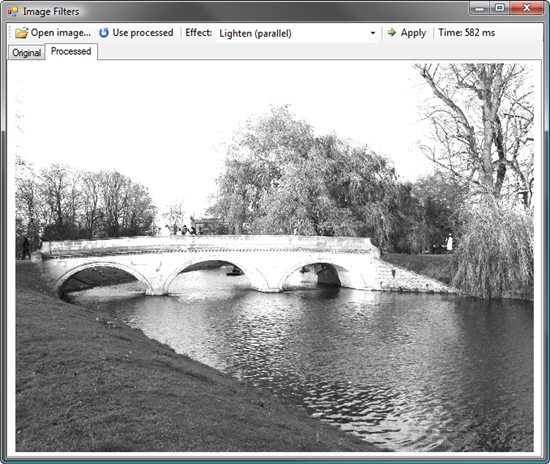
In C#, we can create the UI for the application using the Windows Forms designer. The application uses the ToolStrip control to create the toolbar with the necessary commands, and uses a ToolStripComboBox control for the list of available effects. A PictureBox control wrapped in a TabControl shows the image, so we can easily switch between the original image and the processed version.
Once we’ve created the GUI in the designer, we can use the filter we’ve already implemented. As we said earlier, the application will be flexible enough to work with general effects beyond just filters, so let’s look at how we want to represent these effects in code.
Because this chapter is really about parallelization, this is the most interesting part of the application. We’re going to discuss the code in both languages; we’ll begin by implementing the C# version in the simplest way possible.