concept document in category f#

This is an excerpt from Manning's book F# Deep Dives.
In chapter 3, we’ll implement a parser for the Markdown document format. A document can contain formatting such as *hello* for italicized text or [F#](http://fsharp.org) for hyperlinks. Even without understanding the syntax, you can see that the following snippet encodes these two rules:
I’ve been writing a blog for a number of years now. Since the beginning, I wanted the website to use clean and simple HTML code. Initially, I wrote articles in HTML by hand, but lately I’ve become a big fan of Markdown—a simple text-based markup language that can be used to produce clean HTML. It’s used by sites such as Stack Overflow and GitHub. But none of the existing Markdown implementations supported what I wanted: I needed an efficient parser that could be extended with custom features and that allowed me to process the document after parsing. That’s why I decided to write my own parser in F#.[1]
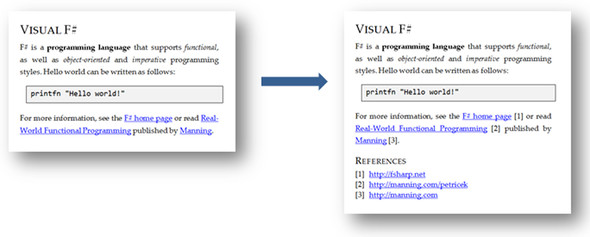
One of my key motivations for writing a custom Markdown parser was that I wanted to be able to easily write functions that transform the document in various ways. Such functions, for example, could count the number of words in the document (excluding code snippets), find all CodeBlock blocks and run a syntax highlighter on the source code, or automatically number all headings in the document. The processing you’ll implement in this section is illustrated in figure 6.
Figure 6. Document transformations that are implemented in this section. You’ll create a document that’s suitable for printing by numbering all the hyperlinks and adding a “References” section that shows the URLs of referenced web pages.
The F# representation makes document-processing tasks easy. Once you parse the document, you can recursively walk through the MarkdownBlock and MarkdownSpan types and implement any transformation or processing you need.
This is an excerpt from Manning's book Real-World Functional Programming with Examples in F# and C#.
Different operations can be more easily implemented using different data representations. In this chapter we’ll work with two representations of documents. In section 7.2, we’ll implement a flat data structure, which is suitable for drawing of the document. In section 7.3 we’ll add structured representation, which is more appropriate for storing and processing of the document. This approach also supports sharing work, because operations working on different representations can be developed and maintained to some extent independently by different developers.
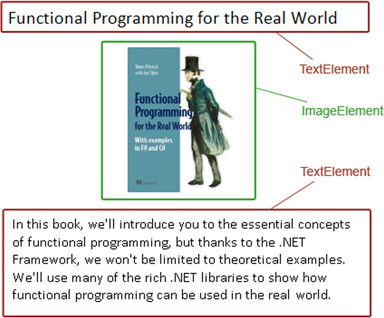
We’ll develop an application for viewing documents in this chapter. Let’s begin by designing a representation of the document that’s suitable for drawing it on the screen. In this representation, the document will be a list of elements with some content (either text or an image) and a specified bounding box in which the content should be drawn. You can see an example of a document with three highlighted elements in figure 7.1.
Figure 7.1. Sample document that consists of three elements; two display text with different fonts and one shows an image.
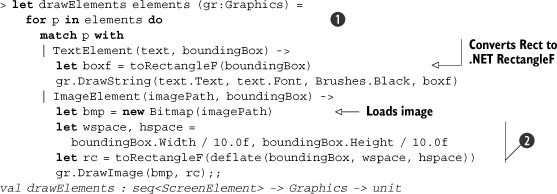
Let’s look at the data structures that represent the document in F#. Listing 7.4 introduces a new discriminated union to represent the two alternative kinds of elements and a new record type for text elements. It uses the Rect type we defined earlier.