concept implementation in category f#

This is an excerpt from Manning's book F# Deep Dives.
The four most common problems are summarized in figure 1. Analytical applications typically implement more complex tasks than the rest of the system; they only deliver value if the implementation is correct, is delivered in time, and satisfies nonfunctional requirements such as efficiency. Table 1 revisits the problems and explores their business implications.
Currently, listings 7 and 8 are functional but ugly. It would be nice if you could tidy up the implementation and make things like registration and posting more fluent. Fortunately, you can create a module that contains some helper functions for tidying up the interface with your agents, as you can see in the next listing.
This is an excerpt from Manning's book Real-World Functional Programming with Examples in F# and C#.
The first version of .NET was released in 2002, and the history of the F# language dates to the same year. F# started off as a Microsoft Research project by Don Syme and his colleagues, with the goal of bringing functional programming to .NET. F# and typed functional programming in general gave added weight to the need for generics in .NET, and the designers of F# were deeply involved in the design and implementation of generics in .NET 2.0 and C# 2.0.
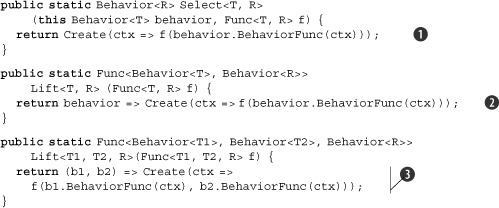
The implementation of lifting function with one parameter is trivial, because it does the same thing as Behavior.map. This is possible only thanks to partial function application, so the C# implementation will be different. The implementations of lift2 and lift3 are similar to the map function we saw earlier, and the same pattern could clearly be applied to functions with more than three arguments.
In C#, we can create an overloaded method, so the lifting method for different types of functions will be called Lift. The version in the previous code snippet takes one argument (a function) and returns a function (as a Func delegate). The Select method takes the function to apply and also the behavior, so it can immediately construct a new behavior using this function. The implementation of these functions will be similar, so we can still see that they’re related, but we can’t implement them easily using the same code. (It’s possible to implement each of these functions using the other one. If you want to practice your functional thinking skills, you can try to do that.) Listing 15.11 shows the implementation of Select, and two overloads of Lift.
We’ve added all the extension methods to the static, nongeneric Behavior class, which already contained the internal Create method. The implementation of Select ❶ is a direct translation of the F# version. It constructs a behavior and gives it a function that calculates the value at the specified time using the original behavior (behavior) and the provided function.
Creating a drawing is a matter of providing a function to draw on the Graphics object, which is given to the function as an argument. The Graphics type has a FillEllipse method, so the implementation shouldn’t be tricky at all. It’s worth noting that the listing contains a small amount of additional noise: adding another drawing would only take a few lines of code. Listing 15.13 shows both the C# and F# implementations.
We’ll implement movement of a drawing as a function (or method) that takes a drawing and a pair of coordinates as arguments. It then returns a new drawing that draws the original one translated by the given offset. How can we implement this functionality? We could draw the original drawing to a bitmap and then draw the bitmap to the specified coordinates, but there’s a simpler solution. The Graphics type that we’re using to do the drawing supports the translation transformation directly. Listing 15.14 shows the implementation for both languages.
Listing 15.14. Translating drawings in F# and C#
// F# version let translate x y (img:Drawing) = drawing(fun g -> g.TranslateTransform(x, y) ❶ img.Draw(g) ❷ g.TranslateTransform(-x, -y) ) ❸ // C# version public static IDrawing Translate(this IDrawing img, float x, float y) { ❹ return new Drawing(g => { g.TranslateTransform(x, y); img.Draw(g); g.TranslateTransform(-x, -y); } ); }The combinator returns a new translated drawing value. The implementation uses the same creation pattern as the code to draw a circle. The F# function uses the drawing primitive to specify how to draw the translated image, while in C# we create a new Drawing object directly and specify the drawing function. The C# version implements Translate as an extension method ❹, so that we can call it using dot notation. Note that we’re adding a method to an interface IDrawing. This wouldn’t be possible without extension methods, because interfaces can contain only abstract members.
The implementation is slightly more interesting this time. It changes the origin of the coordinate system used when drawing on the graphics using the TranslateTransform method ❶. This means that if we run the original drawing code (drawing a circle, for example), it will still draw at (0,0), but the point will actually be somewhere else on the graphics surface. Once we configure the translation, we run the original drawing ❷and reset the transform ❸. Strictly speaking, we should run the code that restores the original settings in a finally block, but we wanted to keep the code simple.