concept name in category f#

This is an excerpt from Manning's book Get Programming with F#: A guide for .NET developers.
Listing 0.1 Declaring values and variables in C# and F#
var name = "Isaac"; #1 const string name = "Isaac"; #2 let mutable name = "Isaac" #3 let name = "Isaac" #4 #1 Declaring a mutable variable in C# #2 Declaring an immutable value in C# #3 Declaring a mutable variable in F# #4 Declaring an immutable value in F#
The key part here is the lambda expression in the map call, where the function takes in name and age. This is a form of pattern matching, which automatically deconstructs the object passed in into its constituent parts.

Write a simple script that, given a folder path on the local filesystem, will return the name and size of each subfolder within it. Use groupBy to group files by folder, before using an aggregation function such as sumBy to total the size of files in each folder. Then, sort the results by descending size. Enhance the script to return a proper F# record that contains the folder name, size, number of files, average file size, and the distinct set of file extensions within the folder.
This is an excerpt from Manning's book Real-World Functional Programming with Examples in F# and C#.
This single expression creates an animation that changes the Left property of the ellipse (specified by the name greenEllipse) from the value 0 to the value 100 in 5 seconds. The code is implemented using XAML, but we could’ve written it in C# by constructing the object tree explicitly. DoubleAnimation is a class, so we’d specify its properties. The XAML language adds a more declarative syntax for writing the specification. In either case, the code would be declarative thanks to the nature of WPF. The traditional imperative version of code that implements an animation would be rather complex. It’d have to create a timer, register an event handler that would be called every couple of milliseconds, and calculate a new location for the ellipse.
Listing 11.3. Working with ‘printPlaces’ function (F#)
// Writing lambda function explicitly printPlaces "Big cities" (fun places -> ❶ List.filter (fun (_, s) -> s > 1000000) places) // Using partial function application printPlaces "Big cities" (List.filter (fun (_, s) -> s > 1000000)) ❷ printPlaces "Sorted by name" (List.sortBy fst) ❸
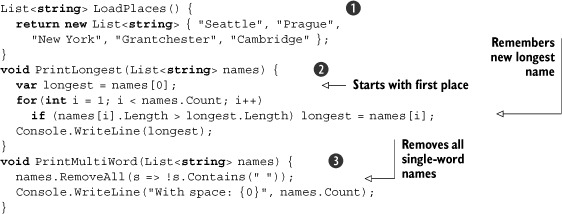
In listing 11.4 you can see two functions that work with a collection storing names of places from the previous example. This time, we’re using C# and storing the names in the standard List<T> type, which is mutable.
The code first shows a function that loads sample data ❶. It’s like our loadPlaces function from earlier, but without the population values. Next, we implement two processing functions. The first one ❷ finds the place with the longest name; the second ❸ determines how many names contain more than one word by removing any name that doesn’t contain a space. Even though the method uses lambda function syntax, it’s definitely not functional: the RemoveAll method modifies the names collection. If we wanted to use these functions later in our program, we could write the following code:
Here, Haskell jumps directly into the body of TestAndCalculate. The name of the argument is num, so Haskell remembers that if it needs the value of num later, it should run Calculate(10) to get it. Then it continues to execute by getting the result of TestCondition. If this function returns true, it needs the value of num and executes Calculate(10). If TestCondition returns false, the Calculate function is never called.
The most interesting part of the application is the code that’s executed when the application starts. It finds all the files in the specified directory and creates an array with information about each file. This information contains the name of the file and the lazy value that will evaluate to the resized preview. Listing 11.21 shows how we can create this data structure.