concept field in category go

This is an excerpt from Manning's book Get Programming with Go.
Write a function to count the frequency of words in a string of text and return a map of words with their counts. The function should convert the text to lowercase, and punctuation should be trimmed from words. The strings package contains several helpful functions for this task, including Fields, ToLower, and Trim.
There’s no functional difference because Go automatically dereferences pointers for fields, but timmy.superpower is easier to read and is therefore preferable.
Go provides a handy feature called interior pointers, used to determine the memory address of a field inside of a structure. The levelUp function in the following listing mutates a stats structure and therefore requires a pointer.
Listing 26.15. The levelUp function: interior.go
type stats struct {
    level             int
    endurance, health int
}

func levelUp(s *stats) {
    s.level++
    s.endurance = 42 + (14 * s.level)
    s.health = 5 * s.endurance
}
The address operator in Go can be used to point to a field within a structure, as shown in the next listing.
Interior pointers can point at fields inside structures without declaring those fields as pointers.

This is an excerpt from Manning's book Go in Practice.
Instead of using FormValue and PostFormValue to retrieve a field value, look up the field on the Form or PostForm properties on the Request object. Then iterate over all the values.
The easiest way to enumerate the fields of a struct is to get the type of that struct and then loop through the fields of that type by using a combination of Type.NumField() (which gives you the number of fields) and Type.Field(). The Type.Field() method returns a reflect.StructField object describing the field. From there, you can learn about the field’s data type and its name.
But when it comes to getting the value of a struct field, you can’t get this from either the reflect.Type (which describes the data type) or the reflect.StructField (which describes the field on a struct type). Instead, you need to get the value from the reflect.Value that describes the struct value. Fortunately, you can combine your knowledge of the type and the value to know that the numeric index of the type field will match the numeric index of the value’s struct field. You can use Value.Field() with the same field number as Type.Field(), and get the associated value for that field. Again, if the field is a pointer, you’d rather have a handle to the value at the other end of the pointer, so you call reflect.Indirect() on the field value. If you take a look at the output of the preceding program, you’ll see this in action:
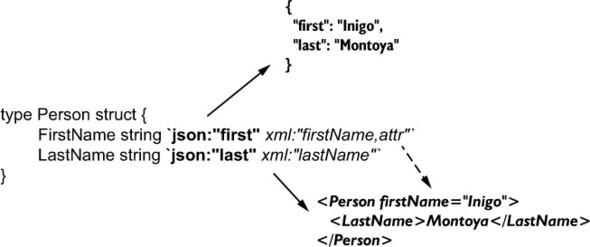
The sample JSON struct you looked at earlier contained annotations of the form `json: "NAME,DATA"`, where NAME is the name of the field (in JSON documents), and DATA is a list of optional information about the field (omitempty or kind data). Figure 11.2 shows an example of a struct annotated for both JSON and XML.
Likewise, if you look at the encoding/xml package, you’d see a pattern similar to annotations for converting structs to and from XML. Tags for XML look like this: `xml:"body"` and `xml:"href,attr"`. Again, the pattern is similar to the JSON tag pattern: `xml:"NAME,DATA"`, where NAME is the field name, and DATA contains a list of information about the field (though XML annotations are more sophisticated than JSON annotations).