concept JSON in category go

This is an excerpt from Manning's book Get Programming with Go.
JavaScript Object Notation, or JSON (json.org), is a standard data format popularized by Douglas Crockford. It’s based on a subset of the JavaScript language but it’s widely supported in other programming languages. JSON is commonly used for web APIs (Application Programming Interfaces), including the MAAS API (github.com/ingenology/mars_weather_api) that provides weather data from the Curiosity rover.

This is an excerpt from Manning's book Go in Practice.
Whereas the preceding section talked about passing in configuration via command-line options, this section looks at passing in configuration via files, or in the case of 12-factor apps, using environment variables. In this section, we add support for common configuration formats, including JSON, YAML, and INI. Then we present the approach favored in the 12-factor pattern, which passes in configuration through environment variables.
This is an excerpt from Manning's book Go Web Programming.
Modern browsers do more than just HTML, though. To support PUT and DELETE, you can use XMLHttpRequest (XHR). XHR is a set of browser APIs (actually, it’s mostly just a browser object called XMLHttpRequest) with JavaScript code usually wrapped around it. XHR allows programmers to send HTTP requests to the server and, despite its name, isn’t limited to using XML only. Requests and responses can be sent in any format, including JSON and text files.
Web services, as you’ll recall from our brief discussion in chapter 1, provide a service to other software programs. This chapter expands on this and shows how you can use Go to write or consume web services. You’ll learn how to create and parse XML and JSON first, because these are the most frequently used data formats with web services. We’ll also discuss SOAP and RESTful services before going through the steps for creating a simple web service in JSON.
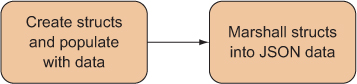
We just went through parsing JSON, which as you can see, is very similar to parsing XML. Creating JSON is also is similar to creating XML (see figure 7.9).
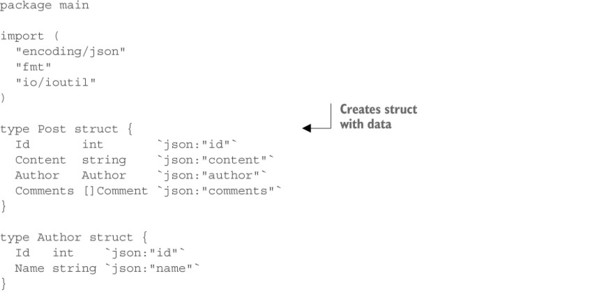
This listing contains the code for marshaling the Go structs to JSON.
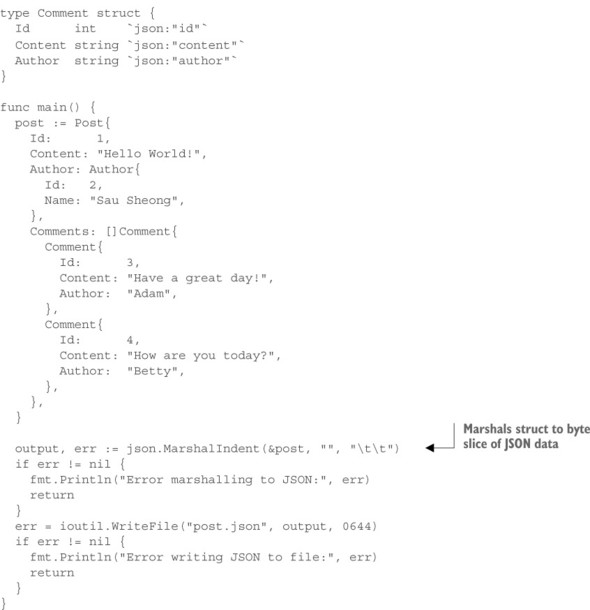
As before, the structs are the same as when you’re parsing JSON. First, you create the struct. Then you call the MarshalIndent function (which works the same way as the one in the xml library) to create the JSON data in a slice of bytes. You can then save the output to file if you want to.
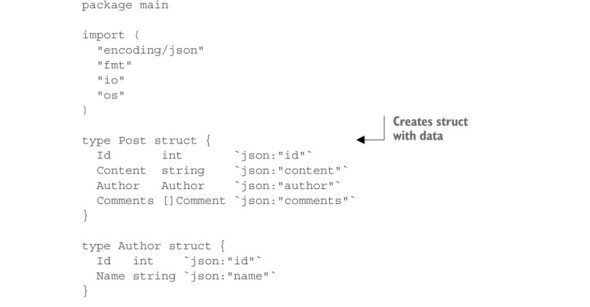
Finally, as in creating XML, you can create JSON manually from the Go structs using an encoder, shown in figure 7.10.
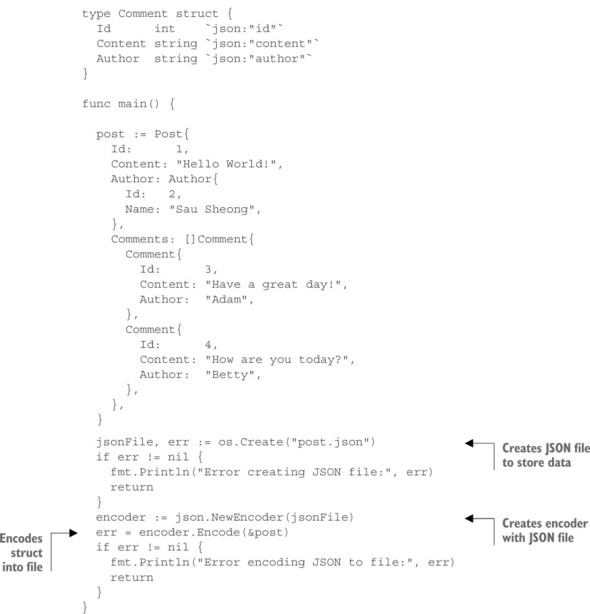
As before, you create a JSON file to store the JSON that’s generated. You use this file to create an encoder using the NewEncoder function. Then you call the Encode method on the encoder and pass it a reference to the post struct. This will extract the data from the struct and create JSON data, which is then written to the writer you passed in earlier.
This wraps up the sections on parsing and creating XML and JSON. Going through these sections seems like plodding through similar patterns, but it provides you with the grounding you need for the next section, where you’ll create a Go web service.


This is an excerpt from Manning's book Go in Action.
To see this in action, we’ll review a complete Go program that implements functionality that can be found in many Go programs being developed today. The program pulls different data feeds from the web and compares the content against a search term. The content that matches is then displayed in the terminal window. The program reads text files, makes web calls, and decodes both XML and JSON into struct type values, and it does all of this using Go concurrency to make things fast.
Many applications, whether they’re using databases, making web calls, or working within a distributed system, need to consume and publish data. If your application is working with either XML or JSON, the standard library has packages called xml and json that make working with these data formats trivial. If you have your own data formats that need to be encoded and decoded, the implementation of these packages is a great road map of how to implement your own packages.
Working with and using JSON is more common nowadays than working with XML. This is primarily because using JSON requires less markup than working with XML. This means less data per message needs to be sent over the network, which helps with the overall performance of the system. Also, JSON can be transformed into BSON (Binary JavaScript Object Notation), which reduces the size of each message even further. In view of this, we’ll explore how to consume and publish JSON in Go applications. But working with XML is very similar.
The first aspect of working with JSON we’ll explore is using the NewDecoder function and Decode method from the json package. If you’re consuming JSON from a web response or a file, this is the function and method you want to use. Let’s look at an example that works with the http package to perform a Get request against the Google search API that returns results in JSON. The next listing shows what the response looks like.
Thanks to the standard library, all of the technical aspects of performing HTTP Get calls and decoding JSON into struct types are taken care of. Let’s look at the declaration of both the NewDecoder function and Decode method.
Listing 8.25. golang.org/src/encoding/json/stream.go
// NewDecoder returns a new decoder that reads from r. // // The decoder introduces its own buffering and may // read data from r beyond the JSON values requested. func NewDecoder(r io.Reader) *Decoder // Decode reads the next JSON-encoded value from its // input and stores it in the value pointed to by v. // // See the documentation for Unmarshal for details about // the conversion of JSON into a Go value. func (dec *Decoder) Decode(v interface{}) error