concept template in category go

This is an excerpt from Manning's book Go in Practice.
Templates should be fairly unintelligent. They display data, and functions can be used to format the data. Any errors in the data should be handled before templates are used with the data, and the functions called within the templates should be for display purposes. This keeps the separation of concerns in place and limits failures when templates are executed, which is important for streaming.
Streaming responses is useful. When you execute a template to a response writer, end users start to receive the page more quickly. When you buffer a response, there’s a delay in end users receiving it. End users expect native desktop performance out of web applications, and streaming responses helps achieve that. When possible, write to output.
But at times, the optimal case doesn’t work out. If executing templates carries a potential for errors, you can write the output of the template to a buffer. If errors occur, they can be handled before displaying anything to the end users. The following listing builds on listing 6.4 to introduce a buffered output.
Templates can be used for a wide variety of things, and email messages are a great place to use them. To illustrate this, the following listing creates email messages from a template and sends them using the net/smtp package.
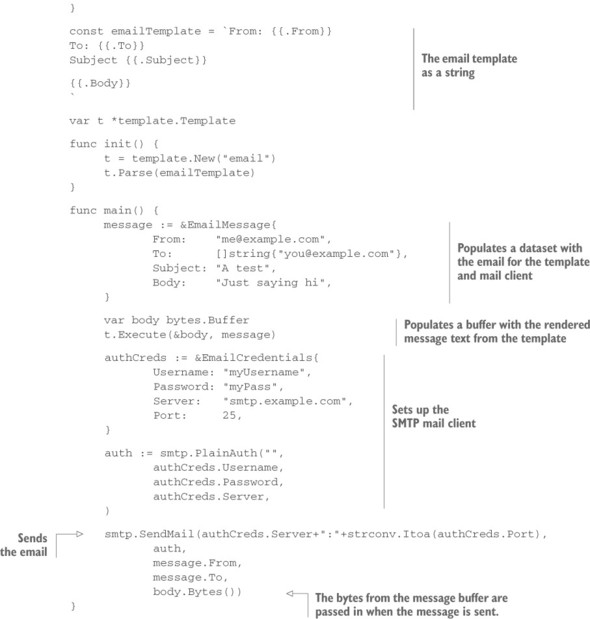
This code sends a simple email generated from a template. You’ll notice the listing is using the text/template package instead of the html/template package used in the previous listings in the chapter. The html/template package is built on top of the text/template package. It provides HTML-specific features such as context-aware escaping on top of the text/template package.
Using the text/template package means the injected properties (for example, .Body) aren’t escaped. If you need to escape anything injected into the template, you can use escape functions from the text/template package.
When you execute the template with a dataset, pass in a buffer to store the rendered template. The buffer provides the source of the content to send from the mail client.

This is an excerpt from Manning's book Go Web Programming.
A template is code that can be converted into HTML that’s sent back to the client in an HTTP response message. Templates can be partly in HTML or not at all. A template engine generates the final HTML using templates and data. As you may recall, template engines evolved from an earlier technology, SSI.
There are two types of templates with different design philosophies:
Static templates or logic-less templates are HTML interspersed with placeholder tokens. A static template engine will generate the HTML by replacing these tokens with the correct data. There’s little to no logic in the template itself. As you can see, this is similar to the concepts from SSI. Examples of static template engines are CTemplate and Mustache.
Template engines often combine data with templates to produce the final HTML (see figure 5.1). Handlers usually call template engines to combine data with the templates and return the resultant HTML to the client.

Go templates are text documents (for web apps, these would normally be HTML files), with certain commands embedded in them, called actions. In the Go template engine, a template is text (usually in a template file) that has embedded actions. The text is parsed and executed by the template engine to produce another piece of text. Go has a text/template standard library that’s a generic template engine for any type of text format, as well as an html/template library that’s a specific template engine for HTML. Actions are added between two double braces, {{ and }} (although these delimiters can be changed programmatically). We’ll get into actions later in this chapter. This listing shows an example of a very simple template.
The usual way to execute a template is to call the Execute function on a template, passing it the ResponseWriter and the data. This works well when the parsed template is a single template instead of a template set. If you call the Execute method on a template set, it’ll take the first template in the set. But if you want to execute a different template in the template set and not the first one, you need to use the Execute-Template method. For example:
t, _ := template.ParseFiles("t1.html", "t2.html")The argument t is a template set containing two templates, the first named t1.html and the second t2.html (the name of the template is the name of the file, extension and all, unless you change it). If you call the Execute method on it: