concept test in category go

This is an excerpt from Manning's book Go in Practice.
Creating and executing tests is fairly straightforward, as shown in the next listing.
Listing 1.10. Hello World: hello.go
package main import "fmt" func getName() string { return "World!" } func main() { name := getName() fmt.Println("Hello ", name) }Starting with a variant form of a Hello World application, you have a function, getName, that can be tested. Go’s naming convention for test files is that they end in _test.go. This suffix tells Go that this is a file to be run when tests execute, and excluded when the application is built, as shown in the next listing.
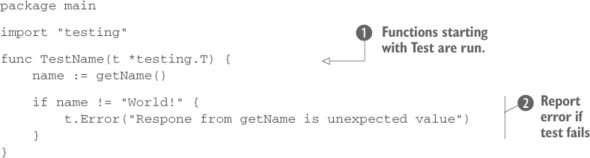
When go test is run, it executes the function that begins with Test
. In this case, TestName is executed, and a struct t is passed in to help with testing. It contains useful functionality such as reporting an error. For more details, see the full testing package. If the name isn’t correct, the test reports an error
.
The output of go test shows the packages tested and how they fared, as shown in the following listing. To test the current package and the ones nested in subdirectories, go test ./... can be used.
If getName had returned something different from World!, you’d see something different. In the next example, the test system reports the location where the test error occurs, indicating the failed test, the file the test is in, and the line where the error happens. In this case, getName has been altered to return something different from World!.
Listing 1.13. Running go test failure
$ go test --- FAIL: TestName (0.00 seconds) hello_test.go:9: Response from getName is unexpected value FAIL exit status 1 FAIL go-in-practice/chapter1/hello 0.010sGo provides the basic tooling and processes needed to get up and running quickly with tests. Go itself uses these tools. For those who want something more opinionated, such as behavior-driven development or something found in a framework from another language, external packages can be used that build atop the built-in functionality. Tests in Go have the full power of the language available, which includes packages.
$ telnet localhost 1026
Trying ::1...
Connected to localhost.
Escape character is '^]'.
test
test
Connection closed by foreign host.
When you type test (indicated in bold in the preceding code), the server echoes back that same text and then closes the connection.

This is an excerpt from Manning's book Go Web Programming.
As with the web application programming libraries we’ve explored in the previous few chapters, Go provides only the fundamental tools. As a programmer you’ll need to build on them to deliver the kind of tests that you need.
As mentioned earlier, unit test cases are meant to be tested independently. Sometimes this isn’t possible because dependencies exist within a test suite. When it is possible, you can run unit test cases in parallel in order to speed up the tests. Let’s see how to do this in Go.
go test –v –short –parallel 3

This is an excerpt from Manning's book Go in Action.
Testing your code is not something that you should wait to do until after you’re finished developing your program. With Go’s testing framework, unit testing and benchmarking can happen during the development process. Just like the go build command, there’s a go test command to execute explicit test code that you write. All you need to do is follow a few guidelines, and you can integrate tests into your project and continuous integration systems seamlessly.
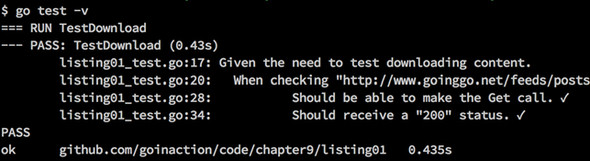
Listing 9.1 shows a unit test that’s testing the Get function from the http package. It’s testing that the goinggo.net RSS feed can be downloaded properly from the web. When we run this test by calling go test -v, where -v means provide verbose output, we get the test results shown in figure 9.1.
The name of the test function is TestDownload, and you can see it on line 13 in listing 9.3. A test function must be an exported function that begins with the word Test. Not only must the function start with the word Test, it must have a signature that accepts a pointer of type testing.T and returns no value. If we don’t follow these conventions, the testing framework won’t recognize the function as a test function and none of the tooling will work against it.
The pointer of type testing.T is important. It provides the mechanism for reporting the output and status of each test. There’s no one standard for formatting the output of your tests. I like the test output to read well, which does follow the Go idioms for writing documentation. For me, the testing output is documentation for the code. The test output should document why the test exists, what’s being tested, and the result of the test in clear complete sentences that are easy to read. Let’s see how I accomplish this as we review more of the code.
Listing 9.4. listing01_test.go: lines 14–18
14 url := "http://www.goinggo.net/feeds/posts/default?alt=rss" 15 statusCode := 200 16 17 t.Log("Given the need to test downloading content.") 18 {You see on lines 14 and 15 in listing 9.4 that two variables are declared and initialized. These variables contain the URL we want to test and the status we expect back from the response. On line 17 the t.Log method is used to write a message to the test output. There’s also a format version of this method called t.Logf. If the verbose option (-v) isn’t used when calling go test, we won’t see any test output unless the test fails.
Each test function should state why the test exists by explaining the given need of the test. For this test, the given need is to test downloading content. After declaring the given need of the test, the test should then state when the code being tested would execute, and how.
Listing 9.5. listing01_test.go: lines 19–21
19 t.Logf("\tWhen checking \"%s\" for status code \"%d\"", 20 url, statusCode) 21 {You see the when clause on line 19 in listing 9.5. It states specifically the values for the test. Next, let’s look at the code being tested using these values.
Listing 9.6. listing01_test.go: lines 22–30
22 resp, err := http.Get(url) 23 if err != nil { 24 t.Fatal("\t\tShould be able to make the Get call.", 25 ballotX, err) 26 } 27 t.Log("\t\tShould be able to make the Get call.", 28 checkMark) 29 30 defer resp.Body.Close()The code in listing 9.6 uses the Get function from the http package to make a request to the goinggo.net web server to pull down the RSS feed file for the blog. After the Get call returns, the error value is checked to see if the call was successful or not. In either case, we state what the result of the test should be. If the call failed, we write an X as well to the test output along with the error. If the test succeeded, we write a check mark.
When we need to report the test has failed but don’t want to stop the execution of the particular test function, we can use the t.Error family of methods.
Listing 9.7. listing01_test.go: lines 32–41
32 if resp.StatusCode == statusCode { 33 t.Logf("\t\tShould receive a \"%d\" status. %v", 34 statusCode, checkMark) 35 } else { 36 t.Errorf("\t\tShould receive a \"%d\" status. %v %v", 37 statusCode, ballotX, resp.StatusCode) 38 } 39 } 40 } 41 }One line 32 in listing 9.7, the status code from the response is compared with the status code we expect to receive. Again, we state what the result of the test should be. If the status codes match, then we use the t.Logf method; otherwise, we use the t.Errorf method. Since the t.Errorf method doesn’t stop the execution of the test function, if there were more tests to conduct after line 38, the unit test would continue to be executed. If the t.Fatal or t.Error functions aren’t called by a test function, the test will be considered as passing.
If you look at the output of the test one more time (see figure 9.2), you can see how it all comes together.
In figure 9.2 you see the complete documentation for the test. Given the need to download content, when checking the URL for the statusCode (which is cut off in the figure), we should be able to make the call and should receive a status of 200. The testing output is clear, descriptive, and informative. We know what unit test was run, that it passed, and how long it took: 435 milliseconds.