concept application in category gwt

This is an excerpt from Manning's book GWT in Action.
This can be a relatively difficult problem given the mismatch in languages. On the server this isn’t so hard because of Java’s reflection capabilities. On the server the application can inspect the Java object to determine its field types and values. In the browser this isn’t possible; reflection won’t work.
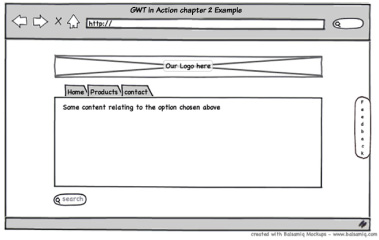
Figure 2.1. A mock-up of the application you’ll build in chapters 2 and 3. In this chapter you create the base application using GWT tools, and in chapter 3 you extend it to implement this mock-up.
A module is defined by an XML format file that gives instructions to the GWT compiler. These instructions tell the compiler, among other things, where to find source Java files to compile into JavaScript, where the application’s entry point is, and how to handle generators and deferred bindings (these are techniques GWT relies on to minimize code you need to write and handle such things as browser differences; we discuss them in detail in chapters 16 and 17), and they can define a number of properties (such as what locales are used in internationalization; see chapter 11) or what other modules need to be inherited.
You already know that our preference is the GPE wizard. It’s easy to use and creates the simplest structure possible, which you then enhance to implement your functionality. The GPE doesn’t only provide wizards for creating applications; it also has a host of supporting functions to make your development smoother, as you’ll see in the rest of this book. But it requires that you use Eclipse as your IDE for the GPE approach to work.
Window.addWindowClosingHandler(new ClosingHandler(){
   public void onWindowClosing(ClosingEvent event) {
      event.setMessage("Ran out of history. Now leaving application, is
            that OK?");
   }
});

This is an excerpt from Manning's book GWT in Practice.
One of the great strengths of GWT is that it builds specific versions of the application, each exactly targeted to what the client needs (user agent, locale, so on). This keeps the final download, and the operational overhead at the client level, very lean. A particular build combination is defined in the GWT module definition using a <define-property> tag. This establishes a base set of values that are used for the build. The first and very obvious property is the user agent that the JavaScript will be built for. Listing 1.7 shows the core GWT UserAgent module definition.
Packaging happens both on the micro level, with modules, and on the larger macro level with entire applications. GWT components are packaged into modules, which are shared and reused as Java Archive (JAR) files. Applications, which are made up of multiple modules, and other JAR files and configuration elements are then typically packaged into larger Web Application Archive (WAR) files. Once all of the required artifacts are bundled up into an application, they are then typically deployed to a servlet container to be made available to the world.
Once you combined your code and modules into an application, you then need to deploy your project to an external web server (and your server-side components in a JEE container if you’re using GWT RPC). This is where all the advantages of GWT’s web-based delivery model come into play.