concept css in category gwt

This is an excerpt from Manning's book GWT in Action.
The compiler is a busy bee, and throughout this book we’ll show you some of its secrets. One of these is a code generator, which generates Java source code for you in certain cases. The compiler may kick off one or more code generators based on what it finds in your code. This could be the generator that produces the code to serialize Java objects and send them to the server (chapter 7, “Communicating with GWT-RPC”), or it could be the generator that converts your templates into working code (chapter 6, “Interface design with UiBinder”). It could also be the generator that takes external files like CSS or images and optimizes them in a way that allows the browser to load them more quickly (chapter 5, “Using client bundles”). Or perhaps you’ll create your own custom generator to fill a specific need (chapter 18, “Generators”).
Constants can be defined in one place in CSS and then used throughout the entire file. You could use constants to define colors, sizes, or any value that you plan to use in multiple places in a CSS file. To define a constant in a CSS file, you use the @def at-rule, shown in the following:
@def DARK_COLOR #000000;
@def NORMAL_BORDER_STYLE solid;
@def NORMAL_BORDER_SIZE 2px;
Then we introduced you to CssResource. This resource, like the other simple resources, helps improve the efficiency of the stylesheet via caching but also adds features to further improve performance and convenience of the stylesheet while allowing the CSS to be more dynamic.
You learned how to further optimize the CSS using both selector merging and class name obfuscation. These features reduce the overall file size while preventing class name collisions that can occur when using multiple CSS files. Next, you learned to use constants to centrally locate property values in a CSS file. This is convenient for making changes that propagate to the entire file. We also covered runtime evaluation to set property values when the CSS is injected, allowing for nonstructural theming of the application. We demonstrated how to use the literal() function to protect nonstandard CSS property values from the GWT compiler. We also showed how you could add conditional sections to the CSS that allow for structural changes to the stylesheet both at compile time and at injection. This allows you to have CSS that’s specific to particular browsers or locales. Finally, you learned how to include other resources from the ClientBundle in your CSS files.
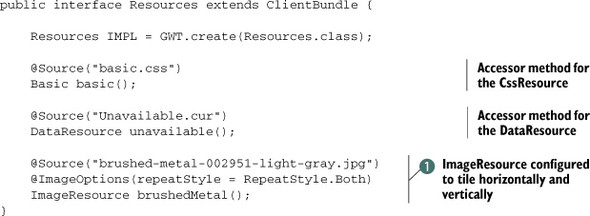
DataResources and ImageResources defined in your ClientBundle can both be used from within your CSS. DataResouces can be used anywhere you might reference binary data via a URL, for instance, a custom cursor or a special font. ImageResources can be used anywhere in CSS where you’d use an image, for instance, borders or background images.
First, you’d need to define a client bundle that contains not only your Css-Resource but also the other resources that you plan to use in the CSS, as shown in the next listing.
ImageResource defines the repeatStyle attribute for its @ImageOptions annotation. This attribute is used to control image tiling when the image is used in CSS. Valid values are RepeatStyle.None, RepeatStyle.Horizontal, RepeatStyle.Vertical, and RepeatStyle.Both. Our example defines an image that will be tiled in both directions
.

This is an excerpt from Manning's book GWT in Practice.
Ajax is also significant in that applications that are native to the browser feel more natural to users. No matter how seamless the browser integration, there are typically some noticeable differences with plugin technologies. Such differences may include an install step; the treatment of browser constructs in a different manner, such as with bookmarks and navigation; and starkly different user interface elements compared with HTML, CSS, and JavaScript. GWT, and Ajax in general, is a form of RIA that embraces the parts of the web that do work well and that users are familiar with.
Our first in Practice foray into GWT will be a calculator project, where we’ll restrict our focus to the client side of the picture. Using a simple and familiar construct such as this will allow us to revisit, and reinforce, some of the fundamental GWT concepts we looked at in chapter 1, such as project layout, modules, host pages, entry points, and bootstrapping. Additionally, this project will allow us to introduce the use of several important architectural and design patterns in a GWT context, including MVC—an important pattern that you will see reused throughout the book. We’ll also begin working with UI Widget classes and styling components using CSS.