concept datum in category gwt

This is an excerpt from Manning's book GWT in Action.
Together, widgets, panels, and composites allow you to piece together your user interface. GWT also provides a special class of widgets called data-presentation widgets (or Cell widgets) that are designed to make it easy to display data to the user in a series of pages, like a search result listing (chapter 10, “Data presentation (Cell) widgets”). These are designed to be fast, to conserve memory in the browser, and to make it easy for you as the developer to provide access to extremely large data sets.
function printData (data) {
  // do some stuff with the data
}
Then we’d need to load the data by creating a <script> element, setting the source attribute, and dynamically adding it to the page with JavaScript. Notice how the URL to the external JavaScript includes a callback parameter set to the name of our local function:
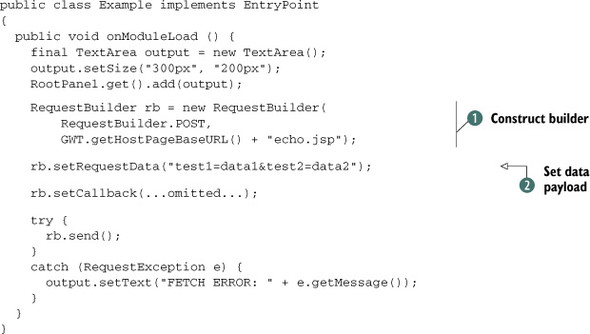
Now that you understand the basics of using RequestBuilder, let’s explore how you can use it to use the HTTP POST method to send data to the server. We’ll use the same example that we did in the previous section with some minor modifications. Listing 12.3 reproduces that example but without the code for the callback. If you’re following along, you can copy the callback code from listing 12.2.
The example in listing 12.3 is relatively unchanged from the example we used in the previous section with the exception that you’re constructing RequestBuilder using
RequestBuilder. POST as your method type and targeting echo.jsp instead of a static text file (which you’ll create in a moment). In addition, you’re now sending data to the server
by calling the setRequestData() method. The data you’re passing to the server is "test1=data1&test2=data2", which is URL-encoded data.
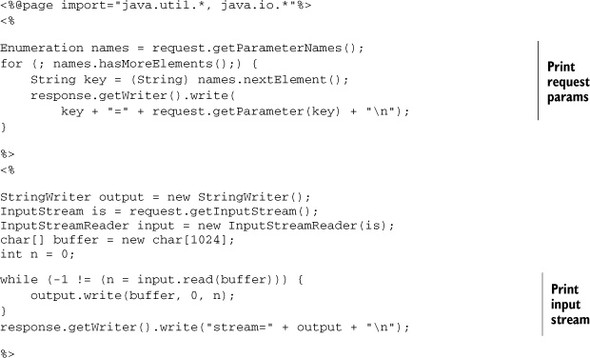
There’s a hidden problem with this example in that it doesn’t specify the content type of the data that you’re sending, so by default RequestBuilder will inform the server that the content type is “text/plain,” which isn’t exactly accurate. But before we discuss how the content type affects handling of the data on the server, you need to look at echo.jsp.

This is an excerpt from Manning's book GWT in Practice.
Table 6.4. A complete list of JSIO-supported annotations
Location
Description
gwt.beanProperties Class, method This annotation indicates that methods that look like bean-style property setters should be generated so as to read and write object properties rather than import functions. This is most useful with JSON-style objects. The setting may be applied on a per-method basis in an imported class and may be overridden on a per-method basis by gwt.imported. If the backing object does not contain data for a property accessor, null, 0, ' ', false, or an empty com.google.gwt.jsio.client.JSList will be returned. gwt.constructor Class, method The annotation gwt.constructor may be applied to a class to specify a JavaScript function to execute when constructing a JSWrapper to use as the initial backing object. A JavaScript Date object could be created by using the value $wnd.Date. If the gwt.constructor annotation is applied to a method within a JSWrapper and the method is invoked, the parameters of the method will be passed to the named global function, and the resulting JavaScript object will be used as the backing object. gwt.exported Method Individual Java functions may be exported to JavaScript callers by declaring a gwt.exported annotation on a concrete Java method within a JSWrapper. The Java method will be bound to a property on the backing object per the class’s NamePolicy or a gwt.fieldName annotation on the method. When applied at the class level to a com.google.gwt.jsio.client.JSFunction, it specifies which of the methods declared within to export as a JavaScript Function object. gwt.fieldName Method When implementing a bean property accessor, the default NamePolicy will be used unless a gwt.fieldName annotation appears on the property’s getter or setter. This is also used with imported and exported functions to specify the object property to attach to. gwt.global Class The annotation gwt.global is similar to gwt.constructor, however it may be applied only at the class level and the value is interpreted as a globally accessible object name rather than as a function. gwt.imported Method This is an override for methods within classes annotated with gwt.beanProperties. gwt.namePolicy Class This annotation specifies the default transformation to use when converting bean property accessor function names to fields on the underlying JavaScriptObject. The valid values for the namePolicy are the field names on the com.google.gwt.jsio.rebind.NamePolicy class, or the name of a class that implements NamePolicy. gwt.noIdentity Class This annotation suppresses the addition of the __gwtObject property on the underlying JavaScriptObject. The object identity of the JSWrapper will no longer maintain a one-to-one correspondence with the underlying JavaScriptObject. Additionally, com.google.gwt.jsio.client. JSWrapper#setJavaScriptObject will no longer throw com.google.gwt.jsio.client. MultipleWrapperException. gwt.readOnly Class This annotation prevents the generated JSWrapper implementation from containing any code that will modify the underlying JavaScriptObject. This implies gwt.noIdentity. Invoking a bean-style getter when the underlying JavaScriptObject does not contain a value for the property will result in undefined behavior.