concept error in category gwt

This is an excerpt from Manning's book GWT in Action.
The error you can see in figure 2.23 is because we forgot to include the User module in the application’s module file (or rather, in this case, we deleted it in order to get the error). You might see in figure 2.23 that dev mode is complaining about the Core module being missing. We could fix this by adding it, but then we’ll get a message saying that another module is missing and then another. The solution is to inherit the User module in our application because that inherits several other modules necessary for a GWT application to run smoothly.
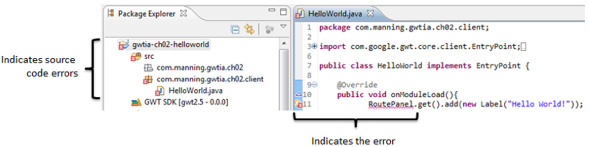
It should be quickly obvious if there’s a syntactical problem with your Java code, it will be flagged in the IDE, usually with a red marking. In Eclipse you get a red X next to the lines in error, and in the explorer view a red X appears next to classes and packages where those errors are, as you can see in figure 2.21.
Additionally, if you try to run dev mode without fixing these types of errors or noticing that you have them, you’ll get the dialog box shown in figure 2.22.