concept module in category gwt

This is an excerpt from Manning's book GWT in Action.
With the module in place you’ve told the GWT compiler how to handle your application, but you haven’t provided any code for the application yet. You need to create an entry point.
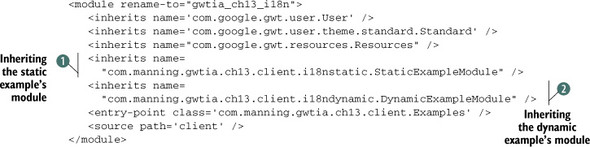
The simpler solution is to put a GWT module file in com.myco.math, say Math.gwt.xml, which contains only those two GWT compiler instructions necessary to use the math library. You’d then inherit that module in your existing application’s module, via an <inherits name="com.myco.math.Math"/> instruction, to make it all visible.

This is an excerpt from Manning's book GWT in Practice.
Several aspects of GWT may seem alien to new users. The main one is the use of the module concept to define GWT applications. One of the core problems with web development over the years has been getting true reusability from applications and components. The GWT system of modules allows application components to package the client-side application code, server-side service implementations, and assets such as graphics and CSS files into an easily redistributable package. Modules, with their facilitation of inheritance, are also an important part of the GWT bootstrap and deployment process.
A module is defined by an XML file packaged with the Java source implementing the module. This XML file declares several primary elements: inherited modules, servlet deployments, compiler plugins, and entry points. Listing 1.1 shows a sample module file.
GWT applications can be broken up into multiple logical modules, and modules can be used as libraries or general components. Modules offer a lot of versatility beyond the configuration and inheritance they enable, which we first covered in chapter 1. In this chapter, we’re going to once again discuss modules, but this time in the context of building and packaging.
Packaging happens both on the micro level, with modules, and on the larger macro level with entire applications. GWT components are packaged into modules, which are shared and reused as Java Archive (JAR) files. Applications, which are made up of multiple modules, and other JAR files and configuration elements are then typically packaged into larger Web Application Archive (WAR) files. Once all of the required artifacts are bundled up into an application, they are then typically deployed to a servlet container to be made available to the world.
Modules and reuse are baked into the toolkit. The concept of inheritance is central to GWT, and both creating and using modules are easily accomplished. Once you create a module and include the source for your code in a JAR archive, other projects can inherit that module.