concept service in category gwt

This is an excerpt from Manning's book GWT in Action.
The next thing you need to do is configure the XsrfTokenServiceServlet
using the <servlet> tag and map it to some path
using a <servlet-mapping>. The XsrfTokenServiceServlet is a GWT-RPC service that will allow you to request a token from the server. More on that in a bit. All you need to know at this point is that you’ve installed the service and mapped it to the path /gwtia_ch07_GWT-RPC/xsrf.
On the server you’ll have, as you expect, some sort of service class that does stuff and entities that the service class works with. Usually the service will manipulate the contents of a database with methods that are named similar to fetch(), update(), persist(), and delete().
You can create this service in two different ways. The first is to implement the service in the entity class, and the second is to implement the service externally. We acknowledge that it may be unpopular to implement your service methods in the entity, but doing so simplifies things for the RequestFactory servlet. And these savings are passed along to you, the customer, in the guise of less coding. In this chapter we’ll often refer to implementing the service methods in the entity as the “simple way.”
In this section we’ll describe one of two ways for you to provide the servlet with the information it needs, starting with what we like to refer to as the “simple” way. The simple way of using RequestFactory is to use the domain class as the service. In order to do this you need to adhere to two sets of rules.

This is an excerpt from Manning's book GWT in Practice.
In this chapter, we will take a look at a basic use-case for a web application you have likely written many times before: user registration. We will move through the whole structure of this example and look at how these parts relate in GWT applications. We will start by building a model layer that is more intelligent than most of the models you have likely used in other web applications. Next, we will show how to construct the view components and connect them to the model. Finally, we will look at the controller, at how to use the controller layer to interact with services on the server, and at how to use the Java Persistence API (JPA) to store elements in the databas.
In this section, we will build the controller and the service servlet that will store our user in the database, pointing out places where you can extend the design with other functionality.
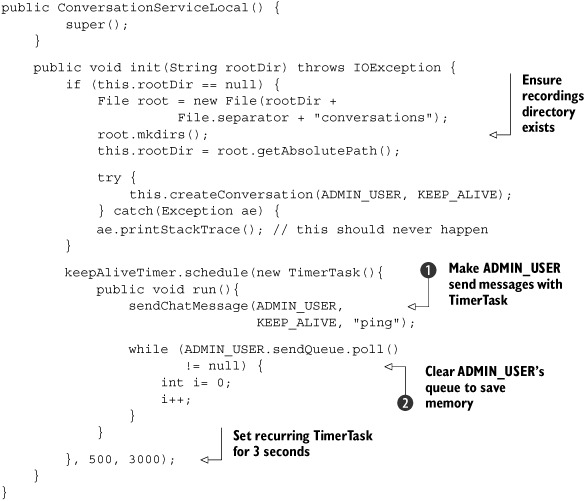
Listing 11.3. ConversationServiceLocal.java, part 2: initializing the service