concept achievement in category ios

This is an excerpt from Manning's book iOS in Practice.
GameCenter is a great way to open your app up to a more social aspect of gaming. It includes leaderboards, achievements, and even chatting within the app. In this chapter you’ll take the Rock, Paper, Scissors game from chapter 8 and add Game-Center functionality to it.
Using GameCenter, a player can view their past game scores and achievements, as well as the scores and achievements of friends. They can invite friends to play games through GameCenter, which matches the devices up to play together.
In this chapter, you’ll look at techniques for authenticating players in Game-Center and using leaderboards and achievements. Leaderboards allow your app to store a user’s score and display the leaderboard as a view. Achievements are similar to leaderboards, but are stored as a percentage (for example, 100% means the player achieved the goal).
Achievements are fun that continues beyond scores. They keep you playing game after game by providing the app with more long-term goals. Some can be silly or overwhelming, but it seems like they keep people coming back for more.
Adding an achievement to your game, or any app, is an easy process that can increase an app’s replay value and overall appeal.
In this section, you’ll look at adding an achievement in iTunesConnect, reporting a user’s progress of an achievement, and displaying the achievement board related to the app.
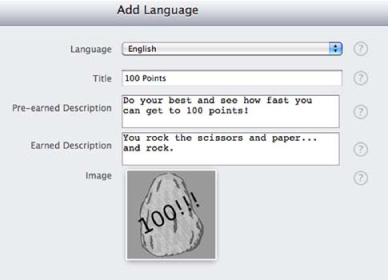
As you did with the leaderboard configuration, you also need to add a language. Click Add Language and specify a Title, Pre-earned Description, and Earned Description to display the user’s progress accordingly (see figure 9.8). This is also where you upload an image to represent the achievement.
Click Save Changes and you’ve created your achievement. It’s now ready to have progress reports sent for users. The app will need the achievement ID you used above (com.brainwashinc.RPS.HundredPoints) and can now report the achievement progress for a user as a percentage. Let’s set up your app to do that.