concept model in category ios
This is an excerpt from Manning's book Hello! iOS Development.
A model is anything in your app that isn’t related to the user interface. In applications that store data, models are used to represent the things that you store. For example, imagine a grocery list application where you keep track of everything that you want to buy, where it is in the store, and how much of it you need. A model can be used to represent the items you want to buy. Each item has a name (such as “Bananas”), the aisle (such as “Produce”), and the amount you want to buy (such as “One bunch”).
So, using a grocery list app example again, when you touch the Grocery Item View on your phone to indicate that you’ve put the item in your shopping cart, the view tells the Grocery Item View Controller that it’s been touched. The controller tells the model to remember that it’s been taken, and then it tells the view to show it crossed out.

The best way to learn MVC is to open apps on your phone and start seeing their features as models, views, and controllers. Every app on your phone can be broken down into these parts. You don’t have to do it this way, and your app will still work if you put something in the wrong place, but it’s much easier to understand and work on your application if you keep the components straight.

This is an excerpt from Manning's book iOS Development with Swift.
If you have experience in programming, you’ll most likely have come across the design pattern Model-View-Controller, where the view is separated from the model and the controller. We’ll come back to this concept in chapter 4 when we look at models, but for now let’s consider the view and the controller.
You could create this array directly in your BooksTableViewController class, but to keep responsibilities of the controller and the model separate, maintaining a good MVC structure, it’s a good idea to manage the books data in a model class. In our Bookcase app, this model class is basically going to be your friendly librarian! It will store books; give books to the user; manage adding, updating, and removing books; and eventually it will handle sorting and searching the books.
Request the main queue before going any further to have access to the user interface. Once you’re on the main thread, you can deal with errors, or (if the operation was successful) call the addBook method to add the book to the books array and sort. func addBookCloudKit(book: Book) { db.save(book.record) { (record, error) in DispatchQueue.main.async { 1 if let error = error as? CKError { 2 print("failed: \(error.localizedDescription)") 2 } else { print("Record saved to iCloud!") 3 self.addBook(book: book) 4 } } } }The BooksManager will now need to notify the view controller that the save operation has completed so that the view controller can update the view based on the result of updating the model. As you’ve seen, several options exist for achieving this. For instance, the BooksManager could use the delegation pattern, or it could dispatch a notification. This time, let’s pass in a closure to the BooksManager, which it will call when the operation is complete.
- 1 Requests main queue
- 2 Deals with save errors
- 3 Saves successful
- 4 Adds book to memory

This is an excerpt from Manning's book Anyone Can Create an App: Beginning iPhone and iPad programming.
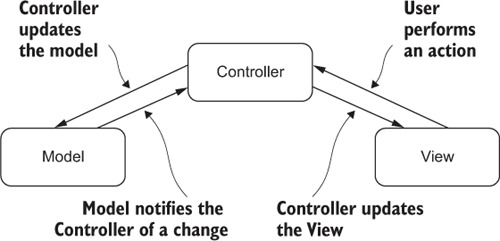
Controller— You’ve seen this already numerous times; in your apps, it’s called the ViewController. This role is the mediator between the view and the model. Remember back when you created buttons on the view in the storyboard? You made the buttons and then had to wire them to the ViewController. Then, when the user tapped the button on the view, the ViewController could take action. Imagine if you created a calculator app and had 12 buttons on your view. You’d wire those buttons on the view and then create all the code in the ViewController to handle the actions of the button tap. But then say you want to completely change the view of the calculator. You want to delete all 12 buttons and create 12 different ones. The only action you’d have to take is to delete the buttons, create new ones, and then wire them to the correct functions in your ViewController. You wouldn’t have to recode all the functions because nothing changed for them. That’s because you separated out the view and the controller. Pretty cool, huh?
As you may remember from chapter 17, it’s a good practice to separate out the view (front end) from the model (the data) from the controller (the go-between). This allows the separation of concerns (SOC) so the view isn’t concerned with what data it will show, and the model isn’t concerned with how the data will be presented.
You’re going to add a model to your app that will represent the LioN data. You’ll take the following steps: