concept playlist in category ios
This is an excerpt from Manning's book iOS in Practice.
The iPhone, iPod, and iPad are great music playing devices and allow you to create playlists. You may want to write an app that includes the ability to create a playlist used within the app. With access to the music in the iPod on a device and a database for the app, apps can allow the user to select tracks and create their own play-lists within an app.
Creating playlists is useful, but being able to play them is what’s important. Using the iPod access to select tracks, CoreData to store the selections, and the music player to play the music makes for a usable app.
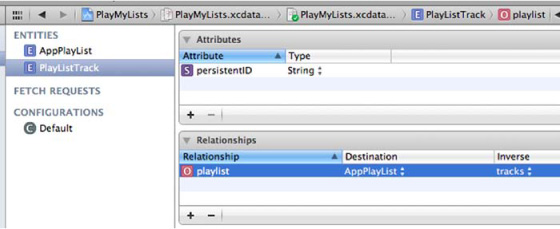
Now select the PlayListTrack entity and create a new relationship from the drop-down menu as you did before. Name it playlist because it points to the given track’s playlist. Set its destination to AppPlayList. Set its inverse to tracks, which is the relationship you defined for AppPlayList (see figure 7.9). This means that it’s the other end of that same relationship.
If you didn’t set this to be the inverse (or even create it at all), the playlist would have a relationship to the tracks. But the track wouldn’t know what playlist it belongs to. Depending on your app, this aspect may be useful.
You can create a new table view controller class based on the default one created for you in the project. Then you’ll specify the new table view to display the tracks for the playlist passed into the class.
You want to update your table view when a new track is added to the playlist via the (+) button. You know when one is created (in the insertNewObject method), so you can update the table there. Because your table is based on the tracks in the playlist and not the database, you need to add the new track to the list and the related NSFetchedResultsControllerDelegate callback methods will update the table:
[_detailItem addTracksObject:newManagedObject];Like you added the track to the playlist when it was created, you want to remove it when it’s deleted. In the tableView:commitEditingStyle:forRowAtIndexPath: method, you want to remove the track and delete it. Be sure to remove it from the playlist before you delete it, as shown in the following listing, because removing a deleted track can cause errors.
Remove the track from the playlist, delete it, and reload
NSManagedObjectContext *context =
  [self.fetchedResultsController managedObjectContext];
[playList removeTracksObject:
  [self.fetchedResultsController
    objectAtIndexPath:indexPath]];
[context deleteObject:
  [self.fetchedResultsController
    objectAtIndexPath:indexPath]];