concept SLRequest in category ios

This is an excerpt from Manning's book iOS 7 in Action.
The Social framework gives you the ability to manually interact with the API of all the services that it supports as long as you have access to an account. All of this is accomplished by using the SLRequest class. This allows you to post to someone’s stream, retrieve their stream or timeline, friend, unfriend, follow, unfollow, and so on. It all depends on the service and what you’re allowed to do based on the limits of their API.
The SLRequest class encapsulates various properties of a standard HTTP request. We covered the different types of HTTP requests and REST in chapter 6.
NSDictionary *options = @{ ACFacebookAppIdKey: @"YOUR-FB-APP-ID",
 ACFacebookPermissionsKey: @[@"read_stream"] };

ACAccountStore *accountStore = [[ACAccountStore alloc] init];
ACAccountType *accountType = [accountStore
 accountTypeWithAccountTypeIdentifier:ACAccountTypeIdentifierFacebook];

[accountStore requestAccessToAccountsWithType:accountType options:options
 completion:^(BOOL granted, NSError *error)
     {
         if(granted)
         {
             // Replace account and make an SLRequest
         }
     }
];
All of your tweets can be retrieved through your public timeline. You can retrieve this via Twitter’s API using an SLRequest. If you look at Twitter’s developer documentation (http://dev.twitter.com/docs/api), you’ll see exactly what you need to send in your request to retrieve a timeline:
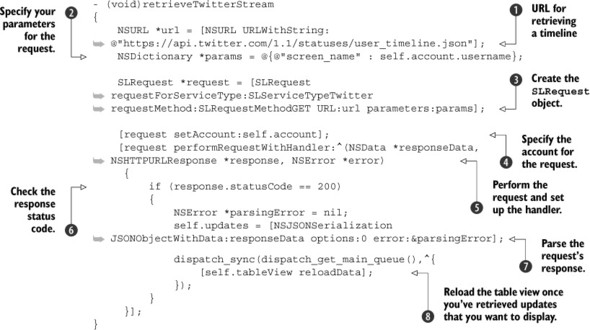
Next, you can define the retrieveTwitterStream method. This method will make a request using SLRequest and store all items in the updates array. Take a look at the following listing to see how to make your request to retrieve a user’s Twitter stream.
You’re setting a url parameter with the URL for retrieving a user’s timeline according to Twitter’s API docs
. You’re then preparing the one parameter you’re passing in for this request, which is the select account’s username
. Next, you create a new SLRequest by specifying your service type, your request method, URL, and parameters for the request
. After your request has been initialized, you first specify the authenticated account that will be making the request
. You can then perform the request and specify a request handler for when the request is finished
. It’s within the request handler where you will inspect what Twitter returns. You first check to see if the status code for the response is 200 to ensure that the request went through smoothly
. You then parse the response data using the NSJSONSerialization class, which returns an array of dictionaries that represents each tweet
. Lastly you make a call to reload your table view within the main queue
.