concept word in category ios

This is an excerpt from Manning's book Anyone Can Create an App: Beginning iPhone and iPad programming.
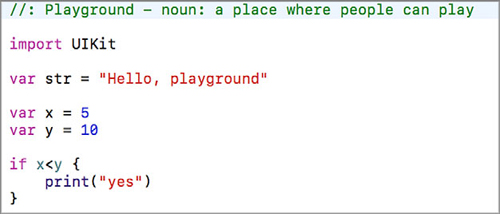
You type words on the screen, which are commands or code.
This chapter covered a lot. You created an app with a label and a button, and you made the words on the button change when you clicked it.

This is an excerpt from Manning's book iOS 4 in Action: Developing iPhone and iPad Apps.
Because we want to examine two UIControl objects more closely, it makes sense to quickly mash up an example that takes advantage of both of them. You’ll do this in the View-Based RGB Application, which sets the background color of a view based on the word you type into a UITextField and the selected position of a UISlider.
Quartz has a number of advanced capabilities that go beyond simple line drawings. In this section, we’ll look at using gradients, images, and words.
Unlike Canvas, Quartz supports drawing words on top of your pictures. The functions required are intricate, though, and we generally suggest using UILabel or other UIKit objects and placing them on top of your Quartz objects. But if you need words in Quartz (either because you’re interweaving the words with other Quartz content or because you’re adding words to a picture), you’ll need to use the CGContext text options.

This is an excerpt from Manning's book iPhone and iPad in Action: Introduction to SDK Development.
We touched earlier on the idea of an always-on internet. What’s notable is how successful Apple has been in pushing this idea. Huge data-transfer rates show that iPhone users are indeed always on. In Europe, T-Mobile reported that its iPhone users transferred 30 times as much data as regular users. Google has also shown a notable uptick among iPhone users, who are 50 times more likely to conduct a search than the average internet user. Looking at overall stats, the iPhone’s Mobile Safari has become the top mobile browser in the United States and is quickly moving up in the international market as well. Anecdotal evidence is consistent, as friends talk about how an iPhone user is likely at any time to grab their iPhone to look up a word in Webster’s or a topic in Wikipedia, showing off how the iPhone has become the encyclopedia of the twenty-first century for its users. The iPad will surely continue this trend.
Quartz has a number of advanced capabilities that go beyond simple line drawings. In this section, we’ll look at using gradients, images, and words.
Unlike Canvas, Quartz supports drawing words on top of your pictures. The functions required are intricate, though, and we generally suggest using UILabel or other UIKit objects and placing them on top of your Quartz objects. But if you need words in Quartz (either because you’re interweaving the words with other Quartz content or because you’re adding words to a picture), you’ll need to use the CGContext text options.

This is an excerpt from Manning's book iPhone in Action: Introduction to Web and SDK Development.
The idea of an always-on internet is something we already touched on earlier. However what’s notable is how successful Apple has been in pushing this idea. Huge data transfer rates show that iPhone users are indeed always-on. In Europe, T-Mobile reported that their iPhone users transferred 30 times as much data as their regular users. Google has also shown a notable uptick among iPhone users, who are 50 times more likely to conduct a search than the average internet user. Looking at overall stats, the iPhone’s mobile Safari has already become the top mobile browser in the United States and is quickly moving up in the international market as well. Anecdotal evidence is consistent, as friends talk about how an iPhone user is likely at any time to grab his or her iPhone to look up a word in Webster’s or a topic in Wikipedia, showing off how the iPhone has become the encyclopedia of the 21st century for its users.
Quartz has a number of advanced capabilities that go beyond simple line drawings. In this section we’re going to look at using gradients, images, and words.
Unlike Canvas, Quartz does support drawing words on top of your pictures. The functions required are pretty intricate, though, and we generally suggest using UILabel or other UIKit objects, and placing them on top of your Quartz objects. But if you need words inside Quartz (either because you’re interweaving your words with other Quartz content or because you’re adding words to a picture), you’ll need to make use of the CGContext text options.