concept array in category java

This is an excerpt from Manning's book Java SE 11 Programmer I Certification Guide.
To define an array, the square brackets, [], can follow either the variable name or its type. The following is a correct method declaration of the main method:
In this section, I’ll cover declaration, allocation, and initialization of one-dimensional and multidimensional arrays. You’ll get to know about the differences between arrays of primitive data types and arrays of objects.
An array is an object that stores a collection of values. The fact that an array itself is an object is often overlooked. I’ll reiterate: an array is an object itself; it stores references to the data it stores. Arrays can store two types of data:
An array of primitives stores a collection of values that constitute the primitive values themselves. (With primitives, there are no objects to reference.) An array of objects stores a collection of values, which are in fact heap-memory addresses or pointers. The addresses point to (reference) the object instances that your array is said to store, which means that object arrays store references (to objects) and primitive arrays store primitive values.
The members of an array are defined in contiguous (continuous) memory locations and hence offer improved access speed. (You should be able to quickly access all the students of a class if they all can be found next to each other.)
The following code creates an array of primitive data and an array of objects:
class CreateArray {
    public static void main(String args[]) {
        int intArray[] = new int[] {4, 8, 107};                #A
        String objArray[] = new String[] {"Harry", "Shreya",     #B
                                          "Paul", "Selvan"};     #B
    }
}
I’ll discuss the details of creating arrays shortly. The previous example shows one of the ways to create arrays. Figure 7.1 illustrates the arrays intArray and objArray. Unlike intArray, objArray stores references to String objects.
An array declaration includes the array type and array variable, as shown in figure 7.3. The type of objects that an array can store depends on its type. An array type is followed by one or more empty pairs of square brackets [].
Figure 7.3 Array declaration includes the array type and array variable
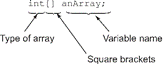
To declare an array, specify its type, followed by the name of the array variable. Here’s an example of declaring arrays of int and String values:

This is an excerpt from Manning's book Get Programming with Java.
The last type of loop that is used in Java is called an enhanced for loop, or a for-each loop. This loop automatically iterates over a collection of items. To demonstrate the for-each loop, I must introduce a collection of items. In Java, one of the simplest ways to create a collection of elements is using an array. An array is used to hold a collection of items that are all the same type. In Java, the array syntax uses square brackets, which creates a variable called videoGames that holds a collection of String elements.
An array is an object that is used to hold a fixed list of data elements (each item in an array is referred to as an element) that are the same data type. They are extremely useful and often used in OO programming. You can think of an array as a list of data elements. The Java collections API has a list interface that is discussed in a later chapter of this book.
An array can be a list of numbers, Strings, characters, or even a list of boolean values. In Java, Strings act like primitive data types but they are actually objects. So, an array can store a list of primitive data or a list of objects. For example, an array can be used to hold the responses of a student who took a true/false quiz, which would be a list of boolean values. If the quiz had 25 questions, without an array, we would need 25 variables to hold the student responses. By using an array, we can hold all 25 values with a single variable.
In Java, an array of elements can be stored with a single variable name. When creating an array, it must be defined with a data type and a specific size for the array. In our quiz example, the array is declared as boolean with 25 elements, here is the syntax for creating that array:
Figure 6.1 This diagram describes the syntax of using an array to hold 25 boolean values.
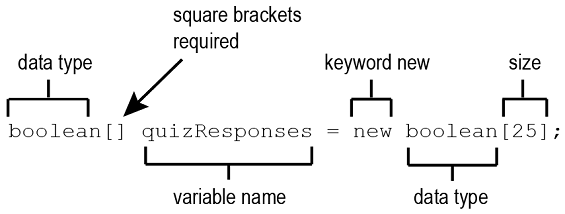
It is possible to declare the array in one statement and then assign the size in a second statement:
To traverse every element in an array, it is a common programming practice to use a for loop. The for loop provides an easy way to evaluate every element in an array. Here is an example of code that prints every element of an array:
Listing 6.1 Example of a for loop that prints all letters in the array alphabet
1.    char[] alphabet = {'a', 'b', 'c', 'd', 'e', 'f', 'g', 'h', 'i', 'j', 'k', 'l', 'm', 'n', 'o', 'p', 'q', 'r', 's', 't', 'u', 'v', 'w', 'x', 'y', 'z'};
 2.
 3.    for(int i = 0; i < alphabet.length; i++)   //#A
 4.       {  System.out.print(alphabet[i]); }     //#B
 5.    System.out.println();
Without arrays, this code would require 26 variables, one for each letter of the alphabet. But with arrays, we can use one variable name and store all values in the array with one variable name.
The for loop starts by printing the element at position zero and stops at one less than the length of the array. A for loop can also be used to populate an array. For example, here is code that creates an integer array and populates the array with even numbers from 0 to 100 (not including 100).

This is an excerpt from Manning's book OCA Java SE 8 Programmer I Certification Guide.
Explanation: Option (a) is incorrect. Initializing a row of array multiStrArr with {"Jan","Feb",null} and {"Jan","Feb",null,null} isn’t the same. The former option defines three array elements with the last array element assigned to null. The latter option defines four array elements with the last two array elements assigned to null.
/**
  * The array buffer into which the elements of the ArrayList are stored.
  * The capacity of the ArrayList is the length of this array buffer.
  */
private transient Object[] elementData;
4.3.1. What is an array?
An array is an object that stores a collection of values. The fact that an array itself is an object is often overlooked. I’ll reiterate: an array is an object itself; it stores references to the data it stores. Arrays can store two types of data:
An array of primitives stores a collection of values that constitute the primitive values themselves. (With primitives, there are no objects to reference.) An array of objects stores a collection of values, which are in fact heap-memory addresses or pointers. The addresses point to (reference) the object instances that your array is said to store, which means that object arrays store references (to objects) and primitive arrays store primitive values.
The members of an array are defined in contiguous (continuous) memory locations and hence offer improved access speed. (You should be able to quickly access all the students of a class if they all can be found next to each other.)
The following code creates an array of primitive data and an array of objects:

I’ll discuss the details of creating arrays shortly. The previous example shows one of the ways to create arrays. Figure 4.19 illustrates the arrays intArray and objArray. Unlike intArray, objArray stores references to String objects.