concept ArrayList in category java

This is an excerpt from Manning's book Java SE 11 Programmer I Certification Guide.
Classes and interfaces in the same package can use each other without prefixing their names with the package name. But to use a class or an interface from another package, you must use its fully qualified name, that is, packageName.anySubpackageName.ClassName. For example, the fully qualified name of class ArrayList is java.util.ArrayList. Because using fully qualified names can be tedious and can make your code difficult to read, you can use the import statement to use the simple name of a class or interface in your code.
11.3 List and ArrayList
[10.3] Declare and use List and ArrayList instances
In this section, I’ll cover how to use ArrayList, its commonly used methods, and the advantages it offers over an array.
The OCP Java SE 11 Programmer I exam covers only one class from the Java Collection API - ArrayList. The rest of the classes from the Java Collection API are covered in the OCP Java SE 11 Programmer II exam (exam number 1Z0-816).
ArrayList is one of the most widely used classes from the Collections framework. It offers the best combination of features offered by an array and the List data structure. The most commonly used operations with a list are add items to a list, modify items in a list, delete items from a list, and iterate over the items.
One frequently asked question by Java developers is, “Why should I bother with an ArrayList when I can already store objects of the same type in an array?” The answer lies in the ease of use of an ArrayList. This is an important question, and this exam contains explicit questions on the practical reasons for using an ArrayList.
You can compare an ArrayList with a resizable array. As you know, once an array is created, you can’t increase or decrease its size. On the other hand, an ArrayList automatically increases and decreases in size as elements are added to or removed from it. Also, unlike arrays, you don’t need to specify an initial size to create an ArrayList.
Let’s compare an ArrayList and an array with real-world objects. Just as a balloon can increase and decrease in size when it’s inflated or deflated, an ArrayList can increase or decrease in size as values are added to it or removed from it. One comparison is a cricket ball, because it has a predefined size. Once created, like an array, it can’t increase or decrease in size.
Here are a few more important properties of an ArrayList:

The following example shows you how to create an ArrayList:
import java.util.ArrayList;                   #1
public class CreateArrayList {
    public static void main(String args[]) {
        ArrayList<String> myArrList = new ArrayList<String>(); #2
    }
}
Package java.util isn’t implicitly imported into your class, which means that #1 imports the class ArrayList in the class CreateArrayList defined previously. To create an ArrayList, you need to inform Java about the type of the objects that you want to store in this collection of objects. #2 declares an ArrayList called myArrList, which can store String objects specified by the name of the class String between the angle brackets (<>). Note that the name String appears twice in the code at #2, once on the left side of the equal sign and once on the right. Do you think the second one seems redundant? Congratulations, Oracle agrees with you. Starting with Java version 7, you can omit the object type on the right side of the equal sign and create an ArrayList as follows:
ArrayList<String> myArrList = new ArrayList<>(); #AMany developers still work with Java SE versions prior to version 7, so you’re likely to see some developers still using the older way of creating an ArrayList.
Look at what happens behind the scenes (in the Java source code for version 11) when you execute the previous statement to create an ArrayList. Because you didn’t pass any arguments to the constructor of class ArrayList, its no-argument constructor will execute. Examine the definition of the following no-argument constructor defined in the class ArrayList.java:
/**
 * Default initial capacity.
 */

private static final int DEFAULT_CAPACITY = 10;

private static final Object[] DEFAULTCAPACITY_EMPTY_ELEMENTDATA = {};

/**
 * Constructs an empty list with an initial capacity of ten.
 */
public ArrayList() {
    this.elementData = DEFAULTCAPACITY_EMPTY_ELEMENTDATA;
}
Because you can use an ArrayList to store any type of Object, ArrayList defines an instance variable elementData of type Object[] to store all its individual elements. Following is a partial code listing from class ArrayList:
/**
 * The array buffer into which the elements of the ArrayList are stored.
 * The capacity of the ArrayList is the length of this array buffer. Any
 * empty ArrayList with elementData == DEFAULTCAPACITY_EMPTY_ELEMENTDATA
 * will be expanded to DEFAULT_CAPACITY when the first element is added.
 */
transient Object[] elementData;
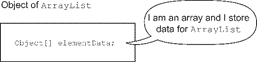
Figure 11.13 illustrates the variable elementData shown within an object of ArrayList.
Figure 11.13 Variable elementData shown within an object of ArrayList
Here’s the definition of the constructor from the class ArrayList (ArrayList.java), which initializes the previously defined instance variable, elementData:
/**
  * Constructs an empty list with the specified initial capacity.
  *
  * @param   initialCapacity   the initial capacity of the list
  * @exception IllegalArgumentException if the specified initial capacity
  *            is negative
  */
public ArrayList(int initialCapacity) {
    if (initialCapacity > 0) {
        this.elementData = new Object[initialCapacity];
    } else if (initialCapacity == 0) {
        this.elementData = EMPTY_ELEMENTDATA;
    } else {
        throw new IllegalArgumentException("Illegal Capacity: "+
                                            initialCapacity);
    }
}
Wait a minute. Did you notice that an ArrayList uses an array to store its individual elements? Does that make you wonder why on earth you would need another class if it uses a type (array, to be precise) that you already know how to work with? The simple answer is that you wouldn’t want to reinvent the wheel.

This is an excerpt from Manning's book Get Programming with Java.
Similar to arrays, when creating an ArrayList we start with the data type. The big difference is that an ArrayList can only be used with class data types. In lessons 2-4, I introduced a Car class and each time I wanted to create a car object, I had to create a new variable. Now, I can use an ArrayList to hold a list of Car objects with only one variable. Here is an example:
Figure 6.5 This diagram identifies the parts of an ArrayList used to create a new empty ArrayList of car objects

The ArrayList in figure 6.6 contains a list of Car objects. The syntax used to denote the type of data in the ArrayList is called a diamond operator and was introduced with Java 7. When using the diamond operator, the compiler only requires the diamond on the left to include a value. So, we could rewrite this statement as:
6.5 Accessing and modifying elements in an ArrayList
I stated earlier that ArrayList is a class. It is included in the Java.util library, which means that you need to add an import statement to the top of your code:
Table 6.5 Commonly used methods for an ArrayList
Returns
Method
Description
boolean
add(element)Adds the element to the end of the list
element
get(index)Returns the element found at the index specified
element
set(index, element)Replaces the element at the index specified, returns the element that was replaced
int
size()Returns the number of elements in the list
element
remove(index)Removes the element at the index position
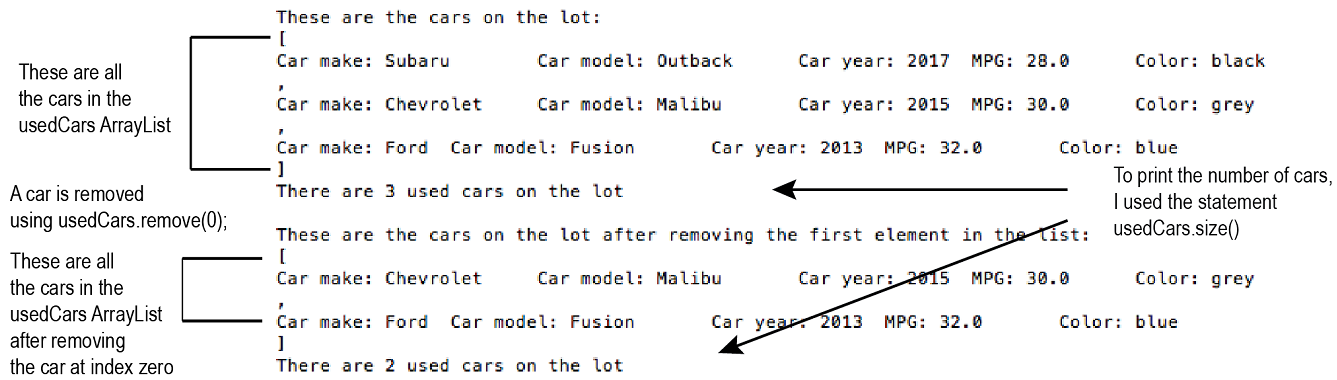
Now that I have reviewed how to create an ArrayList and provided some of the methods for an ArrayList, let’s modify the main method in our Car class to add an ArrayList of car objects. Table 6.6 shows the information for each car. For this activity, I will create an ArrayList of used cars, add car objects to the list, print the number of cars in the list and then remove a car from the list.
Table 6.6 shows the information for three used car objects
object name
make
model
year
mpg
color
oldCar1
Subaru
Outback
2017
28
black
oldCar2
Chevrolet
Malibu
2015
30
grey
oldCar3
Ford
Fusion
2013
32
blue
Figure 6.6 This is the output from the code in listing 6.4 which uses an ArrayList to hold a list of used cars.
Listing 6.4 Car class that uses an ArrayList to hold a list of used cars
public class Car {
 … //#A
 }
 public static void main(String[] args) {
    Scanner in = new Scanner(System.in);
    … //#B

    ArrayList<Car> usedCars = new ArrayList<Car>();   //#C
    usedCars.add(oldCar1);   //#D
    usedCars.add(oldCar2);   //#D
    usedCars.add(oldCar3);   //#D

    System.out.println("These are the cars on the lot: ");
    System.out.println(usedCars);                             //#E
    System.out.println("There are " + usedCars.size() +       //#F
            " used cars on the lot");
    usedCars.remove(0);                                       //#G
    System.out.println("\nThese are the cars on the " +
          "lot after removing the first element in the list: ");
    System.out.println(usedCars);                             //#E
    System.out.println("There are " + usedCars.size() +       //#F
          " used cars on the lot");
  }

This is an excerpt from Manning's book OCA Java SE 8 Programmer I Certification Guide.
Purpose: This exercise tries to trick you by using multiple objects of ArrayList, assigning the object reference of one ArrayList to another, and modifying the value of the ArrayList objects. String objects are immutable—you can’t change their values.
[9.4] Declare and use an ArrayList of a given type
In this section, I’ll cover how to use ArrayList, its commonly used methods, and the advantages it offers over an array.
The OCA Java SE 8 Programmer I exam covers only one class from the Java Collection API: ArrayList. The rest of the classes from the Java Collection API are covered in the OCP Java SE 8 Programmer II exam (exam number 1Z0-809). One of the reasons to include this class in the Java Associate exam could be how frequently this class is used by all Java programmers.
ArrayList is one of the most widely used classes from the Collections framework. It offers the best combination of features offered by an array and the List data structure. The most commonly used operations with a list are add items to a list, modify items in a list, delete items from a list, and iterate over the items.
One frequently asked question by Java developers is, “Why should I bother with an ArrayList when I can already store objects of the same type in an array?” The answer lies in the ease of use of an ArrayList. This is an important question, and this exam contains explicit questions on the practical reasons for using an ArrayList.
You can compare an ArrayList with a resizable array. As you know, once it’s created, you can’t increase or decrease the size of an array. On the other hand, an ArrayList automatically increases and decreases in size as elements are added to or removed from it. Also, unlike arrays, you don’t need to specify an initial size to create an ArrayList.
Let’s compare an ArrayList and an array with real-world objects. Just as a balloon can increase and decrease in size when it’s inflated or deflated, an ArrayList can increase or decrease in size as values are added to it or removed from it. One comparison is a cricket ball, because it has a predefined size. Once created, like an array, it can’t increase or decrease in size.
Here are a few more important properties of an ArrayList:
The following example shows you how to create an ArrayList:

Package java.util isn’t implicitly imported into your class, which means that
imports the class ArrayList in the class CreateArrayList defined previously. To create an ArrayList, you need to inform Java about the type of the objects that you want to store in this collection of objects.
declares an ArrayList called myArrList, which can store String objects specified by the name of the class String between the angle brackets (<>). Note that the name String appears twice in the code at

Many developers still work with Java SE versions prior to version 7, so you’re likely to see some developers still using the older way of creating an ArrayList.
Take a look at what happens behind the scenes (in the Java source code) when you execute the previous statement to create an ArrayList. Because you didn’t pass any arguments to the constructor of class ArrayList, its no-argument constructor will execute. Examine the definition of the following no-argument constructor defined in the class ArrayList.java:
/**
  * Constructs an empty list with an initial capacity of ten.
  */
public ArrayList() {
    this(10);
}
Because you can use an ArrayList to store any type of Object, ArrayList defines an instance variable elementData of type Object[] to store all its individual elements. Following is a partial code listing from class ArrayList:
/**
  * The array buffer into which the elements of the ArrayList are stored.
  * The capacity of the ArrayList is the length of this array buffer.
  */
private transient Object[] elementData;
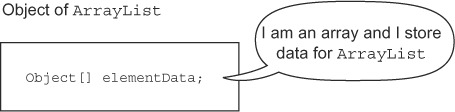
Figure 4.27 illustrates the variable elementData shown within an object of ArrayList.
Figure 4.27. Variable elementData shown within an object of ArrayList
Here’s the definition of the constructor from the class ArrayList (ArrayList.java), which initializes the previously defined instance variable, elementData:
/**
  * Constructs an empty list with the specified initial capacity.
  *
  * @param   initialCapacity   the initial capacity of the list
  * @exception IllegalArgumentException if the specified initial capacity
  *            is negative
  */
public ArrayList(int initialCapacity) {
    super();
    if (initialCapacity < 0)
        throw new IllegalArgumentException("Illegal Capacity: "+
                                                   initialCapacity);
    this.elementData = new Object[initialCapacity];
}
Wait a minute. Did you notice that an ArrayList uses an array to store its individual elements? Does that make you wonder why on earth you would need another class if it uses a type (array, to be precise) that you already know how to work with? The simple answer is that you wouldn’t want to reinvent the wheel.
4.4.6. Other methods of ArrayList
Let’s briefly discuss the other important methods defined in ArrayList.
You can retrieve an object at a particular position in ArrayList and determine its size as follows:

Behind the scenes, the method get will check whether the requested position exists in the ArrayList by comparing it with the array’s size. If the requested element isn’t within the range, the get method throws a java.lang.IndexOutOfBoundsException error at runtime.
All the remaining three methods—contains, indexOf, and lastIndexOf—require you to have an unambiguous and strong understanding of how to determine the equality of objects. ArrayList stores objects, and these three methods will compare the values that you pass to these methods with all the elements of the ArrayList.