concept collection in category java
This is an excerpt from Manning's book Java SE 11 Programmer I Certification Guide.
A package lets you group related classes, interfaces and other entities using a common name space. For instance, you know you can find utility classes for working with collections in the package java.util in Java API. A package statement is used to explicitly define which package a class is in. If a class includes a package statement, it must be the first (non-comment) statement in the class definition and Java source file.
An array is an object that stores a collection of values. The fact that an array itself is an object is often overlooked. I’ll reiterate: an array is an object itself; it stores references to the data it stores. Arrays can store two types of data:
This is an excerpt from Manning's book Modern Java in Action: Lambdas, streams, reactive and functional programming.
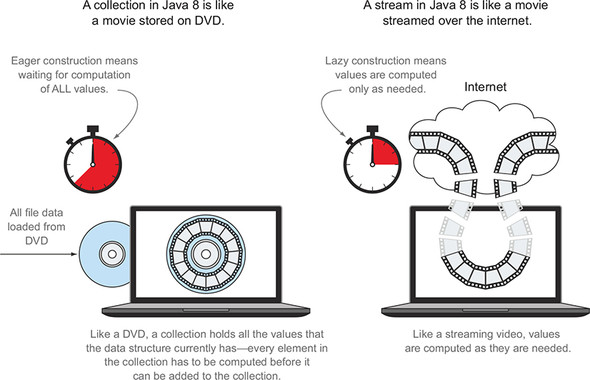
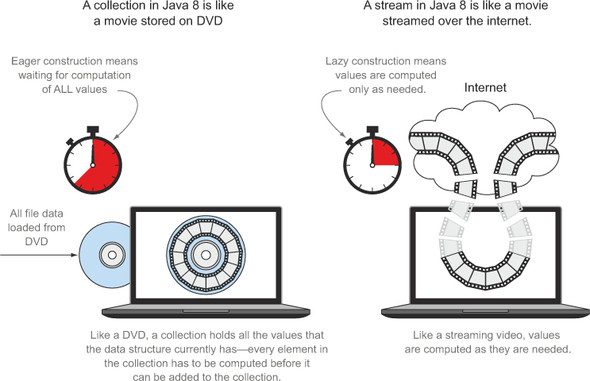
The Java 8 concept of streams generalizes many aspects of collections, but the former often enables more readable code and allows elements of a stream to be processed in parallel.
One important fact to keep in mind is that the collections you created previously are immutable by default, which means that they can’t be changed after they’re created. Immutability is useful because you know that accessing the collection at any point in your program always yields a collection with the same elements.
How can you update an immutable collection in Scala? To come back to the terminology used in chapter 19, such collections in Scala are said to be persistent. Updating a collection produces a new collection that shares as much as possible with the previous version, which persists without being affected by changes (as we show in figures 19.3 and 19.4). As a consequence of this property, your code has fewer implicit data dependencies: there’s less confusion about which location in your code updates a collection (or any other shared data structure) and at what point in time.
This is an excerpt from Manning's book Get Programming with Java.
The last type of loop that is used in Java is called an enhanced for loop, or a for-each loop. This loop automatically iterates over a collection of items. To demonstrate the for-each loop, I must introduce a collection of items. In Java, one of the simplest ways to create a collection of elements is using an array. An array is used to hold a collection of items that are all the same type. In Java, the array syntax uses square brackets, which creates a variable called videoGames that holds a collection of String elements.
This is an excerpt from Manning's book OCA Java SE 8 Programmer I Certification Guide.
An array is an object that stores a collection of values. The fact that an array itself is an object is often overlooked. I’ll reiterate: an array is an object itself; it stores references to the data it stores. Arrays can store two types of data:
To start with, the regular for loop is cumbersome to use when it comes to iterating through a collection or an array. You need to create a looping variable and specify the start and end positions of the collection or the array, even if you want to iterate through the complete collection or list. The enhanced for loop makes the previously mentioned routine task quite a breeze, as the following example demonstrates for the ArrayList myList:
Although a for-each loop is a good choice for iterating through collections and arrays, it can’t be used in some places.
This is an excerpt from Manning's book Java 8 in Action: Lambdas, streams, and functional-style programming.
Nearly every Java application makes and processes collections. But working with collections isn’t always ideal. For example, let’s say you need to filter expensive transactions from a list and then group them by currency. You’d need to write a lot of boilerplate code to implement this data processing query, as shown here:
One important property to keep in mind is that the collections created previously are immutable by default. This means they can’t be changed after they’re created. This is useful because you know that accessing the collection at any point in your program will always yield a collection with the same elements.
So how can you update an immutable collection in Scala? To come back to the terminology used in the previous chapter, such collections in Scala are said to be persistent: updating a collection produces a new collection that shares as much as possible with its previous version, which persists without being affected by changes like we showed in figures 14.3 and 14.4. As a consequence of this property, your code will have fewer implicit data dependences: there’s less confusion about which location in your code updates a collection (or any other shared data structure) and at what point in time.
This is an excerpt from Manning's book The Well-Grounded Java Developer.
Put another way, unless you’re in the habit of writing code that takes as arguments a variable number of references of type T and does something to make a collection out of them, you can move on to the next section. On the other hand, if this bit of code looks like something you might write, you should read on:
In this chapter, we want to do something a little different—we’ll start by highlighting some Scala features that are quite specific to the language. We like to think of it as “Scala in its natural habitat”—a tour of how to start writing Scala that doesn’t look like translated Java. After that, we’ll discuss project aspects—how to figure out if Scala is right for your project. Then, we’ll look at some of Scala’s syntax innovations that can make Scala code concise and beautiful. Next up is Scala’s approach to object orientation, and then a section on collections and data structures. We’ll conclude with a section on Scala’s approach to concurrency and its powerful actor model.
This is an excerpt from Manning's book Struts 2 in Action.
Before you deploy servlets, you must first package them according to the standards. The basic unit of servlet packaging is known as a web application. Though it sounds like a general term, a web application is a specific thing in servlet terminology. The Servlet Specification defines a web application as “a collection of servlets, HTML pages, classes, and other resources.” Typically, a web application will require several servlets to service its clients’ requests. A web application’s servlets and resources are packaged together in a specific directory structure and zipped up in an archive file with a .war extension. A WAR file is a specialized version of the Java JAR file. The letters stand for web application archive. When we discuss chapter 2’s HelloWorld application, we’ll see exactly how to lay out a Struts 2 application to these standards.
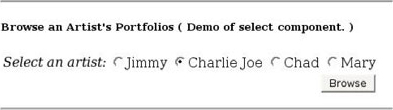
Most of these examples use the same action class implementation, manning.chapterSix.TagDemo. This simple action conducts no real business logic. It merely exposes and populates a couple of properties with data so the tags have something with which to work. In particular, two properties, users and user, are exposed; the first exposes a collection of all users in the system and the second exposes one user of your choice. For the purposes of a tag reference, we won’t try to integrate these tag demonstrations into the core functionality of the Struts 2 Portfolio. We’ll focus on making the usage clear.
Java Collections are a mainstay of the Java web developer’s daily workload. While the JavaBeans specification has always supported indexed properties, working with actual Java Collections, while convenient in the Java side, has always been a hassle in contexts such as JSP tags. One of the great things about the OGNL expression language is its simplified handling of Collections. We’ve already seen this in action when we demonstrated the automatic type conversion to and from complex Collection properties in the previous chapter. We’ll now summarize the OGNL syntax used to reference these properties.

This is an excerpt from Manning's book GWT in Practice.
The GWT compiler needs hints about the work that it must perform partly because it operates from source. These hints come in the form of the module descriptor, the marker interfaces that denote serializable types, the JavaDoc style annotations used in serializable types for collections, and more.
These limitations aside, parsing XML is pretty easy. The getElementsByTagName() method can be used to get a collection of elements, and then a specific item can be obtained by index location
. Then the children
and node values can be obtained
.
Serialization of collections does not provide typing via generics, and serializers don’t get created for contained classes with Java 1.4 language structures.