concept expression in category java

This is an excerpt from Manning's book Java SE 11 Programmer I Certification Guide.
Arithmetic operations can result in operand widening and this can impact the inferred data type of an expression.
You need operators to manipulate operands and expressions. In this section, you’ll use different types of operators—assignment, arithmetic, relational, and logical—to manipulate the values of variables. You’ll write code to determine the equality of primitive data types. The operators have a default precedence, which determines the order of execution of an expression. This can be overridden by using parentheses. For the exam, you should be able to work with the operators listed in table 6.1.
When these operators aren’t part of an expression, the postfix and prefix notations behave in exactly the same manner:
int a = 20;                 #A
int b = 10;                 #B
++a;
b++;
System.out.println(a);      #C
System.out.println(b);      #D
When a unary operator is used in an expression, its placement with respect to its operand decides whether its value will increment or decrement before the evaluation of the expression or after the evaluation of the expression. See the following code, where the operator ++ is used in prefix notation:
int a = 20;                  #A
int b = 10;                  #B
int c = a - ++b;             #C
System.out.println(c);       #D
System.out.println(b);       #E
In the preceding example, the expression a - ++b uses the increment operator (++) in prefix notation. Therefore, the value of variable b increments to 11 before it’s subtracted from 20, assigning the result 9 to the variable c.
When ++ is used in postfix notation with an operand, its value increments after it’s been used in the expression:
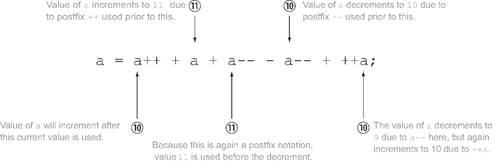
The evaluation of an expression starts from left to right. For a prefix unary operator, the value of its operand increments or decrements just before its value is used in an expression. For a postfix unary operator, the value of its operand increments or decrements just after its value is used in an expression. Figure 6.1 illustrates what’s happening in the preceding expression.
Figure 6.1 Evaluation of an expression that has multiple occurrences of unary operators in postfix and prefix notation
For the exam, it’s important for you to have a good understanding of, and practice in, using postfix and prefix operators. In addition to the expressions shown in the previous examples, you can also find them in use as conditions in if statements, for loops, and do-while and while loops.
This is an excerpt from Manning's book OCA Java SE 8 Programmer I Certification Guide.
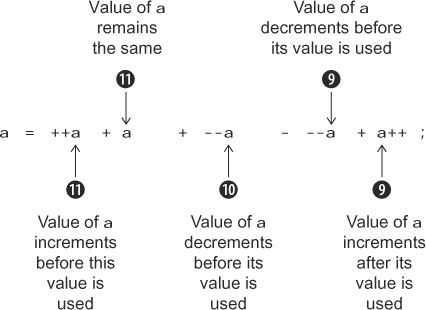
Get the hang of how variables are evaluated in an expression that has multiple occurrences of unary operators in postfix and prefix notation
Figure A.1. Evaluation of an expression that has multiple unary operators in postfix and prefix notation
int myChar = 97;
int yourChar = 98;
System.out.print((char)myChar + (char)yourChar);

int age = 20;
System.out.print(" ");
System.out.print((float)age);
In figure 5.1, condition1 and condition2 refer to a variable or an expression that must evaluate to a boolean or a Boolean value; statement1, statement2, and statement3 refer to either a single line of code or a code block.

This is an excerpt from Manning's book Spring Integration in Action.
Having two options on hand, when should you create a distinct implementation, and when should you use an inline expression? An inline expression is simple enough, and could be externalized easily (using, for example, a Property-PlaceholderConfigurer). But it’s not flexible or reusable across the application. Our recommendation for making a decision in this case is to use expressions whenever the condition is based on the attributes of the message itself. In more complicated cases, when the decision involves a sophisticated algorithm, or the sender must consult with other collaborating components, you may want to create a standalone implementation and take advantage of Spring’s dependency injection capabilities.
This is an excerpt from Manning's book JavaFX in Action.
You’ll note the use of the bind keyword, which tells the JavaFX Script compiler that the code that follows is a bound expression. Expressions are bits of code that return values, so what bind is saying is “the value of this variable is controlled by this piece of code.” In listing 2.28 the bound progress string reevaluates its contents each time the variable it depends on changes. So, whenever percentage changes, its new value is automatically reflected in the progress string.
We touched on the issue of semicolons in the previous text. As in Java, semicolons are used to terminate expressions, but the JavaFX Script compiler seems particularly liberal about when a semicolon is necessary. When we meet ternary expressions in section 3.3.3, we’ll see an example of where they cannot be used, but other than that there’s apparently little enforcement of where they must be used. It seems when the compiler can infer the end of a construct using a closing brace or whitespace alone, it is happy to do so.
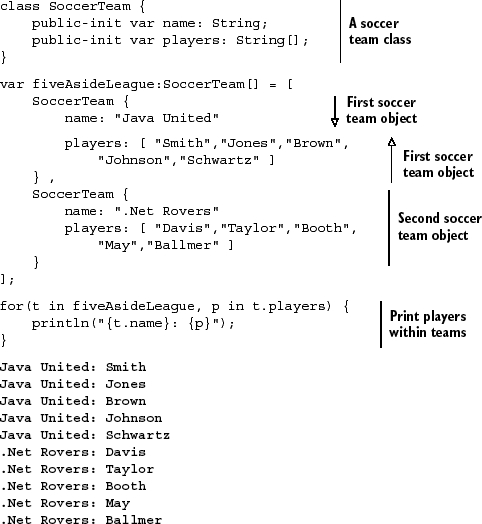
First we define our team class; then we create a sequence of two five-on-a-side teams, each team with a name and five players. The meat of the example comes at the end, when we use a single for statement to print each player from each team. Each level of the loop is separated by a comma. We have the outer part that walks over the teams, and we have the inner part that walks over each player within each team. It means we can unroll the whole structure with just one for expression instead of multiple nested expressions.
If you ever need to know the index of an element during a for expression, indexof is your friend. The first element is 0, the second is 1, and so on. Null values are ignored when building sequences, so not every iteration through the loop need extend the sequence contents. The second part of listing 3.24 shows both these features in action.