concept property file in category java
This is an excerpt from Manning's book Functional Programming in Java: How functional techniques improve your Java programs.
Most software applications are configured using property files that are read at startup. Properties are key/value pairs, and both keys and values are written as strings. Whatever the chosen property format (key=value, XML, JSON, YAML, and so on), the programmer always has to read strings and transform them into Java objects or primitives. This process is tedious and error prone. You can use a specialized library for this, but if something goes wrong, you’ll find yourself throwing exceptions. To get more functional behavior, you’ll have to write your own library.
In this example, you load the property file from the classpath. It could, of course, be loaded from anywhere on disk, or read from a remote URL, or any other source.
This is an excerpt from Manning's book Struts 2 in Action.
As for the other two directories, they’re essential. The lib directory holds all of the JAR file dependencies that your application needs. In the sample application, we’ve placed all of the JARs commonly used by Struts 2 web applications. Note that Struts 2 is flexible. If you add some features that we don’t use in this book, you might need to add additional JARs. Also note that, if you want to see the absolute minimum set of JARs, you should check out HelloWorld.war, referenced in an earlier sidebar. The classes directory holds all of the Java classes that your application will use. These are essentially no different than the resources in the lib directory, but the classes directory contains an exploded directory structure containing the class files, no JARs. In figure 2.3, you can see that the classes directory holds one directory, manning, which is the root of our applications Java package structure, and it holds several other classpath resource files, such as properties files and the struts.xml file we’ve already discussed.
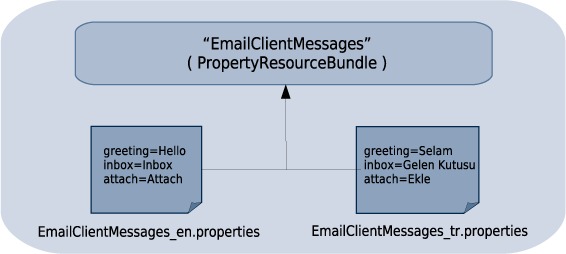
Let’s quickly cover some Java ResourceBundle fundamentals, using properties files ResourceBundles, of course. We’ll walk through a brief example to show how these native Java classes, ResourceBundle and Locale, work together to provide i18n. Our example assumes that we’re working on some sort of email client application. Let’s create a properties file resource bundle for our email client. All bundles must have a name so that we can identify the one from which we’d like to retrieve messages. Figure 11.1 shows a ResourceBundle with the name EmailClientMessages, which is backed by a pair of properties files.
Figure 11.1. The EmailClientMessages ResourceBundle is backed by two properties files, one English and one Turkish.
Since we’re using properties files to store our resources, we don’t have to write any Java code to implement our bundle. The bundle uses the built-in PropertyResourceBundle. We just provide a set of properties files that follow a specific naming convention, as follows:
BundleName_languageCode.propertiesYou can observe this pattern in action in the names of the two properties files shown in figure 11.1. The bundle name shared by the properties files is EmailClientMessages. Thus, we refer to the entire bundle as the EmailClientMessages bundle. There’s one file for each language-specific version of the text resources. If we wanted to support more locales, we could add dozens more properties files with different locale extensions. Regardless of the number of supported locales, all of the properties files that share the same root bundle name belong to a single bundle.