concept request parameter in category java

This is an excerpt from Manning's book Portlets in Action.
The User Registration portlet uses the javax.portlet.actionScopedRequestAttributes container-runtime option to display the registration success message, which includes name and email address information. When the user clicks the Submit button (see figure 2.1), the information in the form is sent to the registerUser action method as request parameters, which then need to be sent to the renderForm method so it can render the success.jsp page. This transfer is achieved with the help of the javax.portlet.actionScopedRequestAttributes container-runtime option. Figure 2.16 illustrates how this container-runtime option is used by the portlet container to allow request attributes stored in ActionRequest to be accessible (through the RenderRequest object) to the subsequent render method.
Figure 2.16. Registration information sent by the User Registration portlet is rendered again by the portlet using the javax.portlet.actionScopedRequestAttributes container-runtime option. The portlet container retains the request attributes stored in the ActionRequest object and makes them available to the render method through the RenderRequest object.
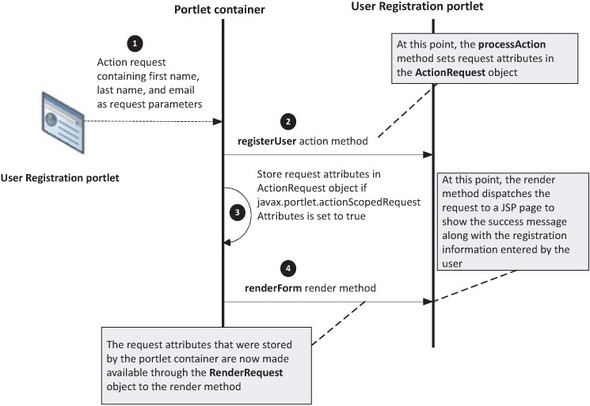
First, the user submits a request to register with the web portal
. The form’s values, like first name, last name, and email, are sent as request parameters to the registerUser action method. The processAction method
does the action processing and stores the request parameters as request attributes in the ActionRequest object. The portlet container
checks whether the value of the javax.portlet.actionScopedRequestAttributes container-runtime option is true or false. If it’s true, the container retrieves the attributes from the ActionRequest object and stores them in memory. The portlet container invokes the User Registration portlet’s renderForm method
and passes the request attributes it stored previously to the render method, which can retrieve them from the RenderRequest object.
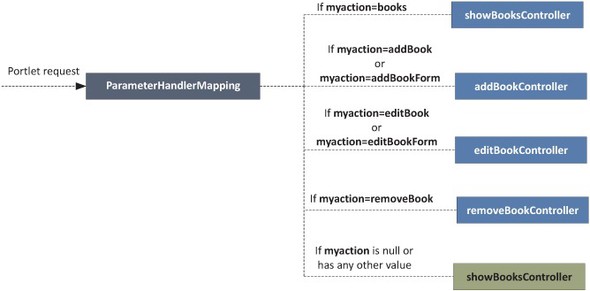
Figure 7.8. ParameterHandlerMapping maps portlet requests to appropriate handlers based on the value of the myaction request parameter. If the request parameter is missing from the request, or if its value isn’t mapped to any handler, the handler specified using the defaultHandler mapping is executed.
The WebDataBinder object in Spring Framework is used to control how the binding of request parameters to model attributes happens. WebDataBinder controls binding by specifying which PropertyEditor to use for binding request parameters to a particular property type. WebDataBinder may also specify the validator to be used to validate model attributes or command objects. If binding or validation errors occur during request processing, they’re stored in Spring Framework’s Errors object, which is then used by the JSP page to display appropriate binding or validation error messages. The error messages displayed in figure 8.3, earlier in this chapter, are generated this way.
Because the request parameters are of type String, WebDataBinder is usually initialized with custom property editors that are responsible for transforming String type request parameters to the type defined for that parameter in the model attribute or command object. You may also want to validate the populated command object or model attribute before the handler method is executed. WebDataBinder can be initialized with custom validators that validate the populated model attribute or command object before the handler method is invoked. The @InitBinder method-level annotation is used to initialize the WebDataBinder instance.
@RequestParam is a method-parameter-level annotation meant for binding a request parameter to a method argument. It’s useful when you want to pass a request parameter value as an argument to your handler method. If your handler method is annotated with @RequestMapping or any other annotation (like @ActionMapping, @RenderMapping, or @ModelAttribute), you can use the @RequestParam annotation; if your handler method isn’t annotated, you can’t use @RequestParam.
In the preceding code fragment, the required element indicates whether the request parameter specified using the value element is mandatory or not. The value element specifies the name of the request parameter whose value needs to be assigned to the method argument. If the required element’s value is true and the request parameter is missing from the portlet request, an exception is thrown.
To take care of such situations, you can specify a default value for the method argument, which is passed to the method if the request parameter is missing from the portlet request. For instance, in the following code snippet, 1234567 is passed as the value of the partNumber request parameter if it’s missing from the portlet request:
@RenderMapping(params="action=showPart")
public String showPart(@RequestParam(required=true,
      value="partNumber", defaultValue="1234567")
      long partNumber) {
  ...
}

This is an excerpt from Manning's book Struts 2 in Action.
The fileUpload interceptor creates a special version of the automatic data transfer mechanisms we saw earlier. With the previous data transfers, we were dealing with the transfer of form field data from the request to matching JavaBeans properties on our action objects. The params interceptor, also part of the defaultStack, was responsible for moving all of the request parameters onto the action object wherever the action provided a JavaBeans property that matched the request parameter’s name. In listing 3.10, you can see that the defaultstack places the fileUpload interceptor just before the params interceptor. When the fileUpload interceptor executes, it processes a multipart request and transforms the file itself, along with some metadata, into request parameters. It does this using a wrapper around the servlet request. Table 3.2 shows the request parameters that are added by this fileUpload interceptor.
After the fileUpload interceptor has exposed the parts of the multipart request as request parameters, it’s time for the next interceptor in the stack to do its work. Conveniently, the next interceptor is the params interceptor. When the params interceptor fires, it moves all of the request parameters, including those listed in table 3.2, onto the action object. Thus, all a developer needs to do to conveniently receive the file upload is add JavaBeans properties to her action object that match the names in table 3.2.
Here’s the other side of the coin. While the property tag, which resides in a result page, reaches back into the Java environment to pull a value from the portfolioName property, we’ve also seen that OGNL expressions are used in HTML forms to target properties in the Java environment as destinations for the data transfer. In both cases, the role of the OGNL expression is to provide a simple syntax for binding things like Struts 2 tags to specific Java-side properties, for moving data both into and out of the framework. OGNL creates the pathways for data to flow through the framework. It helps move data from the request parameters onto our action’s JavaBeans properties, and it helps move data from those properties out into rendering HTML pages.
Hooking up your Java properties to your form field names to facilitate the automatic transfer and conversion of request parameters is a two-step process. First, you need to write the OGNL expressions for the name attributes of your form fields. Second, you need to create the properties that’ll receive the data on the Java side. You could do these in reverse order; it doesn’t matter. We’ll go through each of the built-in conversions in the order from the preceding bulleted list, showing how to set up both sides of the equation.